

Compare the finished analysis before you choose a platform
See the report CodePulse produces from read-only GitHub workflow data, or connect your own repositories and evaluate the fit with real evidence.
Read-only GitHub · Your code stays yours · Team-level by default · No credit card
You're searching for a "Sleuth alternative," which means something isn't fitting. Maybe you've noticed Sleuth pivoting toward AI governance ("Skills") and wonder about the future of their DORA metrics product. Maybe the free tier's limits (1 user, 1 project, 50 deploys) made evaluation impossible. Or maybe you're paying $400/contributor/year for deployment tracking when your real bottleneck is code review. This guide won't pretend CodePulse replaces Sleuth for everyone. Instead, we'll help you figure out which tool makes the right trade-offs for your situation.
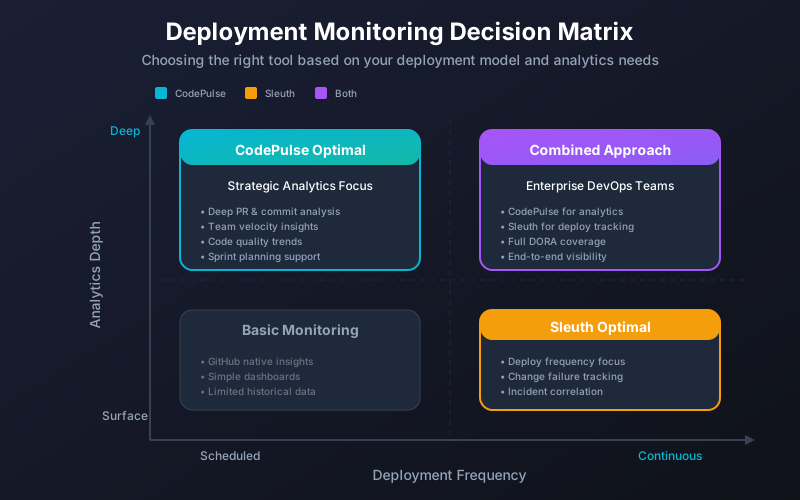
"Sleuth excels at deployment tracking. CodePulse excels at pull request insights. The right choice depends on whether your bottlenecks are in CI/CD or code review."
Both Sleuth and CodePulse measure engineering delivery. But they make fundamentally different bets about where your problems live. Sleuth bets that your biggest wins come from understanding deployment frequency, change failure rate, and incident response. CodePulse bets that for most teams, the real bottlenecks are in the code review process - where PRs sit waiting, who reviews whose code, and how collaboration patterns affect delivery speed.
One of those bets is right for you. Let's figure out which.
What Sleuth Does Well
Let's be honest about where Sleuth genuinely excels. Founded by former Atlassian employees, Sleuth was built specifically to track DORA metrics with a deployment-first approach:
Deployment tracking is their core strength
Sleuth tracks deployments across your entire stack - code changes, feature flags, and infrastructure. Their "project" model correlates microservices, environments, and impact sources to show you exactly what shipped and when. If deployment frequency is your primary metric, Sleuth does this better than most alternatives.
Change failure rate with real incident data
Sleuth integrates with PagerDuty, Statuspage, Sentry, Rollbar, and Datadog to calculate change failure rate using actual incident data - not just estimates. They track rolled-back deploys, unhealthy impact sources, and production incidents. This is genuinely powerful if you have mature incident management practices.
Full CI/CD pipeline visibility
Sleuth integrates with Jenkins, GitHub Actions, CircleCI, Buildkite, and more. They track build times, deployment duration, and pipeline health. If you need to optimize your CI/CD pipeline itself, Sleuth provides this visibility.
AI-powered summaries
Sleuth's AI interprets DORA data and generates summaries for easier reading. It scores your current status and highlights areas needing attention. This is useful for executives who want quick insights without deep analysis.
/// Our Take
If your engineering org has mature deployment practices and you need to optimize CI/CD pipelines, Sleuth is genuinely good at this. We're not trying to replace Sleuth for deployment-heavy teams.
CodePulse focuses on what happens before deployment - code review patterns, PR cycle times, and collaboration health. Different problems need different tools. Choose based on where your actual bottlenecks are.
What Sleuth Users Are Saying
Sleuth has an unusually low volume of public reviews for a product in market since 2019: roughly 41 reviews on G2, 4 reviews on Capterra (all from July 2020), and not enough on TrustRadius to generate a score. That said, the feedback that does exist reveals consistent patterns.
Product direction uncertainty
Sleuth has pivoted its primary product from DORA metrics to an AI governance platform called "Skills" for managing agent skills, rules, and MCP servers. With 22 employees attempting to serve two very different markets and no known funding rounds since their $22M Series A in May 2022, existing DORA metrics customers may face declining investment in the original product. This is worth considering if you're signing a multi-year contract.
The free tier is a demo, not a trial
Sleuth's free tier is limited to 1 team member, 1 project, 50 deploys/month, and 60-day data retention. Third-party analyses note that "due to severe user and data source restrictions on their free platform, it's unlikely that you will be able to leverage Sleuth's free DORA platform to get actionable insights." The free tier is "primarily designed as a demo for their paid offering."
Tuning takes effort
"It took some effort to get things tuned just right to keep the noise level reasonable."
-- VP of Engineering on Capterra (5/5 stars, but noted this friction)
Teams with less common development or deployment workflows may spend extra time figuring out how to adapt Sleuth to their process. GitHub Actions matrix builds can't be auto-detected, and Bitbucket code with Azure CI/CD mapping isn't supported.
Missing features Sleuth acknowledges
From Sleuth's own comparison pages, they admit they lack: PR maturity scoring, PR review depth metrics, rework rate tracking, scope creep measurement, custom dashboards, and the ability to ingest metrics beyond DORA. They also don't offer a dedicated individual developer dashboard. For teams that need broader engineering analytics beyond deployment tracking, these gaps add up.
Pricing has increased
A 2024 price increase was confirmed, with one customer negotiating $6K in savings by leveraging their longstanding partnership. The median annual contract is $39,900 according to Vendr data, and Vendr customers achieve roughly 14% average savings off list price, suggesting the sticker price is seen as high.
Where Teams Hit Limitations with Sleuth
"Most engineering teams struggle more with code review than with deployments. If your PRs merge quickly but deploy slowly, optimize CI/CD. If your PRs sit for days waiting for review, that's where to focus."
We hear consistent feedback from teams evaluating or leaving Sleuth:
Complexity for teams without mature DevOps
Sleuth's deployment-centric model requires you to configure projects, environments, impact sources, and integrations. If your team doesn't have sophisticated CI/CD pipelines or incident management tools, much of Sleuth's value proposition doesn't apply - you're paying for capabilities you can't use.
Limited code review insights
Sleuth tracks "time in review" as part of lead time, but doesn't provide deep insights into who reviews whose code, review load distribution, or collaboration patterns. If your bottleneck is PRs waiting for reviewers, Sleuth won't help you understand why.
Pricing scales with contributors
At approximately $400/contributor/year, a 50-person engineering team pays around $20,000 annually. The median Sleuth deal is $37,800/year according to marketplace data. For teams that only need GitHub analytics without deployment tracking, this can feel like paying for unused features.
Developer recognition is limited
Sleuth focuses on team and project metrics, not individual contributions. If you want to recognize developers for thorough reviews, consistent quality, or collaboration - contributions that don't show up in deployment metrics - Sleuth doesn't surface this.
CodePulse vs Sleuth: Feature Comparison
Here's an honest feature comparison based on documented capabilities:
| Capability | Sleuth | CodePulse |
|---|---|---|
| Primary focus | Deployment tracking & DORA metrics | PR analytics & code review insights |
| Deployment frequency | Excellent tracking | Basic (merge frequency) |
| Change failure rate | Incident-based calculation | Not tracked |
| MTTR (Mean Time to Recovery) | Full incident integration | Not tracked |
| Lead time breakdown | Issue → Code → Review → Deploy | Code → Review → Approve → Merge |
| CI/CD integrations | Jenkins, CircleCI, Buildkite, GitHub Actions | None (GitHub-focused) |
| Incident integrations | PagerDuty, Statuspage, Sentry, Datadog | None |
| Review network visualization | Limited | Interactive graph showing review patterns |
| Developer recognition | Limited | 15 award categories |
| File hotspot analysis | Limited | Risk detection for high-churn files |
| Knowledge silo detection | No | Yes |
| Feature flag tracking | Yes (LaunchDarkly, etc.) | No |
| Setup time | Hours to days (many integrations) | Minutes (one OAuth flow) |
| AI insights | Yes (summaries, scoring) | Alert rules only |
| Product direction | Pivoting to AI governance ("Skills") | Committed to engineering analytics |
| Custom dashboards | No (intentionally unsupported) | Purpose-built views with CSV export |
| Trunk-based development | Limited support (extra configuration needed) | Works with any branching strategy |
| Free tier usefulness | 1 user, 1 project, 50 deploys (demo only) | Full-featured for small teams |
Pricing Comparison
Here's what you'll actually pay based on public sources. For the longer-form dissection of Sleuth's per-seat math, add-ons, and enterprise floor, see our Sleuth pricing review.
| Plan | Sleuth | CodePulse |
|---|---|---|
| Free tier | Free-forever option available | Small teams |
| Paid | ~$400/contributor/year (~$33/mo) | See pricing |
| Typical deal size | $11,200-$42,000/year (median $37,800) | Transparent, self-serve |
| Pricing model | Per contributor | Per active developer |
Sources: Vendr Marketplace, G2 Reviews
The key question isn't just price - it's value. If you're not using incident management integrations or deployment tracking, you're paying for features that don't help you.
When to Choose Sleuth Instead
Sleuth is the better choice if these describe your situation:
Deployment frequency is your primary metric
If your team ships multiple times per day and you need to track deployment patterns, Sleuth's deployment-first model is exactly what you need. CodePulse tracks merges, not deploys - if those differ significantly in your workflow, Sleuth is better.
You have mature incident management
If you're already using PagerDuty, Statuspage, or similar tools and want change failure rate calculated from real incident data, Sleuth integrates directly. CodePulse doesn't track incidents at all.
CI/CD pipeline optimization matters
If you need to understand build times, deployment duration, and pipeline bottlenecks, Sleuth's CI/CD integrations provide this. CodePulse focuses on the code review process, not the deployment pipeline.
Feature flag coordination is critical
Sleuth tracks feature flag changes alongside code deploys, helping you understand how flag flips affect stability. If feature flags are central to your release strategy, Sleuth handles this well.
Decision Tree: Sleuth vs CodePulse

START HERE
    │
    ▼
Do you need to track deployment frequency (not just merge frequency)?
    ├── YES → Sleuth (deployment-first model)
    │
    ▼ NO
Do you have PagerDuty/Statuspage and need change failure rate?
    ├── YES → Sleuth (incident integrations)
    │
    ▼ NO
Do you need CI/CD pipeline optimization (build times, deploy duration)?
    ├── YES → Sleuth (Jenkins, CircleCI, etc.)
    │
    ▼ NO
Are feature flags central to your release strategy?
    ├── YES → Sleuth (flag tracking)
    │
    ▼ NO
Is your main bottleneck PRs waiting for code review?
    ├── YES → CodePulse (review network, cycle time breakdown)
    │
    ▼ NO
Do you need knowledge silo or file hotspot detection?
    ├── YES → CodePulse (risk analysis)
    │
    ▼ NO
Do you want developer recognition beyond metrics?
    ├── YES → CodePulse (15 award categories)
    │
    ▼ NO → Evaluate both, prioritize your must-haves
When CodePulse is the Better Fit
CodePulse is the better choice if these describe your situation:
Code review is your actual bottleneck
If PRs sit for days waiting for reviewers while your CI/CD pipeline is fast, you need insights into review patterns - not deployment metrics. CodePulse's Review Network shows who reviews whose code, reveals load imbalances, and identifies isolated team members.
You want fast setup without integration complexity
Connect GitHub, get insights in minutes. No configuring projects, environments, impact sources, or CI/CD integrations. If you don't have mature DevOps practices, CodePulse gives you value immediately without prerequisite infrastructure.
GitHub is your source of truth
If your team uses GitHub for code, PRs, and issues - and you don't have separate incident management or complex CI/CD - CodePulse gives you deep insights from a single data source. No integration maintenance required.
You want to recognize diverse contributions
CodePulse's 15 award categories recognize speed, quality, collaboration, and consistency. This surfaces valuable contributions that deployment metrics miss: the person who reviews the most, maintains code quality, or stays consistent.
Knowledge silos worry you
CodePulse's Knowledge Silo detection identifies files and areas only one person understands. This is a risk management feature Sleuth doesn't offer.
// How to See This in CodePulse
Navigate to Dashboard to see cycle time broken into 4 stages:
- Coding time (first commit to PR open)
- Pickup time (PR open to first review)
- Review time (first review to approval)
- Merge time (approval to merge)
Then explore Review Network to see collaboration patterns and File Hotspots for high-risk areas of your codebase.
Migration Path from Sleuth
Already using Sleuth and considering CodePulse? Here's the honest migration path:
What transfers easily
- GitHub data: CodePulse syncs directly from GitHub; no export/import needed
- Historical PR data: CodePulse processes last 6 months of PR history automatically
- Team structure: Based on GitHub org, not separate configuration
What you'll lose
- Deployment tracking: CodePulse tracks merges, not deploys - if these differ, you lose that visibility
- Incident correlations: No PagerDuty/Statuspage integration for change failure rate
- CI/CD insights: No build time or pipeline metrics
- Feature flag tracking: No LaunchDarkly or similar integration
- AI summaries: CodePulse has alerts, not AI-generated insights
Migration timeline
- Connect GitHub (5 minutes): One OAuth flow to authorize CodePulse
- Initial sync (30-60 minutes): Historical PR data processing
- Explore dashboards (same day): Dashboard, Review Network, File Hotspots
- Set up alerts (optional): Configure notifications for stuck PRs, large PRs, etc.
- Run in parallel (recommended): Keep Sleuth for 2-4 weeks while you validate
"If you're migrating because Sleuth's deployment tracking wasn't valuable, CodePulse probably solves your actual problem. If you're migrating just because of price but use deployment tracking heavily, think twice."
Frequently Asked Questions
CodePulse tracks lead time (cycle time) and throughput, but not deployment frequency, change failure rate, or MTTR in the way Sleuth does. If strict DORA compliance is required, Sleuth or a dedicated DORA tool may be better -- though note that Sleuth itself is pivoting toward AI governance, so evaluate whether their DORA product will continue receiving investment. See our DORA metrics tools comparison for alternatives.
Compare Other Tools
If Sleuth vs. CodePulse isn't quite the right comparison, these guides might help:
- Engineering Analytics Tools Comparison - Full market overview
- LinearB vs. CodePulse - Multi-tool integration vs. GitHub depth
- Jellyfish vs. CodePulse - Enterprise-scale analytics with business alignment
- DORA Metrics Tools - If DORA compliance is your primary requirement
Making Your Decision
Don't let marketing (including ours) make this decision for you. Here's how to decide:
- Identify your actual bottleneck: Is it deployments/incidents or code review/collaboration? Your answer determines which tool helps more.
- Audit your current stack: If you don't have PagerDuty, mature CI/CD, or feature flags, Sleuth's integrations won't provide value.
- Try free tiers: Both offer free options. Use real data for at least 2 weeks before deciding.
- Measure which dashboard you open: After two weeks, which tool's insights actually changed behavior? That's your answer.
The best tool is the one that helps you fix your actual problems. If that's Sleuth because you need deployment tracking, use Sleuth. If your problems are in code review and collaboration, CodePulse might be what you need. Start your free trial and see if CodePulse addresses the bottlenecks Sleuth doesn't reach.

Evaluate CodePulse against your own delivery history
A comparison table only goes so far. Connect read-only GitHub in about five minutes and judge the output on your repositories, at one flat price, with no per-seat math.
Read-only GitHub · Your code stays yours · Team-level by default · No credit card
See These Features in Action
Track all four DORA metrics and benchmark against industry standards.
Track deployment frequency, lead time, and release patterns.
Related Guides
Jellyfish vs LinearB vs Swarmia: Full 2026 Comparison
Compare Jellyfish, LinearB, Swarmia, Allstacks, Haystack and more engineering analytics tools. Features, pricing, cycle time benchmarks, and integrations.
5 LinearB Alternatives for 2026 (With Pricing)
An honest comparison of CodePulse vs LinearB. We tell you when to choose LinearB instead, because the best tool is the one that makes the right trade-offs for your situation.
7 Jellyfish Alternatives for 2026 (Honest Ranking)
Compare 7 Jellyfish alternatives including CodePulse, LinearB, Swarmia, and more. Honest pros, cons, pricing, and integration comparisons.
Pluralsight Flow Alternative: Why Teams Are Switching
Pluralsight Flow is built for enterprise reporting - but if you need team-focused insights without leaderboards or enterprise pricing, there are better options. This guide compares the trade-offs.