
Inspect the output before you grant repository access
CodePulse turns your GitHub or Azure DevOps history into root-cause insights, not just dashboards, so you see where delivery stalls and why. Set up in about five minutes at one flat price. Free to start, no credit card.
Read-only GitHub · Your code stays yours · Team-level by default · No credit card
Engineering teams migrating from Azure DevOps to GitHub face a critical question: what happens to your security tooling during and after the move? GitHub Advanced Security (GHAS) promises native code scanning, secret detection, and dependency review, but at $49 per active committer per month, the cost adds up fast. According to GitHub's own data, Copilot Autofix handled over 460,000 security alerts in 2025 alone, cutting average resolution time from 1.29 hours to 0.66 hours. But scanning is only half the equation. Without engineering analytics from a tool like CodePulse, you have no way to track whether those findings actually get fixed.
What is GitHub Advanced Security for Azure DevOps?
GHAS for Azure DevOps (GHAzDO) brings GitHub's security scanning - secret detection, CodeQL code analysis, and dependency vulnerability checks - directly into Azure Repos and Azure Pipelines. It costs $49 per active committer per month. Teams migrating to GitHub get the full GHAS suite natively, including Copilot Autofix. CodePulse complements both by tracking whether security findings actually get reviewed, approved, and merged - the remediation gap that scanners alone cannot close.
What Is GitHub Advanced Security for Azure DevOps?
GitHub Advanced Security for Azure DevOps (often abbreviated GHAzDO) is how Microsoft brings GitHub's security tooling to teams that have not yet migrated their repositories. It adds three scanning tools to Azure DevOps:
| Feature | What It Does | How It Works in ADO |
|---|---|---|
| Secret Scanning | Detects exposed credentials, API keys, and tokens | Push protection blocks secrets before they hit the repo; repo scanning finds existing ones |
| Code Scanning (CodeQL) | Static analysis for vulnerabilities like SQL injection and auth bypass | Runs as an Azure Pipeline task; results surface in the Advanced Security tab |
| Dependency Scanning | Identifies known CVEs in open-source dependencies (direct and transitive) | Pipeline task scans lock files and manifests; alerts appear per-repository |
You can enable GHAzDO at the organization, project, or repository level. Once enabled, billing starts based on active committers - anyone who pushed code to a GHAzDO-enabled repo in the last 90 days.
"Finding vulnerabilities is the easy part. The hard part is proving your team actually fixes them before the next board meeting."
The important distinction: GHAzDO gives you the core scanning capabilities, but it does not include several features available in native GitHub Advanced Security. Copilot Autofix (AI-powered remediation suggestions), advanced dependency review with rich PR diffs, and Dependabot auto-update PRs are all GitHub-native only. Microsoft has been transparent that GHAS on GitHub will always run ahead of GHAzDO in feature availability. If you plan to stay on Azure DevOps long-term, understand that you are getting the B-team version of the security suite.
For context on how engineering teams in regulated industries handle these decisions, see our Security and Compliance for GitHub Analytics guide, which covers SOC 2, GDPR, and audit trail requirements for analytics tooling.
How Much Does GHAS Cost and Is It Worth It?
GHAS pricing follows a per-active-committer model. As of April 2025, Microsoft also offers the components as standalone purchases:
| Product | Monthly Cost (per committer) | Annual Cost (100 engineers) | What You Get |
|---|---|---|---|
| GHAS Bundle (ADO or GitHub) | $49 | $58,800 | Secret scanning + code scanning + dependency scanning |
| Secret Protection Only | $19 | $22,800 | Secret scanning push protection + repo scanning |
| Code Security Only | $30 | $36,000 | CodeQL code scanning + dependency scanning |
| GitHub Enterprise (incl. GHAS) | $21 (platform) + $49 (GHAS) | $84,000 | Full GitHub platform + all GHAS features + Copilot Autofix |
The "active committer" definition matters more than most teams realize. A committer counts as active if they appear in any push to a GHAS-enabled repository within the last 90 days, even if the commit itself was authored months earlier. Committers are deduplicated across your Azure subscription, so someone contributing to multiple repositories only counts once.
For a 200-engineer team, the full GHAS bundle runs $117,600 per year on Azure DevOps. On GitHub Enterprise, add the platform license and you are at $168,000. That is a real number that needs to show up in your migration budget, not a surprise line item three months in.
🔥 Our Take
GHAS is worth it for teams over 50 engineers - but only if you also track remediation. Paying $49/committer/month to find vulnerabilities you never fix is worse than not scanning at all. It gives you a false sense of security with a real invoice.
The ROI equation for GHAS is not "cost of tool vs. cost of breach." It is "cost of tool plus cost of developer time to fix findings vs. cost of breach." If your security PRs sit in review for 5 days while feature PRs merge in 12 hours, you have a prioritization problem that no scanner can solve. Engineering analytics that track review coverage and cycle time for security-tagged PRs are what close that loop.
What Security Features Come Built Into Azure DevOps vs GHAS?
Before paying for GHAS, understand what Azure DevOps already gives you for free and where the gaps are:
| Capability | Azure DevOps (Free) | GHAS for ADO ($49/committer) | GHAS on GitHub (native) |
|---|---|---|---|
| Branch policies | Yes - required reviewers, build validation | Yes (same) | Yes - branch protection rules |
| Secret scanning | No (use Azure Key Vault + pipeline checks) | Yes - push protection + repo scanning (200+ token types) | Yes + validity checking |
| Code scanning | No (use Microsoft Security DevOps extension) | Yes - CodeQL static analysis | Yes - CodeQL + Copilot Autofix |
| Dependency scanning | No (use Defender for Cloud or Trivy) | Yes - CVE detection for direct + transitive deps | Yes + Dependabot auto-update PRs |
| Dependency review (PR diffs) | No | Limited | Yes - rich before/after comparison in PRs |
| AI remediation | No | No | Yes - Copilot Autofix suggests fixes inline |
| IaC scanning | Via Defender for Cloud | No (separate tool) | Via CodeQL custom queries |
The free tier of Azure DevOps security is more capable than many teams realize. Branch policies with required reviewers and build validation give you basic gating. The Microsoft Security DevOps extension bundles open-source tools (Trivy, ESLint security rules, Terrascan) into a single pipeline task at no additional cost. For teams with tight budgets, this covers basic dependency and IaC scanning without the $49/committer price tag.
The gap that justifies GHAS is depth. CodeQL is not just another linter - it models your code as a queryable database and traces data flow across function boundaries. It catches vulnerabilities like second-order SQL injection that surface-level scanners miss entirely. Secret scanning with push protection stops credentials from ever reaching the repository, which is a different game than detecting them after the fact.
"The difference between free Azure DevOps security and GHAS is the difference between a smoke detector and a fire suppression system. Both have a role, but only one stops the damage before it spreads."
How Do You Plan a Security Tooling Migration?
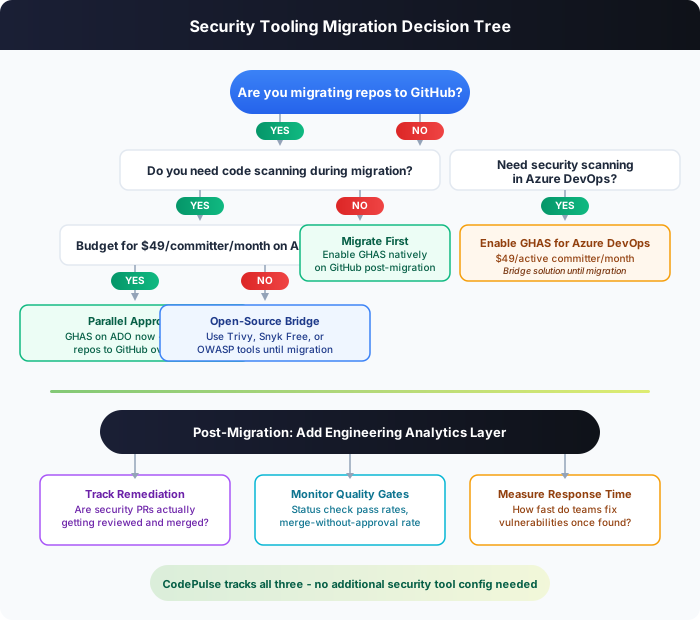
Migrating from Azure DevOps to GitHub changes your security posture, not just your repository host. The GitHub Well-Architected Migration Guide covers the general process, but security tooling deserves its own planning track. Here is the decision framework:
The Three Migration Paths
Path 1: Parallel Approach. Enable GHAS on Azure DevOps now ($49/committer) while migrating repositories to GitHub over weeks or months. This gives you continuous scanning coverage with no security gap during the transition. Best for: regulated industries, teams with active compliance requirements.
Path 2: Migrate First, Enable GHAS After. Move repositories to GitHub using the GitHub Enterprise Importer, then enable GHAS natively. This avoids paying for GHAS on Azure DevOps and gives you the full feature set (including Copilot Autofix) from day one on GitHub. Best for: teams with a fast migration timeline (under 4 weeks) and lower compliance pressure.
Path 3: Open-Source Bridge. Use free tools (Trivy, Snyk Free, OWASP Dependency-Check) in Azure Pipelines during the migration, then switch to GHAS on GitHub. This keeps costs at zero during the transition but requires more pipeline configuration work. Best for: budget-constrained teams where the migration itself already has executive buy-in.
Whichever path you choose, one thing stays constant: the GitHub Enterprise Importer handles repositories well, but it does not migrate permissions, service hooks, or pipeline run history. Security-relevant configurations (required reviewers, branch policies, status checks) need to be manually recreated as GitHub branch protection rules after migration.
For a broader comparison of Azure DevOps vs GitHub covering CI/CD, project management, and AI capabilities, see our Azure DevOps vs GitHub Comparison Guide.
The 90-Day Security Migration Checklist
Week 1-2:  Audit current security posture
           - Document all Azure Pipelines security tasks
           - List third-party scanners (SonarQube, Checkmarx, etc.)
           - Export current vulnerability backlog

Week 3-4:  Choose migration path (parallel / migrate-first / bridge)
           - Calculate GHAS cost based on active committers
           - Get budget approval for dual-platform period

Week 5-8:  Execute repository migration
           - Migrate repos in batches (start with low-risk)
           - Recreate branch protection rules on GitHub
           - Enable GHAS features incrementally per repo

Week 9-12: Validate and optimize
           - Compare scan results: ADO vs GitHub (are you catching the same issues?)
           - Configure Copilot Autofix for supported languages
           - Set up engineering analytics to track remediation velocity
- Decommission Azure DevOps security toolingWhy Is Security Scanning Not Enough Without Engineering Analytics?
Here is the uncomfortable truth about security scanning: finding vulnerabilities is the easy part. Every major scanner - GHAS, Snyk, SonarQube, Checkmarx - is good at detection. The hard part is tracking whether your team actually fixes what gets found.
According to GitHub's 2025 data, Copilot Autofix cut average resolution time from 1.29 hours to 0.66 hours for the alerts it handled. That is impressive for individual fixes. But it does not answer the questions engineering leaders actually need answered:
- What percentage of security findings get a PR opened within 48 hours?
- Do security-tagged PRs get reviewed as fast as feature PRs, or do they sit in the queue?
- Are teams merging security fixes without proper approval (bypassing the gate)?
- Which repositories have the most open security alerts with no active remediation?
"A security scanner that finds 100 vulnerabilities is useless if your team only fixes 30 of them. The scanner does not know that. Your engineering analytics platform does."
Engineering analytics fills that gap. CodePulse tracks metrics that map directly to security remediation:
| Metric | What It Tells You About Security | Where to Find It |
|---|---|---|
| test_failure_rate_percent | Are GHAS status checks passing or being ignored? | Dashboard, Repository metrics |
| merge_without_approval_rate | Are security PRs getting merged without review? | Dashboard, Risky Changes page |
| review_coverage_percent | What percentage of security PRs get at least one review? | Dashboard, Repository metrics |
| cycle_time_hours | How fast are security fixes moving from PR to merge? | Dashboard, Cycle Time Breakdown |
| has_failing_checks (per PR) | Which specific PRs have failing GHAS scans? | Pull Requests page, Risky Changes |
🛡️ How to Track Security Remediation in CodePulse
CodePulse automatically tracks GHAS status checks as part of its PR sync. To monitor your security posture:
- Navigate to Dashboard to see test_failure_rate_percent (includes GHAS check failures)
- Check Risky Changes for PRs merged with failing checks or without approval
- Use Alerts to set rules like "merge_without_approval_rate > 5%" or "test_failure_rate > 10%"
- Review Review Network to check whether security-focused reviewers are bottlenecked
The combination matters. GHAS tells you "this repository has 14 high-severity CodeQL alerts." CodePulse tells you "the PRs fixing those alerts have been sitting in review for 3 days with no reviewer assigned, and the team's merge-without-approval rate has climbed to 18% this month." One is a scan result. The other is actionable intelligence. For more on building effective code review practices alongside security tooling, see our Code Reviewer Best Practices Guide.
What Should Your First 90 Days Look Like After Enabling GHAS?
Enabling GHAS is the beginning, not the end. Teams that treat it as a "flip the switch and we are secure" exercise end up with hundreds of unactioned alerts and developer fatigue. Here is a structured approach that works:
Days 1-30: Foundation
- Enable secret scanning push protection first. This has the highest immediate ROI - it prevents new secrets from entering the codebase. Zero developer workflow change required beyond being blocked on push.
- Run CodeQL on 2-3 pilot repositories. Pick repositories with active development (not dormant ones) so you see scan results in real pull requests. Review the initial alert backlog - expect 50-200 alerts per repository for mature codebases.
- Do not try to fix everything at once. Triage the backlog by severity. Focus on critical and high alerts that affect production-facing code. Mark false positives and "won't fix" items early to establish your baseline.
- Set up engineering analytics tracking. Connect CodePulse to the same repositories. Establish baseline metrics for review coverage, cycle time, and status check pass rates before the full rollout changes developer behavior.
Days 31-60: Scale and Integrate
- Enable GHAS across all active repositories. Roll out incrementally - 5-10 repos per week - to avoid overwhelming teams with alert noise.
- Configure branch protection rules. Require CodeQL checks to pass before merge. Start with warning mode (alerts surface but do not block) for 2 weeks, then enforce blocking.
- Establish SLAs for security findings. Critical: fix within 72 hours. High: fix within 2 weeks. Medium: fix within 30 days. Track adherence using cycle time metrics.
- If on GitHub: enable Copilot Autofix. It supports C#, Java, Python, JavaScript/TypeScript, Go, Ruby, and Rust. The AI-suggested fixes appear directly in PRs and developers can apply them with one click.
Days 61-90: Optimize and Report
- Build a security dashboard for leadership. Combine GHAS alert trends with CodePulse metrics: "We found 340 vulnerabilities. 290 are resolved. Average remediation time dropped from 8 days to 3 days. Review coverage on security PRs is 94%."
- Set up automated alerts. In CodePulse, configure alert rules for merge-without-approval rate exceeding 5% and test failure rate exceeding 10%. These catch teams bypassing security gates.
- Review the cost-per-finding. Divide your monthly GHAS spend by the number of actionable findings resolved. If you are paying $10,000/month and only resolving 15 findings, each fix costs $667. That number should decrease as teams build security habits.
Security ROI Tracking Formula:

  Cost per resolved finding = Monthly GHAS spend / Findings resolved

  Example (100-engineer team):
    GHAS cost:           $4,900/month
    Findings found:      180
    Findings resolved:   145 (81% resolution rate)
    Cost per fix:        $33.80

  Compare against:
    Average cost of a production vulnerability: $4,000-$15,000
    (Source: IBM Cost of a Data Breach Report 2024)

  Net ROI = (Findings resolved x Avg vulnerability cost) - Annual GHAS cost
         = (145 x $4,000) - $58,800
         = $521,200 net savings (conservative estimate)
The GHAS Migration Security Framework
Use this framework to evaluate your readiness across five dimensions. Score each dimension 1-5 and multiply by the weight to get your migration security readiness score:
| Dimension | Weight | Score 1 (Low) | Score 5 (High) |
|---|---|---|---|
| Current Coverage | 25% | No scanning in place | Full secret + code + dependency scanning |
| Remediation Velocity | 25% | Security findings sit for weeks | Critical fixes merge within 72 hours |
| Review Discipline | 20% | Security PRs often merge without approval | 95%+ review coverage, mandatory approvals |
| Budget Alignment | 15% | No budget allocated for security tooling | GHAS cost approved and included in migration plan |
| Analytics Infrastructure | 15% | No way to track fix rates or cycle time | Engineering analytics tracking security metrics |
A score below 60% means your team is not ready for a security tooling migration. Shore up remediation velocity and review discipline first - GHAS will only amplify whatever habits your team already has, good or bad.
A score above 80% means you are positioned well. The migration will add scanning depth without creating a backlog your team cannot handle.
Frequently Asked Questions
GitHub Advanced Security for Azure DevOps costs $49 per active committer per month, billed through your Azure subscription. An active committer is anyone who pushed code to a GHAS-enabled repository in the last 90 days. For a 100-engineer team, that is $58,800 per year. As of April 2025, you can also purchase the components separately: Secret Protection at $19/committer/month and Code Security at $30/committer/month.

Start with one repository and a read-only connection
CodePulse turns your GitHub or Azure DevOps history into root-cause insights, not just dashboards, so you see where delivery stalls and why. Set up in about five minutes at one flat price. Free to start, no credit card.
Read-only GitHub · Your code stays yours · Team-level by default · No credit card
See These Features in Action
Flag large PRs, single-owner changes, and untested modifications.
Track deployment frequency, lead time, and release patterns.
Related Guides
Azure DevOps vs GitHub: 2026 Comparison (Both Tested)
Azure DevOps vs GitHub compared: pricing, CI/CD, AI features, project management, analytics, and migration paths. Side-by-side guide for engineering leaders choosing between Microsoft platforms.
The SOC 2 Question That Eliminates 80% of Analytics Vendors
Everything you need to know about data security, SOC 2 compliance, and privacy when evaluating engineering analytics platforms.
7 Code Review Rules That Actually Get PRs Approved Faster
Learn code review best practices backed by metrics. Covers reviewer guidelines, author guidelines, team practices, and how to measure review effectiveness.
DevSecOps Metrics: Security Without Killing Velocity
Learn how to measure the "Sec" in DevSecOps using GitHub data. Track check failure rates, time-to-fix vulnerabilities, and security impact on delivery speed.
The GitHub Permission Mistake That Gets Security Rejected
Understand GitHub OAuth scopes and app permissions required for engineering analytics tools, with security best practices.