
See exactly where your delivery flow is waiting
Preview the phase-by-phase report for review pickup, active review, and merge time. Connect in about five minutes; the initial analysis runs after sync.
Read-only GitHub · Your code stays yours · Team-level by default · No credit card
Your engineers are busy. Commits are flowing, PRs are opening, and standups sound productive. But somewhere between "code complete" and "shipped to production," hours - sometimes days - are disappearing. This guide shows you how to visualize the invisible friction that's silently eating your engineering capacity.
According to the Stripe Developer Coefficient report, developers spend only 32% of their time on actual development work. The rest? Meetings, administrative tasks, and - most insidiously - friction. Waiting for reviews. Debugging environment issues. Fighting flaky tests. Hunting for documentation that doesn't exist.
The challenge is that friction is invisible in most dashboards. You can't see "time spent waiting" in JIRA. Git doesn't log "hours lost to broken dev environment." But the patterns are there if you know where to look. If you want to size the bill first, our free developer context switching cost calculator turns this hidden time into a dollar figure in a couple of minutes.
What is engineering workflow friction and how do you measure it?
Workflow friction is any obstacle that slows the path from idea to production: review waits, environment issues, flaky tests, merge conflicts. Measure it with the Friction Score formula: (Total Cycle Time - Active Work Time) / Active Work Time. Most teams have a score above 3.0, meaning more time is spent waiting than working. CodePulse's Dashboard and Velocity Rings surface these friction patterns automatically.
What Is Workflow Friction and Why Is It Invisible?
Defining Engineering Friction
Workflow friction is any obstacle that slows or interrupts the path from idea to production. Unlike bugs or feature complexity - which are visible work - friction is the invisible tax on all work.
ENGINEERING WORKFLOW: VISIBLE vs INVISIBLE TIME
━━━━━━━━━━━━━━━━━━━━━━━━━━━━━━━━━━━━━━━━━━━━━━━━━━━━━━━━━━━━━━━━━━━━━━━

VISIBLE WORK (What shows in tracking systems):
├── Writing code .......................... 4 hours
├── Code review comments .................. 1 hour
├── Testing .............................. 2 hours
└── Meetings ............................. 3 hours
    TOTAL VISIBLE: 10 hours

INVISIBLE FRICTION (What doesn't show):
├── Waiting for PR review ................. 8 hours  ← HIDDEN
├── Environment setup/debugging ........... 2 hours  ← HIDDEN
├── Context switching ..................... 3 hours  ← HIDDEN
├── Searching for documentation ........... 1 hour   ← HIDDEN
├── Resolving merge conflicts ............. 1 hour   ← HIDDEN
└── Rerunning flaky CI .................... 2 hours  ← HIDDEN
    TOTAL INVISIBLE: 17 hours

ACTUAL TIME TO DELIVER: 27 hours
PERCEIVED TIME TO DELIVER: 10 hours

THE FRICTION RATIO: 17/10 = 1.7x
For every hour of visible work, 1.7 hours of friction.
Why Friction Stays Invisible
Friction hides because:
- No one tracks it: JIRA tickets don't have a "time waiting" field. Sprint velocity doesn't distinguish between active work and waiting.
- It's distributed: 15 minutes here, 30 minutes there. No single incident is worth complaining about.
- It's normalized: "PRs take 2 days" becomes the accepted reality. Teams don't question whether it should take 2 hours.
- It shifts blame: "The tests are slow" is easier to accept than "we haven't prioritized fast tests."
"The most expensive engineering problems aren't the ones you're tracking. They're the ones no one thinks to measure."
🔥 Our Take
Friction isn't a tooling problem - it's a visibility problem.
Most teams invest in new tools hoping to reduce friction, but without measuring friction first, you're guessing. We've seen teams buy expensive CI infrastructure when their actual bottleneck was PR review time - which costs nothing to fix. The first step isn't buying tools; it's seeing where time actually goes.
How Do You Map the Developer Journey for Friction?
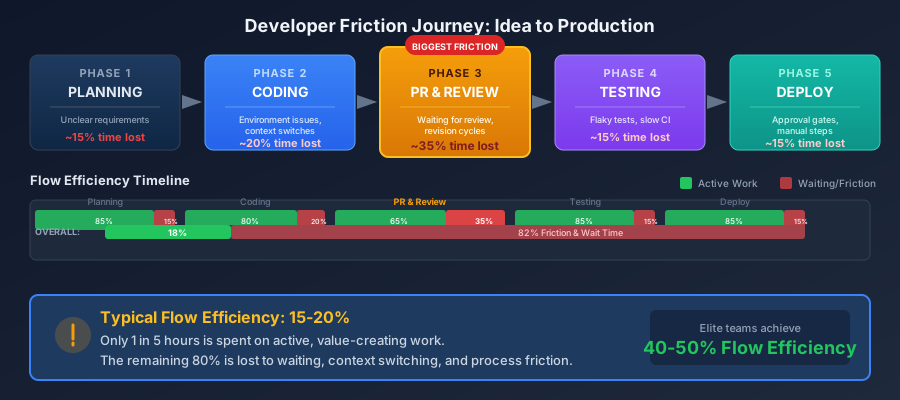
Before you can reduce friction, you need to map where it occurs. The developer journey from idea to production has distinct phases, each with its own friction points.
The Full Developer Journey
THE DEVELOPER JOURNEY: IDEA TO PRODUCTION
━━━━━━━━━━━━━━━━━━━━━━━━━━━━━━━━━━━━━━━━━━━━━━━━━━━━━━━━━━━━━━━━━━━━━━━

PHASE 1: PLANNING
┌─────────────────────────────────────────────────────────────────────┐
│  Understand → Research → Design → Break down → Estimate            │
│                                                                     │
│  Friction Points:                                                   │
│  • Unclear requirements                                             │
│  • Missing context from previous work                               │
│  • Waiting for decisions from stakeholders                          │
│  • Dependencies on other teams                                      │
└─────────────────────────────────────────────────────────────────────┘
              │
              ▼
PHASE 2: SETUP
┌─────────────────────────────────────────────────────────────────────┐
│  Branch → Environment → Dependencies → Test data                   │
│                                                                     │
│  Friction Points:                                                   │
│  • Dev environment not working                                      │
│  • Missing credentials or access                                    │
│  • Outdated dependencies breaking builds                            │
│  • Inconsistent local vs CI environments                            │
└─────────────────────────────────────────────────────────────────────┘
              │
              ▼
PHASE 3: CODING
┌─────────────────────────────────────────────────────────────────────┐
│  Write → Test locally → Iterate → Commit                           │
│                                                                     │
│  Friction Points:                                                   │
│  • Slow build/compile times                                         │
│  • Flaky local tests                                                │
│  • Context switching (interruptions, meetings)                      │
│  • Unclear code patterns or standards                               │
└─────────────────────────────────────────────────────────────────────┘
              │
              ▼
PHASE 4: PR & REVIEW
┌─────────────────────────────────────────────────────────────────────┐
│  Open PR → Wait → Review → Iterate → Approve                       │
│                                                                     │
│  Friction Points:                                                   │
│  • Waiting for first review (pickup time)                           │
│  • Multiple revision cycles                                         │
│  • Reviewer bottlenecks                                             │
│  • Unclear feedback requiring clarification                         │
└─────────────────────────────────────────────────────────────────────┘
              │
              ▼
PHASE 5: MERGE & DEPLOY
┌─────────────────────────────────────────────────────────────────────┐
│  CI → Merge conflicts → Deploy → Verify                            │
│                                                                     │
│  Friction Points:                                                   │
│  • Slow CI pipelines                                                │
│  • Flaky tests requiring reruns                                     │
│  • Merge conflicts from stale branches                              │
│  • Manual deployment gates                                          │
└─────────────────────────────────────────────────────────────────────┘Friction by Phase: Where Time Actually Goes
Different teams have different friction profiles. Here's what we typically see:
| Phase | Active Time | Friction Time | Primary Cause |
|---|---|---|---|
| Planning | 2-4 hours | 4-16 hours | Waiting for decisions, unclear requirements |
| Setup | 30 mins | 1-4 hours | Environment issues, missing access |
| Coding | 4-16 hours | 2-8 hours | Context switching, slow builds |
| PR & Review | 1-2 hours | 8-48 hours | Waiting for review, revision cycles |
| Merge & Deploy | 15 mins | 1-8 hours | CI time, flaky tests, merge conflicts |
Notice the pattern: the phases with the least active work often have the most friction. A 15-minute merge can take 8 hours if CI is slow and tests are flaky.
How Do You Detect Friction from Git Data?
Git data doesn't capture everything, but it reveals more friction than you might expect. The key is knowing which patterns indicate which problems.
Signals Visible in Git Data
FRICTION SIGNALS IN GIT DATA
━━━━━━━━━━━━━━━━━━━━━━━━━━━━━━━━━━━━━━━━━━━━━━━━━━━━━━━━━━━━━━━━━━━━━━━

SIGNAL                          │ FRICTION TYPE           │ DATA SOURCE
━━━━━━━━━━━━━━━━━━━━━━━━━━━━━━━━┿━━━━━━━━━━━━━━━━━━━━━━━━━┿━━━━━━━━━━━━
Long PR pickup time             │ Review bottleneck       │ PR timeline
Multiple revision cycles        │ Unclear requirements    │ PR commits
High merge conflict rate        │ Long-lived branches     │ PR metadata
Force pushes after review       │ Rework/miscommunication │ Git reflog
Commits after approval          │ Process friction        │ PR timeline
Long time from approval to merge│ CI/deployment friction  │ PR timeline
PRs abandoned/closed unmerged   │ Planning friction       │ PR status
Weekend/night commits           │ Schedule/WIP pressure   │ Commit times
Erratic commit patterns         │ Context switching       │ Commit gaps

COMPOSITE SIGNALS (combining multiple data points):

"The Endless Review" Pattern:
├── First commit to first review: < 4 hours (code ready quickly)
├── First review to approval: > 48 hours (stuck in review)
└── Indicates: Revision cycle friction or reviewer unavailability

"The Merge Purgatory" Pattern:
├── Approval to merge: > 8 hours
├── Multiple CI runs visible
└── Indicates: Flaky tests or slow CI

"The Zombie PR" Pattern:
├── PR age > 7 days
├── No activity in last 3 days
└── Indicates: Blocked, abandoned, or deprioritized work
Cycle Time Breakdown: The Friction X-Ray
The most powerful friction detection tool is the cycle time breakdown. By decomposing total PR time into phases, you can see exactly where friction accumulates:
- Coding Time: Time from PR creation until review is requested. High values indicate unclear requirements or scope creep.
- Pickup Time: Time waiting for the first review. This is often the largest source of friction - pure waiting with zero value added.
- Review Duration: Time from first review to approval. High values indicate complex code, nitpicky reviews, or timezone mismatches.
- Merge Delay: Time from approval to merge. High values indicate CI problems, merge conflicts, or manual gates.
"In most teams we analyze, 60-70% of cycle time is waiting - not working. The PR is complete, tested, and ready. It's just sitting there."
📊 How to See This in CodePulse
CodePulse visualizes friction through multiple lenses:
- Velocity Rings → See Speed, Throughput, Quality, and Collaboration dimensions at a glance. Low scores in any dimension indicate friction.
- Dashboard → The Cycle Time Breakdown shows exactly which phase is your bottleneck. The longest bar is where friction lives.
- Click into any PR to see its timeline: coding, waiting, review, and merge phases broken down to the hour.
How Does the Friction Heatmap Framework Work?
A friction heatmap helps you prioritize where to focus improvement efforts. Map your friction points by frequency (how often they occur) and severity (how much time they cost).
Building Your Friction Heatmap
FRICTION HEATMAP FRAMEWORK
━━━━━━━━━━━━━━━━━━━━━━━━━━━━━━━━━━━━━━━━━━━━━━━━━━━━━━━━━━━━━━━━━━━━━━━

                    FREQUENCY (How often does it happen?)
                    Low (Monthly)    Medium (Weekly)    High (Daily)
                    ─────────────────────────────────────────────────
SEVERITY        │
(Time cost      │
per incident)   │
                │
High            │   MONITOR         URGENT            CRITICAL
(> 4 hours)     │   [Plan for       [Fix this         [Fix this
                │    future]        quarter]          this sprint]
                │
────────────────┼─────────────────────────────────────────────────────
Medium          │   ACCEPT          MONITOR           URGENT
(1-4 hours)     │   [Low            [Track            [Fix this
                │    priority]      trends]           month]
                │
────────────────┼─────────────────────────────────────────────────────
Low             │   IGNORE          ACCEPT            MONITOR
(< 1 hour)      │   [Not worth      [Cost of          [May compound
                │    tracking]      doing business]   over time]


EXAMPLE FRICTION HEATMAP FOR A TYPICAL TEAM:
━━━━━━━━━━━━━━━━━━━━━━━━━━━━━━━━━━━━━━━━━━━━━

CRITICAL (Fix immediately):
🔴 PR waiting > 24 hours for first review (daily, > 8 hours lost)

URGENT (Fix this quarter):
🟠 CI pipeline failures requiring reruns (weekly, 2-4 hours lost)
🟠 Merge conflicts on shared files (weekly, 1-2 hours lost)

MONITOR (Track but don't panic):
🟡 Dev environment setup issues (monthly, 2-4 hours lost)
🟡 Unclear requirements causing rework (weekly, 1 hour lost)

ACCEPT (Cost of doing business):
🟢 Code review revision cycles (daily, 30 mins each)
🟢 Context switching between features (constant, 15 mins each)Friction Types and Their Signatures
| Friction Type | Git Signal | Typical Severity | Common Fix |
|---|---|---|---|
| Review Bottleneck | Long pickup time | Critical (8-24+ hrs) | Review rotation, SLAs |
| CI Friction | Long approval-to-merge | High (2-8 hrs) | Pipeline optimization, caching |
| Branch Conflicts | Force pushes, rebases | Medium (1-2 hrs) | Smaller PRs, trunk-based dev |
| Scope Creep | Many commits after PR open | Medium (2-4 hrs) | Better requirements, PR splitting |
| Rework Cycles | Multiple review rounds | Medium (1-4 hrs) | Coding standards, early feedback |
Calculating Your Friction Score
Quantify friction to track improvement over time:
FRICTION SCORE CALCULATION
━━━━━━━━━━━━━━━━━━━━━━━━━━━━━━━━━━━━━━━━━━━━━━━━━━━━━━━━━━━━━━━━━━━━━━━

FORMULA:
Friction Score = (Total Cycle Time - Active Work Time) / Active Work Time

WHERE:
• Total Cycle Time = first commit to merge
• Active Work Time = Coding time + actual review time (not waiting)

EXAMPLE:
  Total Cycle Time: 48 hours (PR created Monday, merged Wednesday)
  Active Work Time: 8 hours (4h coding + 2h reviews + 2h addressing feedback)

  Friction Score = (48 - 8) / 8 = 5.0

INTERPRETATION:
  < 1.0: Excellent - More work than waiting
  1.0-2.0: Good - Typical healthy team
  2.0-4.0: Concerning - More waiting than working
  > 4.0: Critical - Friction dominating productivity

TRACKING IMPROVEMENT:
Week 1: Friction Score = 5.0 (baseline)
Week 4: Friction Score = 3.2 (after review SLA)
Week 8: Friction Score = 2.1 (after CI optimization)
Goal: Friction Score < 2.0
🔥 Our Take
The friction score is the metric most teams should track but don't.
Velocity metrics tell you how fast you're going. Quality metrics tell you how well you're building. But friction scores tell you how much capacity you're wasting. A team with a friction score of 5.0 could theoretically ship 5x more with the same headcount - if they eliminated all friction. That's rarely possible, but even cutting friction in half doubles effective capacity.
How Do You Reduce Friction Systematically?
Armed with your friction heatmap and friction score, here's how to systematically reduce friction without disrupting productive work.
The Friction Reduction Playbook
FRICTION REDUCTION PLAYBOOK
━━━━━━━━━━━━━━━━━━━━━━━━━━━━━━━━━━━━━━━━━━━━━━━━━━━━━━━━━━━━━━━━━━━━━━━

PHASE 1: MEASURE (Week 1-2)
┌─────────────────────────────────────────────────────────────────────┐
│ □ Calculate baseline friction score                                 │
│ □ Build friction heatmap with your top 10 friction points           │
│ □ Identify your #1 friction source (usually review pickup time)     │
│ □ Set target: Reduce friction score by 30% in 8 weeks               │
└─────────────────────────────────────────────────────────────────────┘

PHASE 2: QUICK WINS (Week 2-4)
┌─────────────────────────────────────────────────────────────────────┐
│ □ Set review SLA: First review within 4 hours                       │
│ □ Implement "reviewer on duty" rotation                             │
│ □ Enable auto-merge when CI passes                                  │
│ □ Create alerts for PRs waiting > 8 hours                           │
│ Expected impact: 20-30% friction reduction                          │
└─────────────────────────────────────────────────────────────────────┘

PHASE 3: PROCESS IMPROVEMENTS (Week 4-8)
┌─────────────────────────────────────────────────────────────────────┐
│ □ Enforce PR size limits (< 400 lines)                              │
│ □ Parallelize CI pipeline (target: < 15 minutes)                    │
│ □ Fix or remove flaky tests                                         │
│ □ Document coding standards to reduce review cycles                 │
│ Expected impact: Additional 20-30% friction reduction               │
└─────────────────────────────────────────────────────────────────────┘

PHASE 4: SUSTAIN (Ongoing)
┌─────────────────────────────────────────────────────────────────────┐
│ □ Weekly friction score tracking                                    │
│ □ Monthly friction heatmap review                                   │
│ □ Quarterly deep-dive on remaining friction sources                 │
│ □ Celebrate improvements publicly                                   │
└─────────────────────────────────────────────────────────────────────┘
Friction Reduction by Type
Reducing Review Friction
Review friction is usually the biggest opportunity. See our Developer Experience guide for detailed strategies, but the essentials are:
- Single reviewer ownership: Tag one person responsible, not everyone who might help. Diffuse responsibility = no responsibility.
- Time-boxed SLAs: First review within 4 hours during working hours. Escalation if missed.
- Smaller PRs: PRs under 200 lines get reviewed 3x faster than PRs over 500 lines. Break work down.
- Review blocks: Dedicate time for reviews rather than treating them as interruptions.
Reducing CI Friction
- Parallelize: Run independent test suites simultaneously.
- Cache aggressively: Dependencies, Docker layers, build artifacts.
- Fix flaky tests: A test that fails randomly isn't testing anything. Delete it or fix it.
- Optimize the test pyramid: Too many slow E2E tests? Replace with faster integration tests.
Reducing Planning Friction
- Clear requirements: Acceptance criteria before coding starts.
- Decision-making authority: Empower teams to make decisions without waiting for approval chains.
- Dependencies visible: If work is blocked on another team, make it visible and escalate early.
The Velocity Rings Connection
CodePulse's Velocity Rings provide a quick visual check on friction:
- Speed Ring: Measures cycle time. Low score = high friction in the PR process.
- Throughput Ring: Measures completed work. Low score with high activity = friction consuming capacity.
- Quality Ring: Measures code quality signals. Low score = friction from rework and bugs.
- Collaboration Ring: Measures review patterns. Low score = review bottlenecks or silos.
When any ring is significantly lower than others, that's where friction is hiding.
What Are Common Questions About Workflow Friction?
Workflow friction is any obstacle that slows or interrupts the path from idea to production. Unlike bugs or feature complexity, friction is invisible work: waiting for reviews, debugging environment issues, fighting flaky tests, and hunting for documentation. Developers spend only 32% of their time on actual development, with the rest consumed by friction.
"Friction reduction isn't about moving faster - it's about spending more time on work that matters and less time waiting, fighting tools, or redoing work that wasn't clear the first time."
Related Guides
Continue improving your workflow with these related resources:
- Improving Developer Experience - Comprehensive strategies for DevEx improvement
- Cycle Time Breakdown Guide - Deep dive into PR cycle time phases
- Engineering Metrics Dashboard - Building dashboards that surface friction
- Context Switching Patterns - Understanding and reducing interrupt-driven friction
- Reduce PR Cycle Time - Actionable playbook for faster PR flow

Find out which phase is holding your delivery up
CodePulse splits your cycle time into coding, waiting for review, active review, and merge, so you fix the queue that is actually costing you days. Read-only GitHub, no credit card.
Read-only GitHub · Your code stays yours · Team-level by default · No credit card
See These Features in Action
Break down cycle time into coding, waiting, review, and merge phases.
Interactive graph of review relationships and workload distribution.
Related Guides
Improve Developer Experience: Proven Strategies
A practical guide to improving developer experience through surveys, team structure, and proven strategies that actually work.
The 4-Minute Diagnosis That Reveals Why Your PRs Are Stuck
Learn to diagnose exactly where your PRs are getting stuck by understanding the 4 components of cycle time and how to improve each one.
Engineering Flow Metrics Dashboard: Measuring Developer Flow State
Build a flow metrics dashboard to optimize developer experience. Track flow efficiency, WIP limits, and the metrics that correlate with deep work.
Predicting Software Delivery Delays Before They Happen
Build early warning systems for delivery delays. Learn leading indicators of risk, prediction models, and how to communicate uncertainty to stakeholders.