
See exactly where your delivery flow is waiting
Preview the phase-by-phase report for review pickup, active review, and merge time. Connect in about five minutes; the initial analysis runs after sync.
Read-only GitHub · Your code stays yours · Team-level by default · No credit card
Your project is 60% complete. Leadership wants to know if you will hit the deadline. You have two options: optimistic guessing or data-driven forecasting. One leaves you scrambling to explain delays after they happen. The other gives you weeks of advance warning to course-correct. Predicting delivery delays is not about better estimates - it is about reading the leading indicators your development workflow already produces.
How do you predict software delivery delays before they happen?
Track three leading indicators: rising PR cycle time (work is slowing down), increasing work-in-progress count (too many open PRs), and declining deployment frequency (the pipeline is clogging). These signals appear 2-4 weeks before a deadline slip becomes visible in project management tools. A 20% increase in average cycle time over two weeks is a reliable early warning. CodePulse tracks these indicators automatically and can alert your team via Slack when thresholds are exceeded.
"The project that 'suddenly' missed its deadline was showing warning signs for weeks. Nobody was watching the right signals."
Every delayed project follows a predictable pattern: work-in-progress grows silently, cycle times creep upward, review queues lengthen, and by the time anyone notices, the schedule is unrecoverable. This guide shows you how to build an early warning system that catches delays while you still have time to do something about them. No crystal ball required - just the data you already have.
🔥 Our Take
Estimation is asking your team to predict the future. Forecasting is using historical data to model probability distributions. One is guessing. One is math.
Teams spend hours in estimation sessions producing numbers that are consistently wrong by 30-50%. Meanwhile, their Git history contains weeks of actual throughput data that predicts delivery dates within 10-15% accuracy. The irony is painful: the most accurate predictor of when work will finish is how long similar work has taken before. Your historical data is a better fortune-teller than your planning meetings.
Why Traditional Estimates Fail
Before building a delay prediction system, it is worth understanding why traditional estimation fails so reliably. This is not about bad engineers or lazy planning - it is about systematic biases that no amount of rigor can eliminate.
The Psychology of Underestimation
Psychologists Daniel Kahneman and Amos Tversky identified the "planning fallacy" in 1979: people systematically underestimate how long tasks will take, even when they have direct experience with similar tasks that took longer than expected.
- Best-case thinking: Estimates assume everything goes smoothly. They do not account for the meeting that runs long, the dependency that breaks, or the edge case discovered in review.
- Scope blindness: Estimators focus on the work they can see. The unknown unknowns - the scope that only emerges mid-implementation - are invisible during planning.
- Social pressure: Nobody wants to be the pessimist. "That will take three months" gets questioned. "Four weeks" gets approved. Optimism is rewarded; realism is interrogated.
- Anchoring bias: Once someone suggests a timeline, all subsequent discussion adjusts relative to that anchor, even if the anchor was arbitrary.
"Estimation asks humans to overcome cognitive biases that evolution spent millions of years installing. Forecasting uses historical data that has no biases at all."
The Estimation Accuracy Problem
Research consistently shows that software estimates are off by significant margins:
| Study | Finding |
|---|---|
| Standish Group CHAOS Report | Only 29% of projects delivered on time and on budget |
| Steve McConnell (Software Estimation) | Initial estimates off by 4x on average for novel projects |
| State of Agile Reports | 70%+ of sprints experience spillover |
| McKinsey IT Project Study | Large IT projects 45% over budget, 7% over time |
The common response is "we need to estimate better." But after decades of estimation methodologies - PERT, Function Points, Story Points, Planning Poker - accuracy has not meaningfully improved. The problem is not technique. The problem is that estimation asks humans to do something humans are fundamentally bad at: predicting complex, uncertain futures.
Leading Indicators of Delay
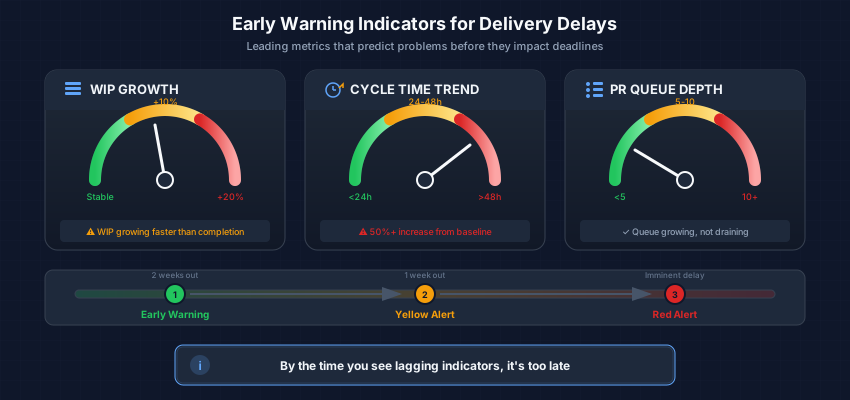
Instead of trying to predict the future from first principles, look for the early warning signs that delays are forming. These leading indicators appear days or weeks before deadlines are missed - in time to take action.
The Three Primary Warning Signs
| Indicator | What It Signals | Warning Threshold |
|---|---|---|
| WIP Growth | Work is starting faster than it is finishing | >20% increase week-over-week |
| Cycle Time Increase | Items are taking longer to complete | >25% above rolling average |
| PR Queue Growth | Review bottleneck is forming | >50% increase in open PRs |
WIP Growth: The Silent Schedule Killer
Work-in-progress (WIP) is the leading indicator most teams ignore until it is too late. When WIP grows, it means the team is starting more work than they are finishing. This creates an illusion of progress - "look at all this work in flight!" - while actually slowing everything down.
WIP GROWTH WARNING PATTERN

Week 1: 8 items in progress, 6 completed    [Healthy]
Week 2: 10 items in progress, 5 completed   [Watch]
Week 3: 14 items in progress, 4 completed   [WARNING]
Week 4: 18 items in progress, 3 completed   [CRITICAL]

Each week, more work starts but less finishes.
By Week 4, completion rate has dropped 50%.
Deadline impact: 2-3 weeks of delay per week at this rate.

Root causes to investigate:
  - Too many priorities competing for attention
  - Context switching reducing focus
  - Blockers accumulating without resolution
  - Dependencies creating wait states
Cycle Time Creep: The Velocity Lie
Cycle time - the duration from work started to work completed - is a more reliable predictor than velocity because it measures actual flow, not story point completion. When cycle time increases, it signals that something in your process has slowed down.
- Coding phase growing: Work is more complex than expected, or engineers are context-switching between too many items.
- Review phase growing: Reviewers are overloaded, PRs are too large, or feedback loops are slow.
- Merge phase growing: CI/CD issues, flaky tests, or deployment queue bottlenecks.
- Wait time growing: Dependencies, approvals, or external blockers are accumulating.
"A 50% increase in cycle time does not just mean work is 50% slower. It means your throughput capacity has dropped, your forecasts are now wrong, and your deadline is in danger."
PR Queue Depth: The Review Bottleneck
The number of pull requests awaiting review is a powerful leading indicator. When this queue grows, it signals that completed code is waiting instead of shipping. Every PR in the queue represents:
- Work that is done but not delivered
- Context that will need to be rebuilt when review finally happens
- Potential merge conflicts accumulating
- Engineers blocked from starting their next task
| Queue Status | PRs Waiting >24h | Action |
|---|---|---|
| Healthy | 0-2 per reviewer | Continue normal operations |
| Warning | 3-5 per reviewer | Prioritize review time, consider pairing |
| Critical | 6+ per reviewer | Stop new work, clear the queue |
The Delay Prediction Model
Combine leading indicators into a systematic model that forecasts delay risk before it materializes into missed deadlines.
The Delay Risk Score
Calculate a weekly delay risk score by combining the three primary indicators:
DELAY RISK SCORE CALCULATION

Risk Score = (WIP Score + Cycle Time Score + Queue Score) / 3

WIP SCORE:
  WIP change = (This week WIP - Last week WIP) / Last week WIP
  Score = 0 if change <= 0
  Score = 1 if change > 0 and <= 10%
  Score = 2 if change > 10% and <= 20%
  Score = 3 if change > 20%

CYCLE TIME SCORE:
  CT deviation = (Current CT - 4-week avg CT) / 4-week avg CT
  Score = 0 if deviation <= 10%
  Score = 1 if deviation > 10% and <= 25%
  Score = 2 if deviation > 25% and <= 50%
  Score = 3 if deviation > 50%

QUEUE SCORE:
  PRs per reviewer = Open PRs / Active reviewers
  Score = 0 if ratio <= 2
  Score = 1 if ratio > 2 and <= 4
  Score = 2 if ratio > 4 and <= 6
  Score = 3 if ratio > 6

INTERPRETATION:
  0.0 - 1.0: Low risk - On track
  1.1 - 2.0: Medium risk - Watch closely
  2.1 - 2.5: High risk - Intervention needed
  2.6 - 3.0: Critical - Deadline likely at risk
Forecasting Delivery Dates
Use historical throughput to forecast when remaining work will complete. This approach is more accurate than estimation because it uses actual data rather than predictions.
THROUGHPUT-BASED DELIVERY FORECAST

1. Count remaining items (PRs, tickets, features)
   Example: 24 items remaining

2. Calculate weekly throughput range (last 8-12 weeks)
   Example: [8, 12, 10, 14, 9, 11, 13, 10]
   Best week: 14 items
   Average: 10.9 items
   Worst week: 8 items

3. Project completion dates:
   OPTIMISTIC (50% confidence):
     24 items / 14 per week = 1.7 weeks
     "Could finish by [date + 12 days]"

   LIKELY (85% confidence):
     24 items / 10.9 per week = 2.2 weeks
     "Highly likely by [date + 16 days]"

   SAFE (95% confidence):
     24 items / 8 per week = 3 weeks
     "Almost certain by [date + 21 days]"

4. Compare to deadline:
   Deadline: 14 days away
   85% forecast: 16 days
GAP: 2 days at riskBuilding Early Warning Systems
An early warning system transforms leading indicators into actionable alerts. The goal is to catch delays early enough that intervention is possible - not just to document the inevitable.
The Three-Tier Alert Framework
EARLY WARNING SYSTEM CONFIGURATION

TIER 1: WATCH (Yellow)
Trigger when ANY of:
  - WIP up 10-20% week-over-week
  - Cycle time 15-25% above average
  - PR queue 3-5 per reviewer
  - Throughput down 10-20%
Action: Note in standup, monitor closely

TIER 2: WARNING (Orange)
Trigger when ANY of:
  - WIP up >20% week-over-week
  - Cycle time >25% above average
  - PR queue >5 per reviewer
  - Throughput down >20%
  - OR two or more Tier 1 conditions
Action: Escalate to project lead, identify root cause

TIER 3: CRITICAL (Red)
Trigger when ANY of:
  - Risk Score >2.5
  - 85% forecast misses deadline
  - WIP up >30% for 2+ consecutive weeks
  - Throughput down >30%
  - OR two or more Tier 2 conditions
Action: Escalate to leadership, implement recovery plan

ALERT CHANNELS:
  - Tier 1: Team Slack channel
  - Tier 2: PM/EM direct notification
  - Tier 3: Leadership alert + calendar invite for recovery planning
Weekly Health Check Routine
Implement a weekly cadence for reviewing leading indicators:
- Monday: Calculate metrics - Pull WIP, cycle time, and queue data for the previous week. Calculate the delay risk score.
- Tuesday: Forecast review - Update the throughput-based forecast. Compare to deadline. Note the gap (positive or negative).
- Wednesday: Standup discussion - Share any Watch or Warning conditions with the team. Identify blockers contributing to risk.
- Thursday: Intervention planning - If Warning or Critical conditions exist, develop a response plan. This might include scope reduction, resource reallocation, or deadline negotiation.
- Friday: Trend analysis - Are conditions improving or worsening? Update forecasts and communicate changes to stakeholders.
📊How to See This in CodePulse
CodePulse provides the forecasting and trend analysis you need for early warning:
- Forecasting shows where your metrics are trending and highlights anomalies before they become problems
- Cycle time breakdown: See which phase is slowing down - coding, waiting, review, or merge
- Throughput trends: Track PRs merged per week with 8-week historical context
- Alert Rules let you configure automatic notifications when metrics cross thresholds
- Pull Requests shows queue depth and aging PRs awaiting review
Communicating Risk to Stakeholders
Technical leading indicators are useless if they never reach decision-makers. Translating delay risk into business language is as important as measuring it.
The Probability Communication Framework
Instead of giving a single date that is certain to be wrong, communicate probability ranges that accurately represent uncertainty:
STAKEHOLDER COMMUNICATION TEMPLATES

STATUS: ON TRACK (Risk Score < 1.0)
"Based on current throughput, we're 85% confident we'll complete by
[target date]. All leading indicators are healthy. No action needed."

STATUS: AT RISK (Risk Score 1.0-2.0)
"We're seeing early warning signs that could impact the [target date]
deadline. Current indicators suggest:
  - 50% confidence: On time
  - 85% confidence: [X days] late
We're investigating [specific issue] and will update by [date]."

STATUS: HIGH RISK (Risk Score 2.0-2.5)
"Based on current trends, we have only 30% confidence in hitting
[target date]. To get back on track, we need to [specific action].
Recommended options:
  1. Reduce scope by [X items] to hit original date
  2. Add [X resources] to maintain scope
  3. Extend deadline to [new date] for 85% confidence"

STATUS: CRITICAL (Risk Score > 2.5)
"Current data shows less than 20% probability of hitting [target date].
Our 85% confidence date is now [X days/weeks] after the deadline.
Immediate decision needed:
  - Option A: Cut [specific scope] to salvage [portion] of deadline
  - Option B: Move deadline to [date] for full scope
  - Option C: [Other intervention]
Delay in deciding will further increase delivery risk."
The Weekly Status Report Format
| Element | What to Include |
|---|---|
| Traffic Light | Green/Yellow/Red based on risk score |
| Confidence Level | "85% confident we'll finish by X" |
| Trend Direction | Improving, stable, or degrading |
| Key Risk | Primary threat to delivery |
| Mitigation | What you are doing about it |
| Decision Needed | Any scope/timeline decisions required |
Handling Pushback
Stakeholders often resist probability-based forecasts because they want certainty. Here is how to handle common objections:
- "Just tell me the date" - "Use the 85% confidence date for planning. That is the date we are highly likely to hit."
- "Why the range?" - "Software delivery has inherent variability. Pretending otherwise has led to missed deadlines in the past. This range reflects real-world outcomes from similar projects."
- "Can we commit to the optimistic date?" - "You can if you accept a 50% chance of missing it. For external commitments, I recommend the 85% date."
- "Your predictions keep changing" - "Yes, they update based on actual progress. A forecast that does not update is just an estimate that ignores new information."
Frequently Asked Questions
The three primary leading indicators are rising work-in-progress (WIP) counts, increasing PR cycle time, and growing review queue depth. These signals typically appear 2-4 weeks before a deadline slip becomes visible in project management tools.
Your Delay Prediction Action Plan
This Week
- Calculate your current state: Count work-in-progress, pull average cycle time for the last 4 weeks, and count PRs awaiting review per reviewer.
- Set up basic tracking: Create a spreadsheet or use CodePulse to track these three metrics weekly.
- Run a forecast: For one current project, calculate the 50%/85%/95% delivery dates using the throughput method above.
This Month
- Implement weekly health checks: Add the Monday-Friday cadence described above to your team's routine.
- Configure alerts: Set up Tier 1/2/3 notifications based on the thresholds that match your team's patterns.
- Train stakeholders: Share the probability communication framework with PMs and leadership. Start using confidence ranges in status updates.
This Quarter
- Refine thresholds: Adjust warning thresholds based on what has actually predicted delays versus false alarms.
- Measure forecast accuracy: Track how often reality falls within your confidence ranges. Adjust methodology if accuracy is below 85%.
- Expand coverage: Roll out delay prediction to all active projects, creating a portfolio-level view of delivery risk.
For more on data-driven delivery management, see our guides on Stop Estimating, Start Forecasting, Sprint Spillover Analysis, and Engineering Strategy Execution Tracking.

Find out which phase is holding your delivery up
CodePulse splits your cycle time into coding, waiting for review, active review, and merge, so you fix the queue that is actually costing you days. Read-only GitHub, no credit card.
Read-only GitHub · Your code stays yours · Team-level by default · No credit card
See These Features in Action
Predict delivery timelines based on historical velocity trends.
Break down cycle time into coding, waiting, review, and merge phases.
Related Guides
Story Points Are a Scam. Here's What Actually Works
Story points are often waste. Learn how to use historical throughput and cycle time to forecast delivery dates with higher accuracy and less meeting time.
Sprint Spillover Analysis: Why 70% of Sprints Miss and How to Fix It
Analyze sprint spillover patterns to predict and prevent missed commitments. Use PR data to build an early warning system for sprint risk.
Engineering Strategy Execution Tracking: From Vision to Delivery
Track engineering strategy execution with measurable outcomes. Map strategy to leading indicators, build an investment-to-outcome pipeline, and prove initiative impact.
Engineering Flow Metrics Dashboard: Measuring Developer Flow State
Build a flow metrics dashboard to optimize developer experience. Track flow efficiency, WIP limits, and the metrics that correlate with deep work.