
See exactly where your delivery flow is waiting
Preview the phase-by-phase report for review pickup, active review, and merge time. Connect in about five minutes; the initial analysis runs after sync.
Read-only GitHub · Your code stays yours · Team-level by default · No credit card
Flow state is when developers do their best work. That feeling of total immersion, where code seems to write itself and hours pass like minutes. Psychologist Mihaly Csikszentmihalyi spent decades studying this phenomenon, and his research reveals something critical for engineering leaders: flow is fragile, measurable, and the single biggest determinant of both productivity and developer happiness.
This guide shows you how to build a flow metrics dashboard that captures the conditions enabling (or destroying) flow state, how to calculate flow efficiency from your existing PR data, and why WIP limits matter more than velocity targets. Flow is not about working faster. It is about creating the conditions where deep work becomes possible.
What is an engineering flow metrics dashboard?
An engineering flow metrics dashboard tracks the conditions that enable or prevent developer flow state. It measures flow efficiency (active work time vs. wait time), work in progress limits, context switches, and cycle time. Teams using flow dashboards in CodePulse typically improve flow efficiency from 25% to over 40% within 12 weeks.
What Is Flow and Why Do Developers Crave It?
Csikszentmihalyi identified flow as a mental state where a person is fully immersed in an activity, experiencing energized focus, full involvement, and enjoyment. For software developers, flow state is when the code architecture is clear in your mind, the problem space is well understood, and solutions emerge almost automatically.
The conditions for flow are specific and demanding:
- Clear goals: You know exactly what you need to accomplish
- Immediate feedback: You can see the results of your actions quickly
- Challenge-skill balance: The task is neither too easy (boredom) nor too hard (anxiety)
- Uninterrupted time: Extended periods without context switching
- Sense of control: Autonomy over the work and its direction
When any of these conditions break down, flow becomes impossible. And for most engineering teams, the conditions break down constantly: unclear requirements, slow CI feedback loops, constant Slack interruptions, meetings fragmenting the day, and too much work in progress pulling attention in multiple directions.
"Research shows developers take an average of 23 minutes to return to deep work after an interruption. In a typical day with 5-6 context switches, that is nearly 2 hours of lost productivity just from the switching cost alone."
Flow in Software Development
For developers, flow manifests as:
- Working on a single feature or problem for extended periods (2+ hours)
- Minimal context switching between repositories or codebases
- Fast feedback from tests and CI pipelines
- Code reviews that do not stall for days
- Clear ownership with minimal handoffs
The opposite of flow is fragmentation: working on five different things simultaneously, waiting for reviews, chasing down unclear requirements, sitting in meetings that could have been messages. Fragmentation does not just reduce output. It drains energy and motivation in ways that compound over time.
Our Take
Velocity metrics miss the point entirely. A team can have high velocity (lots of PRs merged) while having terrible flow (everyone context-switching constantly, juggling multiple half-finished PRs, never getting into deep work). Flow efficiency is the metric that actually predicts sustainable performance. Teams optimizing for velocity often sacrifice flow, leading to burnout and declining quality. Teams optimizing for flow naturally achieve high velocity as a side effect.
What Are the Core Flow Metrics to Track?
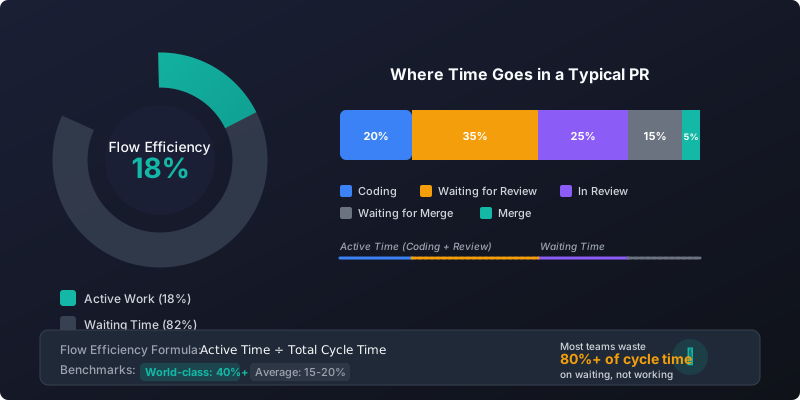
Flow metrics measure the conditions that enable or prevent flow state. Unlike activity metrics (commits, PRs, LOC), flow metrics capture the quality of work time rather than the quantity of output.
Core Flow Metrics
| Metric | What It Measures | Data Source | Target |
|---|---|---|---|
| Flow Efficiency | Active time / Total cycle time | PR timestamps | >40% |
| Work in Progress (WIP) | Open PRs per developer | PR state | 1-2 PRs |
| Context Switches | Repositories touched per day | Commit data | <3 repos |
| Wait Time Ratio | Time waiting vs time working | PR timestamps | <50% |
| Focus Time | Uninterrupted coding blocks | Commit patterns | 4+ hours/day |
| Cycle Time | First commit to merge | PR timestamps | <24 hours |
Flow State Indicators
Some patterns in your data indicate healthy flow:
HEALTHY FLOW INDICATORS
━━━━━━━━━━━━━━━━━━━━━━━━━━━━━━━━━━━━━━━━━━━━━━━━━━━━━━━━━━━━━━━━━━━━━━━

Developer A (Strong Flow):
  Open PRs:            1          (low WIP)
  Repos touched:       1          (focused)
  Avg cycle time:      8 hours    (fast feedback)
  Wait time:           2 hours    (30% of cycle)
  Flow efficiency:     70%        (high active time)

Developer B (Fragmented):
  Open PRs:            5          (high WIP - context switching)
  Repos touched:       4          (scattered attention)
  Avg cycle time:      72 hours   (slow feedback loop)
  Wait time:           48 hours   (67% of cycle)
  Flow efficiency:     33%        (mostly waiting)

KEY INSIGHT:
Developer A likely ships more quality code despite appearing
"less busy" than Developer B who is juggling everything.
How Do You Calculate Flow Efficiency?
Flow efficiency is the single most important flow metric. It measures what percentage of cycle time is spent on value-adding work versus waiting.
The Flow Efficiency Formula
FLOW EFFICIENCY CALCULATION
━━━━━━━━━━━━━━━━━━━━━━━━━━━━━━━━━━━━━━━━━━━━━━━━━━━━━━━━━━━━━━━━━━━━━━━

Formula:
  Flow Efficiency = Active Time / Total Cycle Time

Where:
  Active Time = Coding Time + Review Time (actual work being done)
  Wait Time   = Pickup Time + Merge Delay (nobody working on it)
  Total Cycle Time = Active Time + Wait Time

Example:
  Total Cycle Time:     48 hours
  ├── Coding Time:      12 hours  ← Active
  ├── Pickup Time:      20 hours  ← Waiting
  ├── Review Time:       8 hours  ← Active
  └── Merge Delay:       8 hours  ← Waiting

  Active Time:  12 + 8 = 20 hours
  Wait Time:    20 + 8 = 28 hours
  Flow Efficiency:  20 / 48 = 42%

INTERPRETATION:
  > 60%   Excellent - team operates smoothly
  40-60%  Good - room for improvement
  25-40%  Concerning - significant waste
  < 25%   Critical - mostly waiting, not working
Most teams are shocked when they first calculate their flow efficiency. Industry data suggests the average is between 15-25%, meaning 75-85% of cycle time is pure waiting. This is not a developer problem. It is a process problem.
"In Lean manufacturing, anything below 25% flow efficiency is considered a crisis requiring immediate intervention. Most software teams operate in this zone permanently and think it is normal."
Breaking Down the Waste
Understanding where wait time accumulates helps you target improvements:
| Wait Type | Common Causes | Impact on Flow |
|---|---|---|
| Waiting for Review | Reviewer overload, unclear ownership, timezone gaps | Author loses context, starts new work, WIP increases |
| Waiting in Review | Large PRs, multiple revision rounds, slow feedback | Both author and reviewer context switch repeatedly |
| Waiting for Merge | Slow CI, manual gates, merge conflicts | Completed work sits idle, blocking dependent work |
| Waiting for Requirements | Unclear specs, blocked on decisions | Not visible in PR data but massive flow killer |
For most teams, the biggest opportunity is reducing pickup time (time waiting for first review). This is often 40-60% of total cycle time and represents pure waste where nobody is adding value.
Learn more about identifying and reducing wait time in our Cycle Time Breakdown Guide.
Why Do WIP Limits Matter More Than Velocity Targets?
Work in Progress (WIP) is the number of items being worked on simultaneously. In software development, this typically means open PRs per developer or per team. WIP is the single biggest determinant of flow because it directly controls context switching.
The Psychology of WIP
Cognitive science research shows that humans cannot truly multitask on complex work. When developers juggle multiple PRs:
- Each PR requires loading context (codebase state, requirements, prior decisions)
- Switching between PRs dumps that context, requiring reload later
- More open PRs means more frequent context switches
- Quality drops because no single piece of work gets full attention
- Cycle time increases because nothing gets finished quickly
WIP AND CYCLE TIME RELATIONSHIP
━━━━━━━━━━━━━━━━━━━━━━━━━━━━━━━━━━━━━━━━━━━━━━━━━━━━━━━━━━━━━━━━━━━━━━━

Little's Law (from queueing theory):
  Cycle Time = WIP / Throughput

Practical impact:
  WIP   │ Throughput │ Avg Cycle Time │ Flow State
  ──────┼────────────┼────────────────┼─────────────────
  1 PR  │ 0.8/day    │ 1.25 days      │ High flow
  2 PRs │ 0.9/day    │ 2.2 days       │ Good flow
  3 PRs │ 0.85/day   │ 3.5 days       │ Degrading
  5 PRs │ 0.7/day    │ 7+ days        │ Fragmented

COUNTER-INTUITIVE TRUTH:
Higher WIP does NOT increase throughput. It destroys it.
Starting new work before finishing current work makes
everything take longer.
Setting WIP Limits
WIP limits are explicit constraints on how much work can be in progress simultaneously. They force completion before starting new work, which improves both flow and throughput.
| Level | Recommended WIP Limit | Rationale |
|---|---|---|
| Individual | 2 PRs maximum | One in active work, one in review/CI |
| Team (5-7 devs) | Team size minus 1 | Forces collaboration and unblocking |
| Review Queue | 2 per reviewer | Prevents review bottleneck buildup |
The key insight is that WIP limits create healthy pressure. When you cannot start new work, you are forced to:
- Finish what you started (improves completion rate)
- Help unblock others (improves team throughput)
- Address review requests promptly (reduces wait time)
- Fix blockers instead of working around them
Our Take
Teams resist WIP limits because they feel artificially constraining. "What if I am blocked? I should start something else!" This logic seems reasonable but leads to the multi-PR chaos that destroys flow. The better response to being blocked is to unblock yourself: pair with someone, escalate, or fix the underlying process issue. WIP limits make systemic problems visible instead of hiding them behind busy-looking activity.
For more on context switching patterns and their impact, see our Context Switching Patterns Guide.
How Do You Build a Flow Metrics Dashboard?
CodePulse provides the data you need to build a comprehensive flow metrics dashboard. Here is how the pieces fit together:
How to See This in CodePulse
Flow metrics are visible across several CodePulse pages:
- Velocity Rings show your team's Speed dimension, which incorporates cycle time and flow efficiency
- Dashboard shows cycle time breakdown by phase (coding, waiting, review, merge)
- Developer detail pages show individual WIP (open PRs) and repository distribution
- The cycle time trend chart shows flow efficiency improving or degrading over time
Key Dashboard Components
FLOW METRICS DASHBOARD LAYOUT
━━━━━━━━━━━━━━━━━━━━━━━━━━━━━━━━━━━━━━━━━━━━━━━━━━━━━━━━━━━━━━━━━━━━━━━

SECTION 1: FLOW HEALTH SUMMARY
┌─────────────────────────────────────────────────────────────────────┐
│  FLOW EFFICIENCY     │  AVG WIP/DEV        │  CYCLE TIME           │
│  42%                 │  2.3 PRs            │  28 hours             │
│  ↑ 8% from last wk   │  ↓ from 3.1         │  ↓ 15% from last wk   │
│  Target: > 40%       │  Target: < 2        │  Target: < 24h        │
│  Status: ✓ ON TRACK  │  Status: ⚠ AT RISK  │  Status: ⚠ AT RISK    │
└─────────────────────────────────────────────────────────────────────┘

SECTION 2: TIME ALLOCATION (where time goes)
┌─────────────────────────────────────────────────────────────────────┐
│  ACTIVE WORK:                                                       │
│  Coding:     ████████████░░░░░░░░░░░░░░░░░░░░  28%                  │
│  Review:     ██████░░░░░░░░░░░░░░░░░░░░░░░░░░  14%                  │
│                                                                     │
│  WAITING (waste):                                                   │
│  Pickup:     ██████████████████░░░░░░░░░░░░░░  38%  ← FOCUS HERE    │
│  Merge:      ████████░░░░░░░░░░░░░░░░░░░░░░░░  20%                  │
│                                                                     │
│  Flow Efficiency = (28% + 14%) / 100% = 42%                         │
└─────────────────────────────────────────────────────────────────────┘

SECTION 3: WIP DISTRIBUTION
┌─────────────────────────────────────────────────────────────────────┐
│  Developer        │ Open PRs │ Repos │ Status                       │
│  ─────────────────┼──────────┼───────┼──────────────────────────    │
│  Alice            │ 1        │ 1     │ ✓ Focused                    │
│  Bob              │ 2        │ 2     │ ✓ OK                         │
│  Charlie          │ 4        │ 3     │ ⚠ Fragmented                 │
│  Diana            │ 6        │ 4     │ ⛔ Critical - needs help      │
│                                                                     │
│  Team Average: 2.3 PRs  │  Target: ≤ 2  │  4/8 within limit         │
└─────────────────────────────────────────────────────────────────────┘

SECTION 4: FLOW TRENDS (last 12 weeks)
┌─────────────────────────────────────────────────────────────────────┐
│  Week │ Flow Eff │ Avg WIP │ Cycle Time │ Notes                     │
│  ─────┼──────────┼─────────┼────────────┼────────────────────────   │
│  W-12 │ 28%      │ 3.8     │ 56h        │ Pre-improvement           │
│  W-8  │ 35%      │ 3.2     │ 42h        │ WIP limits introduced     │
│  W-4  │ 38%      │ 2.8     │ 35h        │ Review rotation started   │
│  W-0  │ 42%      │ 2.3     │ 28h        │ Current                   │
│                                                                     │
│  Trajectory: +14% flow efficiency over 12 weeks                     │
└─────────────────────────────────────────────────────────────────────┘
Velocity Rings and Flow
CodePulse's Velocity Rings visualize four dimensions of team performance, with flow metrics directly influencing the Speed ring:
- Speed Ring: Incorporates cycle time and flow efficiency. A fast-moving outer ring indicates work flowing smoothly through the system.
- Throughput Ring: PRs merged reflects completed work. High WIP with low throughput signals flow problems.
- Quality Ring: Review coverage and test pass rate. Poor flow often correlates with lower quality (rushed work, skipped reviews).
- Collaboration Ring: Review participation. Flow requires responsive reviewers who unblock others quickly.
When any ring shows a score below 80, the Velocity Rings page provides drill-down tips and links to relevant metrics. For flow issues, you will typically see the Speed ring underperforming.
How Do You Improve Flow Metrics Over Time?
Quick Wins (This Week)
- Make WIP visible: Add open PR count to your team channel or daily standup
- Set soft WIP limits: "Try to keep open PRs at 2 or fewer"
- Review first thing: Start each day by unblocking others before starting new work
- Smaller PRs: Split large features into reviewable increments
Medium-Term (This Month)
- Enforce WIP limits: Block new PR creation when limit exceeded
- Review SLAs: Set expectation for first review within 4 hours
- Dedicated review time: Schedule 30-60 min blocks for reviews
- Reduce meeting fragmentation: Consolidate meetings to specific days/times
Long-Term (This Quarter)
- Optimize CI pipeline: Faster feedback improves flow efficiency
- Reduce external dependencies: Minimize waiting on other teams
- Improve requirements clarity: Reduce blocked-on-decisions wait time
- Build flow culture: Celebrate completion over starting, unblocking over personal output
For more on the SPACE framework and measuring developer productivity holistically, see our SPACE Framework Metrics Guide.
Ready to see your team's flow metrics? Connect your repositories and get actionable insights in minutes.
Frequently Asked Questions
Utilization measures how much of available time is spent working. Flow efficiency measures how much of work time is spent on value-adding activities versus waiting. You can have high utilization (everyone is busy) with low flow efficiency (most time is spent waiting or context switching). Flow efficiency is more actionable because it identifies specific waste to eliminate.

Find out which phase is holding your delivery up
CodePulse splits your cycle time into coding, waiting for review, active review, and merge, so you fix the queue that is actually costing you days. Read-only GitHub, no credit card.
Read-only GitHub · Your code stays yours · Team-level by default · No credit card
See These Features in Action
Break down cycle time into coding, waiting, review, and merge phases.
Track all four DORA metrics and benchmark against industry standards.
Related Guides
Why Microsoft Abandoned DORA for SPACE (And You Should Too)
Learn how to implement the SPACE framework from Microsoft and GitHub research to measure developer productivity across Satisfaction, Performance, Activity, Communication, and Efficiency.
Context Switching Costs You $47K Per Developer Per Year
Learn to detect context switching costs from PR data, distinguish productive breadth from harmful fragmentation, and help developers maintain focus.
The 4-Minute Diagnosis That Reveals Why Your PRs Are Stuck
Learn to diagnose exactly where your PRs are getting stuck by understanding the 4 components of cycle time and how to improve each one.
MLOps vs DevOps: Key Differences, Tools, and When You Need Both
MLOps extends DevOps for machine learning with unique challenges like model drift, data versioning, and continuous training. This guide compares pipelines, roles, tools, and metrics across both practices, plus migration strategies for hybrid organizations.