
Compare the finished analysis before you choose a platform
See the report CodePulse produces from read-only GitHub workflow data, or connect your own repositories and evaluate the fit with real evidence.
Read-only GitHub · Your code stays yours · Team-level by default · No credit card
The questions that matter in engineering leadership rarely map onto one dashboard tile. Why did cycle time jump last quarter? Which team is the constraint? Who is carrying review for everyone else? The Model Context Protocol (MCP) lets you ask those questions in Claude and get answers pulled from your own GitHub data. This guide covers how to connect CodePulse to Claude, Claude Code, ChatGPT and Cursor, what to ask once you have, and what the AI can and cannot see.
How do you connect Claude to your engineering metrics?
Add CodePulse as a remote MCP server using the address https://mcp.codepulsehq.com/mcp. In Claude, that is Settings, then Connectors, then Add custom connector. In Claude Code it is one claude mcp add command. You sign in with your CodePulse login, pick one organization, and Claude can then answer questions about delivery, review load, DORA metrics, hotspots and knowledge silos. The connection is read-only and never sees more than you can see in CodePulse.
What Can Claude Answer About Your Engineering Team?
Dashboards show the numbers someone decided you would need. The questions you actually get asked don't stick to that list, and they come with follow-ups. The connector gives Claude access to the numbers CodePulse already calculates, so it can combine them the way a person doing prep for a meeting would: pull the overview, notice the jump, check which phase of the PR lifecycle it came from, then look at who is reviewing what.
In practice that covers four kinds of work:
- Leadership reporting. Delivery speed, quality, DORA grades, where engineering time went, and the risks worth raising. The board-ready metrics you would normally assemble by hand.
- Finding the bottleneck. Cycle time split into coding, waiting for review, in review and merging, next to review load and team comparisons.
- 1:1 preparation. What someone shipped, where they waited on reviews, and whether they carry a heavy review load. Material for a coaching conversation.
- Code risk. Files that change constantly, files only one person understands, and where knowledge needs spreading.
Because Claude can hold several connectors at once, the same conversation can pull in your issue tracker, your chat history or your docs. That combination is where the connector earns its keep: a sprint slipped, and you can see both the review queue that caused it and the discussion around it without opening four tabs.
"A dashboard answers the questions its designer thought of. A conversation answers the one you have the night before the meeting."
How Do You Add the CodePulse MCP Server to Claude?
Every app below connects to the same address, https://mcp.codepulsehq.com/mcp, and uses the same sign-in: your normal CodePulse login, then a consent screen where you choose which one organization the app may read. You can also copy the address from the Claude connector card on the Integrations page, which also lists your connections once you are set up.
Claude on the web and desktop
- Open Settings, then Connectors.
- Choose Add custom connector at the bottom of the list.
- Name it CodePulse and paste the address above.
- Choose Connect, sign in to CodePulse, pick your organization and allow access.
On a Claude Team or Enterprise plan, an Owner adds the connector once under Organization settings, then Connectors. Everyone else then connects it for themselves from their own Connectors page, so each person signs in with their own CodePulse login and gets their own permissions. Anthropic documents the steps in its custom connector guide.
Claude Code
Add the server from your terminal, then sign in from inside a session:
claude mcp add --transport http --scope user codepulse https://mcp.codepulsehq.com/mcp

# then, inside Claude Code:
/mcp
--scope user makes the server available in every project rather than only the current one. /mcp opens the browser sign-in; after that Claude Code keeps the connection refreshed on its own.
ChatGPT and Cursor
In ChatGPT, open Settings, then Apps & Connectors, turn on Developer mode under Advanced settings, choose Create, and paste the address. Developer mode is available on paid ChatGPT plans, and on Business or Enterprise workspaces an admin may need to allow it first. In Cursor, add the server to ~/.cursor/mcp.json; Cursor registers itself and opens the CodePulse sign-in the first time you use it:
{
  "mcpServers": {
    "codepulse": {
      "url": "https://mcp.codepulsehq.com/mcp"
    }
  }
}What Should You Ask It? Prompts for VPs, EMs and Staff Engineers
You can ask in plain English and Claude picks the right data. It still helps to know what is underneath, because a precise question gets a precise answer. The connector ships five ready-made prompts in Claude's prompt menu (board prep, 1:1 prep, weekly team review, finding bottlenecks and knowledge risk review), and these are the questions each role tends to get the most from:
| Role | Try asking | What Claude pulls |
|---|---|---|
| VP / Director | "Draft a one-page engineering update for the board covering the last quarter." | Executive report, DORA grades, investment split, risk signals |
| VP / Director | "Which team is the constraint on delivery right now, and why?" | Team metrics side by side, cycle time phases, review load |
| Engineering manager | "Help me prepare for my 1:1 with Priya." | Her recent work, PR size and cycle time spread, reviews given |
| Engineering manager | "What is waiting for review longest, and who could pick it up?" | The review queue, review network, busiest reviewers |
| Staff / Principal | "Where does our codebase depend on one person?" | Knowledge silos, hotspots with few contributors |
| Staff / Principal | "Is our deployment frequency real or estimated?" | DORA metrics with their data source |
Two habits make the answers better. First, name the period: "this month" and "last quarter" give Claude a window to compare against. Second, ask for the reasoning, not just the number. "Why did review wait time go up?" leads Claude to split the change by team and phase, which is where the useful answer usually sits. The cycle time breakdown guide explains what each phase measures if you want to sanity-check the reading.
🔥 Our Take
An AI that can rank your engineers in one sentence is the fastest way to lose their trust. We built the connector to answer questions about teams, systems and bottlenecks, and to support 1:1s, not to produce a league table on demand.
Comparing named people only works if your organization has deliberately switched on individual metrics in its CodePulse organization settings. Without that, Claude says no and explains why. The same research that shows surveillance-style analytics backfires shows the effect disappears when the data is used to develop people rather than grade them, and that is the use we designed for. The engineering manager guide covers how to use this data well in practice.
What Can Claude See, and What Can't It?
This is the question a security reviewer asks first, so here is the complete answer. The connector only reads, and it only ever reads as the person who connected it:
- Your permissions, nothing more. Each request runs through the same access checks as the web app. If you cannot open something in CodePulse, Claude cannot read it.
- One organization per connection. You pick the organization at sign-in, and the connection cannot reach any other, even ones you belong to.
- No descriptions, comments or code. Claude sees PR titles, branch names, timings, sizes and review flags. It never receives PR descriptions, review comments or file contents.
- Unknown stays unknown. When a metric cannot be measured for your setup, or there is not enough data in the period, Claude is told it was withheld and why, so it cannot report a missing number as zero.
- Repository text is marked as data. PR titles, branch names and file paths are written by whoever opened the PR, so they reach Claude clearly labelled as untrusted text that must not be followed as instructions.
"The safest AI integration is the one that can only ever see what the person asking could already open."
🛡️Admin Controls in CodePulse
Admins manage the connector from the Claude connector card on the Integrations page:
- Every connection in one list, with who connected, which app and when it was last used
- Disconnect any connection, or switch the connector off for the whole organization, which ends every connection at once
- An email to admins the first time anyone in the organization connects an AI app
- Removing a member ends their connections automatically
What If the Connection Doesn't Work?
Most problems come down to one of a handful of causes:
| What you see | Likely cause | Fix |
|---|---|---|
| Your organization is greyed out at sign-in | Free plan, or an admin switched the connector off | The sign-in page says which; upgrade, or ask an admin |
| Claude says it cannot compare developers | Individual metrics are off for your organization | Working as designed; an admin can opt in under organization settings |
| The connection suddenly stopped working | It was disconnected, your membership changed, or the plan lapsed | Reconnect from your AI app; if that fails, check with an admin |
| A metric comes back as withheld | No data in the period, or not measurable for your source control | Widen the period, or check the definition Claude links to |
| The consent link says it expired | Sign-in links work once, for ten minutes | Start the connection again from the AI app |
If a number looks wrong, ask Claude to describe the metric. Every figure it receives links to its definition, and several are proxies with caveats worth knowing. The DORA metrics guide covers the deployment metrics in particular, and the hotspots and knowledge silos guide explains how code risk is scored. If you are also tracking whether AI coding tools are paying off, the Claude Code usage guide covers that side.
Frequently Asked Questions
claude mcp add --transport http codepulse https://mcp.codepulsehq.com/mcp and then /mcp inside a session to sign in.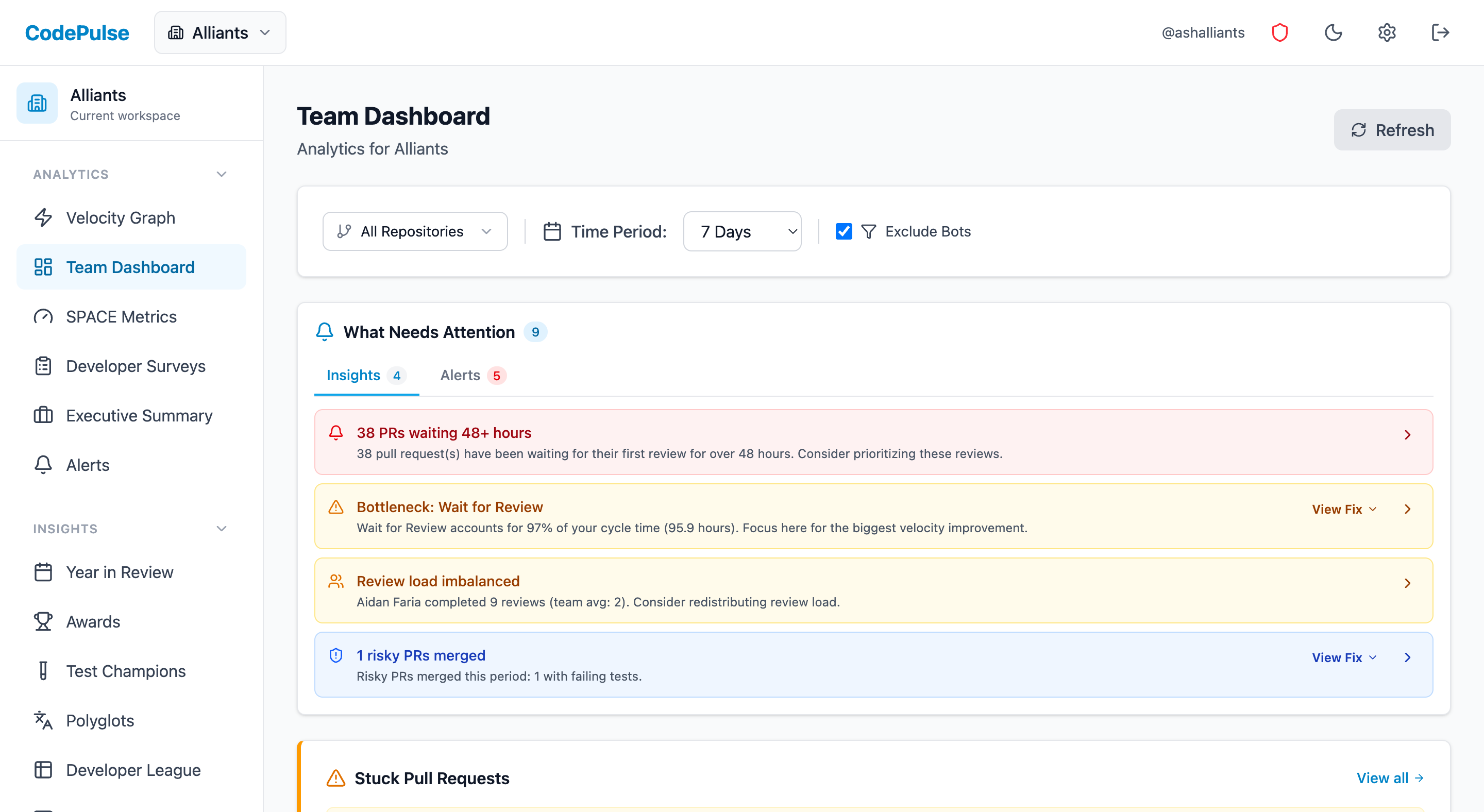
Evaluate CodePulse against your own delivery history
A comparison table only goes so far. Connect read-only GitHub in about five minutes and judge the output on your repositories, at one flat price, with no per-seat math.
Read-only GitHub · Your code stays yours · Team-level by default · No credit card
See These Features in Action
Ask Claude about your delivery, review load and code health in plain English. Read-only, your permissions, admin-controlled.
Board-ready engineering performance in a single page.
Interactive graph of review relationships and workload distribution.
Related Guides
I Got $2M in Budget With These 5 Engineering Metrics
Learn how to create engineering metrics presentations that resonate with board members, investors, and C-suite executives.
The EM Dashboard That Won't Get You Reported to HR
With 83% of developers suffering from burnout and a 12-point perception gap between engineers and executives, EMs need metrics that reveal team health - not just delivery. Here is what to track, what to ignore, and how to use data without destroying trust.
Your Best Engineer Is About to Quit (Check Review Load)
Learn how to identify overloaded reviewers, distribute review work equitably, and maintain review quality without burning out your senior engineers.
The 'Bus Factor' File That Could Kill Your Project
Use the Bus Factor Risk Matrix to identify where knowledge concentration creates hidden vulnerabilities before someone leaves.
Measuring Claude Code Usage Without Fooling Yourself
Usage reporting for AI coding tools is partial, and adoption maths built on it understates reality. How to get a real denominator, and what a seat with no usage actually means.