
See exactly where your delivery flow is waiting
Preview the phase-by-phase report for review pickup, active review, and merge time. Connect in about five minutes; the initial analysis runs after sync.
Read-only GitHub · Your code stays yours · Team-level by default · No credit card
Code review is one of the most valuable activities in software development - but it's also one of the most unevenly distributed. In many teams, a handful of senior engineers handle the majority of reviews, creating bottlenecks, burnout, and knowledge silos.
This guide shows you how to identify review load imbalances, implement fair distribution strategies, and maintain review quality without burning out your best people.
Why Review Load Balance Matters
The Hidden Cost of Unbalanced Reviews
When review work concentrates in a few engineers, the consequences ripple through your entire engineering organization:
- Bottlenecks: PRs queue up waiting for the same 2-3 reviewers, slowing everyone's cycle time.
- Burnout: Overloaded reviewers spend 3-4 hours daily on reviews, leaving little time for their own work.
- Review quality decline: Exhausted reviewers rubber-stamp PRs they don't have time to properly review.
- Knowledge silos: When only a few people review code, the rest of the team doesn't learn the codebase.
- Attrition risk: Your most experienced engineers - the ones doing most reviews - are also the most likely to leave if burned out.
Quantifying the Impact
Consider a typical scenario:
Team Review Distribution
8 engineers, 40 PRs/weekThis isn't just a fairness issue - it's a delivery issue. Unbalanced reviews directly slow your team's velocity.
Identifying Overloaded Reviewers
Signs of Reviewer Overload
Look for these warning signs that reviewers are overwhelmed:
- Long review queues: The same reviewers have 5+ PRs waiting
- Slow initial response: Time to first review exceeds 24 hours consistently
- Short review comments: "LGTM" or single-word approvals instead of substantive feedback
- Reviewer complaints: "I can't get anything done because I'm always reviewing"
- Delayed own PRs: Heavy reviewers' own work gets deprioritized
Manual Analysis: GitHub Insights
You can get basic review counts from GitHub's contributor insights:
- Go to your repository → Insights → Contributors
- Look at the "Reviews" tab to see who's reviewing most
- Compare review counts across team members
Limitations: GitHub shows counts but not time spent, review depth, or trends.
Better Analysis: Review Network Visualization
A review network shows not just who reviews, but who reviews whom. This reveals patterns like:
- Concentrated reviewers: Single node with many incoming edges
- Review pairs: Two people who only review each other (clique)
- Isolated reviewers: Team members who rarely give or receive reviews
You can also ask for this in plain English. With the CodePulse MCP connector for Claude, a question like "who is carrying review for everyone else this month?" returns the busiest reviewers, their share of all reviews and the strongest reviewer-author pairs.
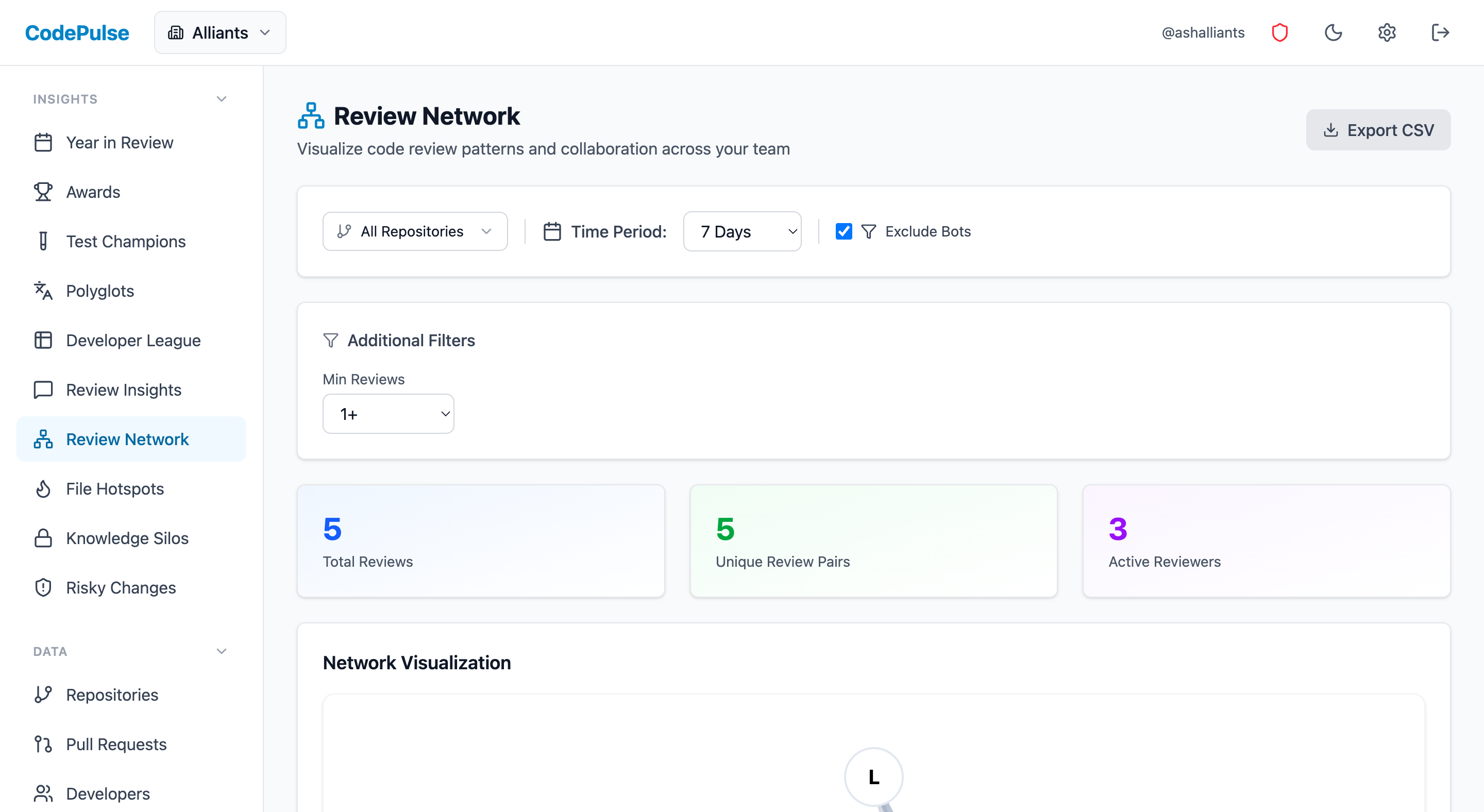
📊 How CodePulse Helps
CodePulse's Review Network page visualizes exactly who reviews whom on your team. You can instantly see:
- Review pairs and collaboration patterns
- Which reviewers have the most incoming review requests
- Team members who are isolated from the review process
The Code Review Insights page shows top reviewers by volume, helping you identify who might be overloaded.
Strategies for Better Distribution
Strategy 1: Round-Robin Assignment
The simplest approach: assign reviewers in rotation. Each PR goes to the next person in the list.
Pros:
- Perfectly even distribution
- Easy to implement with CODEOWNERS or assignment bots
- No subjective decisions
Cons:
- Ignores expertise - a frontend PR might go to a backend specialist
- Doesn't account for availability (PTO, busy sprints)
- Can slow review quality if reviewers lack context
Best for: Small, generalist teams where everyone knows the whole codebase.
Strategy 2: Expertise-Weighted Assignment
Assign reviewers based on file ownership or past activity in the changed files, but distribute the load among multiple experts.
Example CODEOWNERS setup:
# Frontend - rotates among 3 experts
/src/components/ @frontend-team

# Backend - rotates among 3 experts
/api/ @backend-team

# Shared infrastructure - any senior engineer
/infra/ @senior-engineers
Pros:
- Reviews stay high quality (experts review their areas)
- Load distributes within expertise pools
- GitHub natively supports team-based CODEOWNERS
Cons:
- Requires maintaining accurate CODEOWNERS files
- Can still create bottlenecks if pools are too small
Strategy 3: Load-Aware Assignment
Assign to the team member with the fewest pending reviews who has relevant expertise. This dynamically balances load.
Implementation approaches:
- GitHub Actions: Build a workflow that checks pending review counts before assigning
- Review bots: Tools like PullApprove, Reviewbot, or LGTM can implement load-aware assignment
- Manual check: Before assigning, quickly check who has capacity
Strategy 4: Review Rotation Duty
Designate a "review duty" rotation where one person handles most reviews for a day or week, then rotates to someone else.
Pros:
- Clear accountability - you know who's "on duty"
- Allows deep focus when not on duty
- Ensures everyone takes turns
Cons:
- Heavy load for the person on duty
- Might lack expertise for some PRs
Best for: Teams that want to minimize context-switching for most people. For teams spread across timezones, see also our Async Code Review for Distributed Teams guide.
Implementing Review Rotation
Step 1: Assess Current State
Before changing anything, document your current distribution:
- Pull 90 days of PR data
- Count reviews per team member
- Calculate the Gini coefficient or simply compare highest vs. lowest
- Identify the top 2-3 reviewers handling most load
Step 2: Define Expertise Pools
Group your team by area of expertise:
Example pools for a full-stack team:

Frontend Pool:
  - Alice (senior) - any frontend PR
  - Bob (mid) - UI components, not API layer
  - Carol (junior) - simple styling/markup only

Backend Pool:
  - Dave (senior) - any backend PR
  - Eve (mid) - business logic, not infrastructure
  - Frank (junior) - simple CRUD endpoints

Full-Stack:
  - Alice, Dave - cross-cutting changes
Step 3: Set Up Assignment Rules
Configure your assignment based on chosen strategy:
For CODEOWNERS (GitHub native):
# .github/CODEOWNERS

# Default reviewers (team, not individual)
* @your-org/engineering

# Frontend (rotates within team)
/src/components/ @your-org/frontend-team
/src/pages/ @your-org/frontend-team

# Backend (rotates within team)
/api/ @your-org/backend-team
/services/ @your-org/backend-team
For review bots:
- Configure load balancing in the bot's settings
- Set maximum concurrent reviews per person (e.g., 3)
- Enable automatic reassignment if reviewer doesn't respond in 24h
Step 4: Communicate the Change
Review distribution changes can feel political. Communicate clearly:
- Share the data showing current imbalance
- Explain the impact on cycle time and burnout
- Emphasize this is about team health, not individual criticism
- Set expectations for response times across all reviewers
Step 5: Monitor and Adjust
After implementing, track these metrics weekly:
- Review count distribution (is it more even?)
- Time to first review (is it faster?)
- Review quality (are substantive comments still happening?)
- Cycle time (is overall delivery improving?)
📈 How CodePulse Helps
Track your review load distribution over time with CodePulse:
- Code Review Insights shows review counts by team member, making imbalances obvious
- Dashboard displays review coverage percentage to ensure PRs aren't going unreviewed
- Review Network visualizes changes in collaboration patterns over time
Measuring Improvement
Key Metrics to Track
After implementing load balancing, track these metrics to measure success:
1. Review Distribution Evenness
Compare reviews per person before and after:
Review Distribution Evenness
- Highest reviewer: 45 reviews/week
- Lowest reviewer: 5 reviews/week
- Ratio: 9:1
- Highest reviewer: 22 reviews/week
- Lowest reviewer: 15 reviews/week
- Ratio: 1.5:1
2. Time to First Review
More distributed reviews should mean faster initial response. Target: under 4 business hours for most PRs.
3. Overall Cycle Time
Better load balance should reduce queue time and improve total cycle time.
4. Review Depth
Monitor that quality doesn't suffer. Look for:
- Average comments per review (should stay stable or improve)
- Percentage of "LGTM-only" reviews (should decrease)
- Bug catch rate in reviews
What Good Looks Like
A well-balanced review culture shows measurable improvements. Set clear PR review SLAs to track progress:
- No one dominates: No single person handles more than 25% of reviews
- No one is excluded: Everyone on the team reviews at least 10% of PRs
- Fast response: 90% of PRs get first review within 4 hours
- Quality maintained: Average review has 2+ substantive comments
- No bottlenecks: No reviewer has more than 3 pending reviews
Continuous Improvement
Review load balancing isn't a one-time fix. Build it into your regular cadence:
- Weekly: Quick check on distribution metrics in team standup
- Monthly: Review trends and adjust pools/rules if needed
- Quarterly: Retrospective on review culture and process
The goal isn't perfect equality - it's sustainable, high-quality reviews that don't burn out your best people or slow down your team.
Related Guides
- Code Reviewer Best Practices - improve review quality alongside distribution
- Detecting Burnout Signals from Git Data - catch overload before it becomes burnout
- Reducing PR Cycle Time - balanced load is key to faster cycle times

Find out which phase is holding your delivery up
CodePulse splits your cycle time into coding, waiting for review, active review, and merge, so you fix the queue that is actually costing you days. Read-only GitHub, no credit card.
Read-only GitHub · Your code stays yours · Team-level by default · No credit card
See These Features in Action
Interactive graph of review relationships and workload distribution.
Detect bus-factor-1 code before it becomes an operational risk.
Compare contribution patterns for coaching, not surveillance.
Related Guides
We Cut PR Cycle Time by 47%. Here's the Exact Playbook
A practical playbook for engineering managers to identify bottlenecks, improve review processes, and ship code faster - without sacrificing review quality.
Remote Code Reviews Are Broken. Here's the 3-Timezone Fix
How to run effective code reviews across time zones without sacrificing quality or velocity.
3 GitHub Review Features That Cut Our Review Time in Half
Most teams underuse GitHub native review features. Learn CODEOWNERS, branch protection, and suggested changes to speed up reviews without new tools.
The 4-Minute Diagnosis That Reveals Why Your PRs Are Stuck
Learn to diagnose exactly where your PRs are getting stuck by understanding the 4 components of cycle time and how to improve each one.
Software Project Planning: Stop Guessing, Start Forecasting
Most project plans fail because they're based on estimates, not data. This guide shows how to plan software projects using git metrics, historical velocity, and probabilistic forecasting.
DevOps Observability: Logs, Metrics, and Traces
Observability goes beyond monitoring to help you understand why systems break, not just when. This guide covers the three pillars (logs, metrics, traces), implementation strategies, and tool comparisons.
The 300-Line Rule: Why Big PRs Are Sabotaging Your Team
The research-backed case for smaller pull requests, how to measure PR size effectively, and practical strategies for breaking down large changes.
Measure Deploy Frequency Without CI/CD (The Hack)
Master DORA deployment frequency and lead time using GitHub data alone, without requiring CI/CD pipeline access.