
Find quality and ownership risk before it becomes an incident
Preview how CodePulse combines review depth, risky changes, hotspots, and knowledge concentration without turning activity into individual scores.
Read-only GitHub · Your code stays yours · Team-level by default · No credit card
Your "most productive" developer might actually be your biggest risk. That engineer who owns the payment system, ships fast, and never needs help? They're one job offer away from a crisis. This guide introduces the Bus Factor Risk Matrix - a framework for identifying where knowledge concentration creates hidden vulnerabilities in your codebase.
What are code hotspots and knowledge silos?
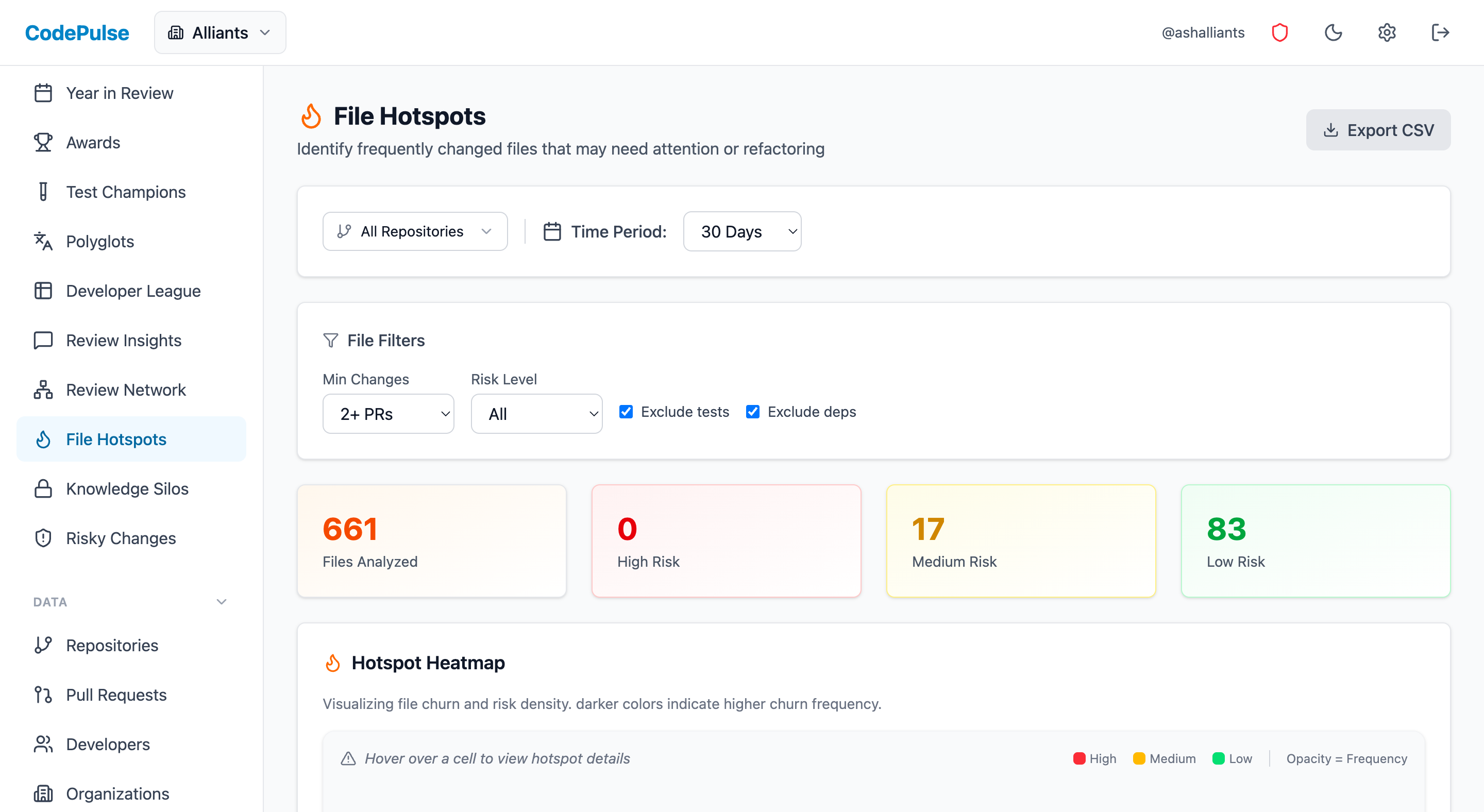
Code hotspots are files that change frequently, while knowledge silos are areas where only one or two people understand the code. The Bus Factor Risk Matrix combines both dimensions to reveal hidden vulnerabilities: files that change often but few people understand are your highest risk. CodePulse's File Hotspots page surfaces these risks automatically.
"Knowledge silos don't announce themselves. They reveal themselves when someone leaves."
What Is the Bus Factor Risk Matrix?
Every file in your codebase falls into one of four quadrants based on two dimensions: how often it changes and how many people understand it. Most teams only track the first dimension. The second is where the real risk hides. Visualize this with a code ownership heatmap, or put a number on the exposure with our free bus factor calculator.
The Bus Factor Risk Matrix
How to score: Change frequency: Count commits in last 90 days (>10 = High, ≤10 = Low). Contributors: Count unique authors in last 6 months (≤2 = Few, ≥3 = Many).
Scoring Your Codebase
Run this analysis quarterly. For each critical file or module:
| Metric | Low Threshold | High Threshold | Data Source |
|---|---|---|---|
| Change Frequency | 0-10 commits/quarter | 11+ commits/quarter | Git log, CodePulse File Hotspots |
| Contributor Count | 1-2 unique authors | 3+ unique authors | Git blame, CodePulse contributor metrics |
| Review Concentration | One person reviews 70%+ | Reviews distributed | PR review history |
🔥 Our Take
Your "fast" developer is probably your most overworked. When one person touches 3x the code anyone else does, they're not a hero - they're a single point of failure and a burnout risk.
Review load imbalance is invisible work. It doesn't show up in commit stats, so it's easy to miss until someone quits. The Bus Factor Risk Matrix exposes this before it's a crisis.
Why Are High-Change Files with Few Contributors So Dangerous?
"A file that changes weekly but only one person touches? That's not ownership - that's a ticking time bomb."
Danger Zone files are actively evolving but understood by too few people. These are your highest priority risks. Characteristics:
- High commit frequency: The code changes often because it's core business logic
- Single or dual contributor: Only 1-2 people have touched it in months
- Concentrated reviews: The same person authors AND reviews most changes
- Complex domain: Payment processing, authentication, billing calculations
Real-World Example
Danger Zone File Analysis
billing/invoice_calculator.py🎯Finding Your Danger Zone in CodePulse
Use File Hotspots to identify high-risk files:
- Navigate to File Hotspots
- Sort by change frequency to find your most active files
- Check contributor count for each hotspot - 1-2 contributors signals danger
- Cross-reference with Review Network to see review concentration
What Is Dormant Risk and Why Does It Matter?
Dormant Risk files are stable - they rarely change. But when they do need changes, only one person knows how they work. These are time bombs with slow fuses.
Why Dormant Risk Is Dangerous
- Knowledge decay: The original author may have forgotten details after months of not touching the code
- Documentation rot: Whatever docs existed are now outdated
- False security: "It never breaks" becomes "we have no idea how to fix it"
- Surprise complexity: The rare change takes 10x longer than expected
Common Dormant Risk Areas
| Area | Why It's Dormant | Why It's Risky |
|---|---|---|
| Infrastructure scripts | "Set it and forget it" mentality | Cloud migration requires deep changes |
| Auth/security modules | Fear of breaking things | Security vulnerability requires urgent patch |
| Data pipelines | Running smoothly for years | Schema change cascades everywhere |
| Legacy integrations | Original author left 2 years ago | Third-party API deprecation forces update |
The strategy for Dormant Risk is proactive documentation and deliberate cross-training during quiet periods - before you need the knowledge urgently.
How Do You Maintain the Active Zone?
The Active Zone is healthy. Multiple people are working on frequently-changing code. This naturally distributes knowledge and reduces bus factor risk.
How to Maintain the Active Zone
Don't become complacent. Active Zone files can slip into the Danger Zone if:
- Team departures: Two of your three contributors leave, and suddenly you have one person carrying everything
- Review shortcuts: PRs get rubber-stamped instead of thoughtfully reviewed
- Test neglect: High velocity without test coverage creates fragile code
- Documentation debt: Everyone assumes someone else will document
Active Zone Best Practices
- Maintain test coverage: Active files need excellent tests. Use the Test Failure Rate Guide to track coverage
- Rotate reviewers: Ensure at least 3 people review PRs in this area regularly
- Monitor for contributor concentration: If one person starts dominating commits, intervene early
What Makes Code Fall Into the Safe Zone?
Safe Zone files are stable AND well-understood. This is where mature, well-designed code lives. Your goal is to get more of your codebase here.
Safe Zone Characteristics
- Stable abstractions: The design is solid, so changes are rare
- Multiple knowledgeable contributors: Several people can modify it confidently
- Good documentation: The "why" is captured, not just the "what"
- Comprehensive tests: Changes are safe because tests catch regressions
One Risk to Monitor
Safe Zone files can become Dormant Risk over time if knowledge isn't actively maintained. People who understood the code leave. Documentation becomes stale. The "many contributors" of two years ago become "no one who's still here" today.
Check Safe Zone files quarterly: Do your current team members actually understand this code, or is the contributor count historical?
How Do You Detect Knowledge Silos with Git Commands?
You don't need fancy tools to start. These git commands help identify knowledge concentration:
Find Your Change Frequency Hotspots
# Top 20 most-changed files in last 90 days
git log --since="90 days ago" --name-only --pretty=format: | \
  sort | uniq -c | sort -rn | head -20
Count Contributors Per File
# Who has touched a specific file in the last 6 months?
git log --since="6 months ago" --format='%an' -- path/to/file.py | \
  sort | uniq -c | sort -rn

# Calculate ownership concentration
# If top contributor has >75% of commits, it's a knowledge silo
Identify Potential Danger Zone Files
# Script to find high-change files with low contributor diversity
# Run from repo root

for file in $(git log --since="90 days ago" --name-only --pretty=format: | \
  sort | uniq -c | sort -rn | head -20 | awk '{print $2}'); do
    contributors=$(git log --since="6 months ago" --format='%an' -- "$file" | \
      sort -u | wc -l)
    commits=$(git log --since="90 days ago" --oneline -- "$file" | wc -l)
    echo "$file: $commits commits, $contributors contributors"
done | grep " 1 contributor\| 2 contributor"📊Automated Detection in CodePulse
Skip the manual commands - CodePulse surfaces this automatically:
- File Hotspots shows change frequency with contributor counts
- Developer Leaderboard reveals who dominates which code areas
- Review Network exposes review concentration
- Set up Alert Rules to notify when contributor concentration exceeds thresholds
How Do You Mitigate Knowledge Silo Risks?
"The goal isn't to eliminate expertise. It's to ensure expertise isn't exclusive."
For Danger Zone Files (Act Now)
| Action | Timeline | Success Metric |
|---|---|---|
| Pair programming | This sprint | Second contributor makes commits |
| Rotate reviewers | Immediate | 3+ people reviewing PRs in this area |
| Knowledge transfer sessions | Within 2 weeks | Recorded walkthrough exists |
| Assign backup owner | This month | Second person can ship changes independently |
| Increase test coverage | Next quarter | Coverage above team average |
For Dormant Risk Files (Document Proactively)
- Schedule documentation sprints: During slow periods, have the expert document the "why" behind design decisions
- Create runbooks: "How to debug X" and "How to modify Y" guides
- Assign exploratory tickets: Have non-experts make small, low-risk changes with expert guidance
- Review during onboarding: New hires review dormant code as a learning exercise, asking questions that get documented
For Active Zone Files (Maintain Health)
- Track contributor trends: Alert if diversity drops below 3 active contributors
- Enforce test coverage thresholds: Block PRs that decrease coverage below 70%
- Rotate ownership deliberately: Spread complex features across the team
How Do You Run a Quarterly Bus Factor Review?
Add this to your quarterly technical health check:
Review Agenda (30 minutes)
- List Danger Zone files (5 min): Which high-change files have only 1-2 contributors?
- Review mitigation progress (10 min): Did we successfully spread knowledge from last quarter's Danger Zone?
- Identify new risks (5 min): Have any Active Zone files slipped into Danger Zone?
- Assign actions (10 min): Who pairs with whom this quarter? What gets documented?
Sample Tracking Table
| File/Module | Quadrant | Primary Owner | Backup Owner | Action This Quarter |
|---|---|---|---|---|
| billing/invoice.py | Danger Zone | Sarah | None | Pair with Alex on billing tickets |
| auth/oauth.py | Dormant Risk | Marcus | None | Document edge cases, record walkthrough |
| api/orders.py | Active Zone | Team | N/A | Maintain - watch for concentration |
| lib/utils.py | Safe Zone | Team | N/A | Monitor quarterly |
What Cultural Changes Reduce Knowledge Silos?
The Bus Factor Risk Matrix is a diagnostic tool. The cure is cultural.
What Needs to Change
- Stop rewarding silo heroics: "Only Sarah can fix billing" should trigger concern, not praise
- Make knowledge sharing a first-class activity: Pair programming and documentation count as real work. Match the method to the type of tribal knowledge you are moving - decision history needs writing, judgment needs pairing
- Include bus factor in tech debt discussions: Knowledge concentration is technical debt - it accrues interest when someone leaves
- Plan for departures: Ask "what if X left tomorrow?" for every critical system
How to Talk About It
| Don't Say | Do Say |
|---|---|
| "Sarah is our billing expert" | "Sarah is our primary billing contributor - who's her backup?" |
| "Marcus is the only one who understands auth" | "Auth is in the Danger Zone. We need to cross-train this quarter." |
| "We'll document that later" | "Let's schedule documentation before knowledge decays" |
| "That code works fine, don't touch it" | "That's Dormant Risk - we need to understand it before we need to change it" |
How Do You Get Started This Week?
Day 1: Run the Analysis
- Use the git commands above or check File Hotspots in CodePulse
- List your top 10 most-changed files from the last 90 days
- Count unique contributors for each
Day 2: Classify Into Quadrants
- High change + few contributors = Danger Zone
- Low change + few contributors = Dormant Risk
- High change + many contributors = Active Zone
- Low change + many contributors = Safe Zone
Day 3-5: Create Your Action Plan
- Identify your top 3 Danger Zone priorities
- Assign pair programming partners
- Schedule first knowledge transfer session
- Add Bus Factor Review to your next quarterly planning
For more on managing technical risk, see our guides on Quantifying Technical Debt, Detecting Risky Deployments, and Understanding Code Churn.
Frequently Asked Questions
The bus factor is the number of people who would need to be unavailable before a project or file becomes unmaintainable. A bus factor of 1 means a single departure, illness, or vacation could halt progress on critical code. Files with high change frequency and low contributor count have the worst bus factor risk.

See which files and owners carry your real risk
Connect GitHub and get your churn hotspots, single-owner modules, and review-depth signals ranked by exposure. No repository cloning, no file contents read.
Read-only GitHub · Your code stays yours · Team-level by default · No credit card
See These Features in Action
Detect bus-factor-1 code before it becomes an operational risk.
Find high-churn files and correlate change frequency with ownership.
Related Guides
Tribal Knowledge: Find What Only One Developer Knows
Tribal knowledge is the system understanding that lives in people's heads. Learn the four types, how to find yours in git history, and which parts are worth transferring.
Your Technical Debt Costs $127K/Year. Here's the Math
Stop calling it "technical debt" - call it what it is: an engineering tax. Learn to calculate the Debt Tax Rate, quantify innovation drag, and build a board-ready business case.
The PR Pattern That Predicts 73% of Your Incidents
Learn how to identify high-risk pull requests before they cause production incidents.
High Code Churn Isn't Bad. Unless You See This Pattern
Learn what code churn rate reveals about your codebase health, how to distinguish healthy refactoring from problematic rework, and when to take action.
Your CI Is Crying for Help. Here's What It's Telling You
Understand what test failure rate measures, identify patterns causing CI failures, and implement strategies to improve your pipeline reliability.
Shift Left Metrics: Measuring Early Detection ROI
Shift left means catching bugs earlier. This guide covers the metrics that prove shift-left ROI, what to shift first, and how to implement without slowing delivery.
Git Branch Aging Report: Finding and Cleaning Stale Branches
Track branch aging to identify technical debt. Learn branch lifecycle stages, hygiene policies that scale, and safe cleanup automation strategies.
100% Review Coverage Is a Lie (What Actually Matters)
Why 100% review coverage matters, how to track it, and practical steps to build a consistent code review culture across your team.
The Pre-Black-Friday Checklist That Saved Our Launch
How e-commerce engineering teams use quality metrics and risk scoring to ensure deployment readiness before high-traffic periods.
Cyclomatic Complexity Explained (With Real Thresholds)
What cyclomatic complexity actually measures, how it is calculated, the widely cited risk bands, and where it falls short as a readability signal.
Cognitive Complexity Explained (vs Cyclomatic)
What cognitive complexity measures, how SonarSource's algorithm scores nesting and control-flow breaks, and how it differs from cyclomatic complexity.