

Compare the finished analysis before you choose a platform
See the report CodePulse produces from read-only GitHub workflow data, or connect your own repositories and evaluate the fit with real evidence.
Read-only GitHub · Your code stays yours · Team-level by default · No credit card
If you're searching for a "Hatica alternative," you've likely hit a wall. Maybe the multi-tool integration is more complex than expected. Maybe the pricing scaled faster than your budget. Or maybe you just need something simpler for a GitHub-centric team. This guide helps you decide whether CodePulse is the right fit - or whether Hatica is actually the better choice for your situation.
What are the best alternatives to Hatica?
The top Hatica alternatives are CodePulse (GitHub-native, simpler setup, lower cost), Swarmia (similar developer experience focus with free tier), LinearB (adds workflow automation via gitStream), and Jellyfish (enterprise business alignment). Hatica differentiates with multi-tool integration across GitHub, GitLab, Jira, Slack, and calendar data. If you need that breadth, Hatica may still be the right choice. If you primarily use GitHub and want faster setup with deeper PR analytics, CodePulse is a strong fit.
"The best engineering analytics tool isn't the one with the most integrations - it's the one that answers your actual questions without creating new problems."
Hatica and CodePulse approach engineering analytics from different angles. Hatica bets that you need a unified view across GitHub, Jira, Slack, calendars, and more. CodePulse bets that for many teams, GitHub contains 80% of what matters, and the other integrations add complexity without proportional insight.
Both approaches have merit. Let's figure out which makes the right trade-offs for you.
What Hatica Offers
Credit where it's due - Hatica has built a comprehensive platform with genuine strengths:
Broad Integration Ecosystem
Hatica connects to 20+ tools including GitHub, GitLab, Bitbucket, Jira, Linear, Slack, Zoom, Google Calendar, PagerDuty, and various CI/CD systems. This breadth allows them to correlate data across your entire engineering workflow - from code commits to meeting time to incident response.
Work Breakdown and Effort Allocation
By connecting to issue trackers like Jira, Hatica categorizes engineering time into features, bugs, tech debt, and maintenance. This investment visibility is valuable for leaders who need to answer "where does engineering time actually go?"
Developer Experience Focus
Hatica includes developer surveys, async stand-ups via Slack, and focus time analytics that measure meeting load and collaboration patterns. They explicitly track burnout risk indicators.
Sprint and Retro Dashboards
For teams running sprints, Hatica provides dedicated views that pull data from Jira to show sprint velocity, carry-over, and retrospective insights.
/// Our Take
There's no universally "better" tool. Hatica is genuinely good at what it does - multi-source analytics for teams with complex toolchains.
CodePulse makes a different bet: that most actionable insights come from GitHub data alone. If your team lives in Jira and needs calendar analytics, Hatica might be the better fit. We'd rather you choose the right tool than be disappointed with us.
Common Hatica Pain Points
Based on user reviews and feedback, these are the most common reasons teams look for alternatives:
Integration Complexity
Connecting 20+ tools sounds powerful until you're the one configuring them. Users report a learning curve with setup, and some find they need to contact Hatica support to make changes on their behalf. A CTO on Capterra noted that "some configuration changes require raising a support request" rather than being self-service. For teams who just want to see GitHub data quickly, this is overkill.
Data Sync and Accuracy Issues
Some users report data accuracy problems, particularly when syncing from multiple sources. The more integrations you have, the more potential failure points. Users note that tickets assigned to non-developers (like PMs) may not appear in Hatica since users are created from Git activity, not Jira.
No Dashboard Customization
Despite the breadth of metrics, Hatica does not support custom dashboards. An Associate Software Engineer on Capterra noted the "platform doesn't have support to customise dashboards." An Analyst in Telecommunications flagged the same issue, adding there's "no dark mode." Report customization is described as "quite limited" by multiple reviewers.
Overwhelming Metrics and Learning Curve
With 100+ metrics available, new users can feel overwhelmed. A Software Engineer on TrustRadius noted "there are so many metrics that you're able to measure -- it can get overwhelming at first." A CEO on TrustRadius requested "easier dashboards," describing some as having "a learning curve as they are more complex than others."
"Every integration you add is a dependency you maintain. Teams often discover they're paying for complexity they don't actually need."
Limited API and Filtering
For teams wanting programmatic access, the API has limitations. A developer on Capterra (one of the few sub-5-star reviews found) noted that "the ability of the API to filter metrics by custom groups is somewhat restricted." An Operations Manager wanted more autonomy to "filter metrics by branches."
Thin Documentation
A Director of Engineering on Capterra suggested Hatica "start building community support and documentation to help users self-navigate the platform." Another reviewer wanted "links or articles about industry averages and best practices" for context on their metrics. For a platform with this many metrics, self-service documentation matters.
A Note on Review Patterns
Hatica has roughly 15 reviews on Capterra, with nearly all rated 5 out of 5 stars and very mild criticism. This uniformity is unusual for any software product and worth noting when weighing the available feedback. The platform is still relatively new, and the review pool is small.
CodePulse vs Hatica: Feature Comparison
Here's an honest comparison based on documented features:
| Capability | Hatica | CodePulse |
|---|---|---|
| Primary philosophy | Multi-tool aggregation | GitHub depth without complexity |
| Git providers | GitHub, GitLab, Bitbucket | GitHub only |
| Issue tracker integration | Jira, Linear, Asana, ClickUp | None |
| Calendar/meeting analytics | Yes (Google Calendar, Outlook) | No |
| Setup time | Hours to days (multiple integrations) | Minutes (single OAuth) |
| Developer surveys | Yes (async stand-ups) | No |
| DORA metrics | Yes | Yes |
| Cycle time breakdown | Yes | Yes (4-stage) |
| Review collaboration | Basic analytics | Interactive review network graph |
| Knowledge silo detection | Limited | File-level hotspot analysis |
| Developer recognition | Limited | 15 award categories |
| Executive summary | Effort allocation focus | A-F health grade |
| Dashboard customization | Not available (per user reviews) | Purpose-built views per persona |
| API flexibility | Limited custom group filtering | Full API with org/repo/developer scoping |
| Mobile experience | Poor (per user reports) | Responsive design |
| Documentation | Thin, no community resources | Comprehensive guides and toolkit |
The Simplicity Advantage
CodePulse's core value proposition is intentional simplicity. Here's what that means in practice:
One Integration, Full Value
Connect GitHub once, get insights in minutes. No need to configure Jira mappings, calendar permissions, or Slack tokens. If your team uses GitHub as the source of truth for engineering work, you don't lose any insight - you just skip the configuration overhead.
No "Integration Tax"
Every tool you connect is a tool you maintain. Jira schema changes? Calendar permission issues? Slack API deprecations? With CodePulse, you have one integration to manage. Your analytics don't break because someone changed a Jira workflow.
Focused Metrics
Instead of 100+ metrics across 20 tools, CodePulse focuses on the metrics that actually drive decisions: cycle time, review patterns, code hotspots, and knowledge distribution. Less noise, more signal.
// How to See This in CodePulse
Navigate to Dashboard to see your engineering health at a glance:
- Cycle time broken into 4 stages (coding, waiting, review, merge)
- PR velocity trends over time
- Review distribution across team members
Then explore Review Network to see collaboration patterns, and File Hotspots to identify knowledge silos before they become problems.
When Simplicity Wins
CodePulse is the better choice when:
- GitHub is your source of truth: Your team uses GitHub Issues or doesn't need issue tracker correlation
- You want fast time-to-value: Connect today, get insights today - no implementation project required
- Integration fatigue is real: Your team is tired of managing tool connections that break unexpectedly
- Review patterns matter: CodePulse's interactive review network reveals collaboration bottlenecks that basic metrics miss
- Knowledge silos keep you up at night: File-level hotspot analysis shows exactly which code has single-contributor ownership
When to Stick with Hatica
Be honest with yourself - Hatica is the better choice when:
- Jira correlation is critical: Leadership asks "how long did JIRA-1234 take from ticket to deploy?" and you need that answer
- You use multiple Git providers: Teams on GitHub AND GitLab need aggregation that CodePulse doesn't offer
- Meeting analytics matter: You need to track focus time and meeting load across calendar data
- Sprint dashboards are essential: You run sprints in Jira and need sprint velocity pulled automatically
- Developer surveys fit your culture: Async stand-ups and check-ins via Slack align with how your team works
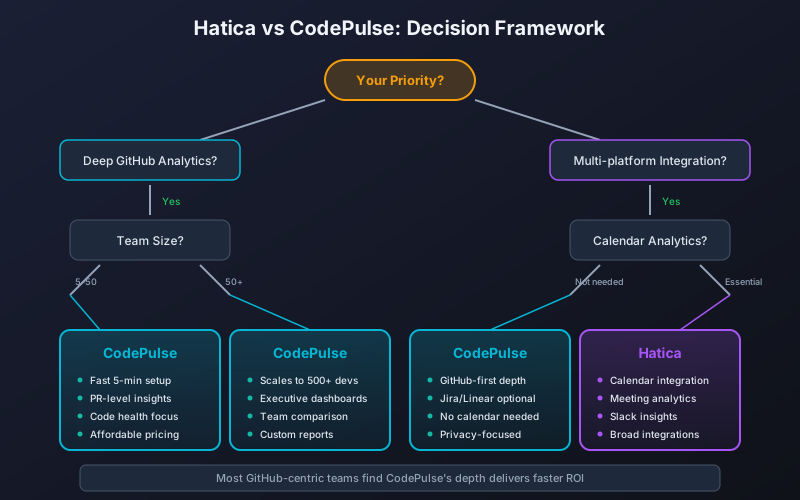
Decision Tree: Hatica vs CodePulse

START HERE
    |
    v
Do you need Jira/Linear correlation for investment tracking?
    |-- YES --> Hatica (CodePulse doesn't integrate)
    |
    v NO
Do you use multiple Git providers (GitHub + GitLab + Bitbucket)?
    |-- YES --> Hatica (CodePulse is GitHub-only)
    |
    v NO
Do you need calendar/meeting analytics?
    |-- YES --> Hatica (CodePulse doesn't track meetings)
    |
    v NO
Is GitHub your primary source of truth?
    |-- NO --> Evaluate Hatica, LinearB, or Jellyfish
    |
    v YES
Do you value fast setup over integration breadth?
    |-- YES --> CodePulse (minutes, not days)
    |
    v NO
Do you need interactive review network visualization?
    |-- YES --> CodePulse (differentiated feature)
    |
    v NO --> Evaluate both with your must-haves
"The question isn't 'which tool has more features?' It's 'which tool answers the questions you're actually asking?'"
Switching from Hatica to CodePulse
If you've decided CodePulse is the right fit, here's what the migration looks like. Teams coming off legacy analytics platforms often ask how CodePulse stacks up against older options - our Code Climate Velocity alternatives comparison covers the parallel migration path.
What Transfers Automatically
- GitHub data: CodePulse syncs directly from GitHub - no export needed
- Historical metrics: We process up to 6 months of PR history automatically
- Team structure: Based on GitHub organization, not manual configuration
What You'll Lose
- Issue tracker correlation: Jira/Linear investment categorization doesn't transfer
- Calendar analytics: Meeting time and focus time tracking goes away
- Developer surveys: Async stand-ups and check-ins need a different solution
- Sprint dashboards: Jira-based sprint metrics won't be available
- Historical Jira data: Issue-related analytics history doesn't transfer
Migration Timeline
- Connect GitHub (5 minutes): Single OAuth flow to authorize CodePulse
- Initial sync (30-60 minutes): Historical PR and commit data processing
- Explore dashboards (same day): Dashboard, Review Network, File Hotspots
- Configure alerts (optional): Set up notifications for stuck PRs or review bottlenecks
- Run in parallel (recommended): Keep Hatica active for 2-4 weeks while you validate CodePulse meets your needs
Frequently Asked Questions
Hatica integrates with 20+ tools (GitHub, GitLab, Jira, Slack, calendars) for broad visibility. CodePulse focuses exclusively on GitHub for deeper PR analytics, interactive review network visualization, and knowledge silo detection. The trade-off is breadth versus depth.
Related Comparisons
If Hatica vs CodePulse isn't quite the right comparison, these related guides might help:
- LinearB vs CodePulse - If gitStream automation or Copilot tracking matters
- Swarmia vs CodePulse - If SPACE framework or working agreements are priorities
- Full Tools Comparison - Overview of all engineering analytics tools
Making Your Decision
Here's the honest summary:
- Choose Hatica if you need multi-tool aggregation, Jira correlation, calendar analytics, or developer surveys. The integration complexity is worth it when you need data from those sources.
- Choose CodePulse if GitHub is your source of truth and you want fast setup, focused metrics, interactive review collaboration insights, and knowledge silo detection without integration overhead.
- Try both - Hatica has a free tier, and CodePulse offers a free trial. Connect a subset of repositories to each and see which dashboard your team actually opens.
The best tool is the one you'll actually use. If Hatica's multi-tool integration fits your workflow, use Hatica. If CodePulse's GitHub-native simplicity fits better, start your free trial and see for yourself.

Evaluate CodePulse against your own delivery history
A comparison table only goes so far. Connect read-only GitHub in about five minutes and judge the output on your repositories, at one flat price, with no per-seat math.
Read-only GitHub · Your code stays yours · Team-level by default · No credit card
See These Features in Action
Compare contribution patterns for coaching, not surveillance.
Board-ready engineering performance in a single page.
Related Guides
Jellyfish vs LinearB vs Swarmia: Full 2026 Comparison
Compare Jellyfish, LinearB, Swarmia, Allstacks, Haystack and more engineering analytics tools. Features, pricing, cycle time benchmarks, and integrations.
5 LinearB Alternatives for 2026 (With Pricing)
An honest comparison of CodePulse vs LinearB. We tell you when to choose LinearB instead, because the best tool is the one that makes the right trade-offs for your situation.
Swarmia Alternatives: Cheaper, Deeper Analytics 2026
A Swarmia alternative worth considering: where Swarmia falls short on customization and per-seat pricing, and which cheaper, GitHub-native tools fit better.
Pluralsight Flow Alternative: Why Teams Are Switching
Pluralsight Flow is built for enterprise reporting - but if you need team-focused insights without leaderboards or enterprise pricing, there are better options. This guide compares the trade-offs.