
Compare the finished analysis before you choose a platform
See the report CodePulse produces from read-only GitHub workflow data, or connect your own repositories and evaluate the fit with real evidence.
Read-only GitHub · Your code stays yours · Team-level by default · No credit card
Most teams trying to measure engineer productivity don’t have a measurement problem - they have a system problem. They have a dashboard (numbers) without a clear definition of success (decisions). This guide shows how to build an engineering analytics system leaders can trust: what to measure, how to design the pipeline from raw GitHub events to board-ready narratives, and how to do it without creating surveillance culture.
If you’re a VP of Engineering, Director, or Engineering Manager, you don’t need “more metrics.” You need a repeatable way to answer a small set of questions:
- Where is time really going? (Coding vs waiting vs review vs merge)
- Where is quality risk accumulating? (Hotspots, churn, failing checks)
- Are we improving? (Trends, not snapshots)
- What should we do next week? (Actions, not charts)
“An engineering analytics system is a decision system with a database attached.”
What Is an Engineering Analytics System?
An engineering analytics system is the combination of:
- Instrumentation: where the data comes from (GitHub, CI, deployments, incidents)
- Semantics: how you define metrics (what counts, what doesn’t, and why)
- Governance: how you keep the system trustworthy (quality checks, access, privacy rules)
- Delivery: how insights show up for different audiences (VP vs EM vs Staff)
- Action layer: what happens when the numbers move (alerts, playbooks, working agreements)
Most organizations accidentally build an “analytics reporting system”: a collection of charts with no consistent definitions and no agreed-upon actions. The output looks sophisticated - but trust collapses the moment someone asks, “Wait, what does this number include?”
That’s why “engineering analytics systems” and “engineer productivity” are tightly linked. If your measurement system is shallow, your productivity conversations get shallow too. You’ll end up debating output instead of improving flow.
🔥 Our Take
If your system optimizes for dashboards, you’ll get dashboards - not decisions.
The best analytics systems start from decision-making: “What do we need to decide, how often, and based on what signal?” Only then do you choose metrics, thresholds, and tools. Otherwise you’ll ship a beautiful VP dashboard that everyone ignores.
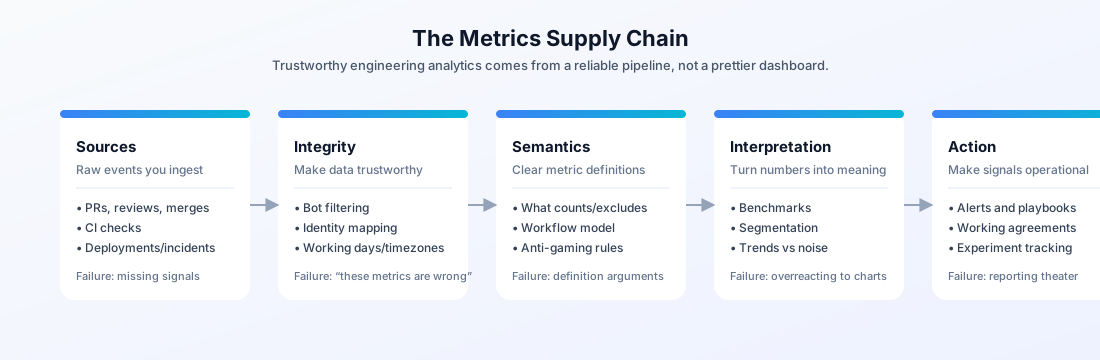
The Metrics Supply Chain (A Named Framework)
To make engineering analytics trustworthy, treat metrics like a supply chain. A number is only as good as the steps that produced it.
| Layer | What it does | Failure mode |
|---|---|---|
| Sources | Collect events (PRs, reviews, checks, merges, deployments) | Missing data; inconsistent event semantics across repos |
| Integrity | Clean and normalize (bots, identities, time zones, working days) | “Garbage in, garbage out” creates distrust |
| Semantics | Define metrics in plain language and code | Teams argue about definitions instead of improving |
| Interpretation | Add context (benchmarks, segmentation, trend windows) | Leaders overreact to noise |
| Action | Turn signal into decisions (alerts, playbooks, working agreements) | Metrics become “reporting theater” |
The trick is that each layer needs its own checks. For example:
- If “cycle time” spikes, can you drill into whether it’s waiting, review, or merge delay?
- If “activity” spikes, can you tell whether it’s real work or bot noise?
- If one team looks “faster,” can you verify they aren’t just shipping smaller PRs or skipping review?
What to Measure (Without the Toxic Metrics)
A common mistake is treating “productivity” as a single number. The research community has largely moved on. The SPACE framework argues developer productivity is multidimensional - Satisfaction, Performance, Activity, Communication, Efficiency - and should be measured as a balanced portfolio, not a leaderboard.
Source: The SPACE of Developer Productivity (Forsgren et al., 2021)
DORA research, meanwhile, is best understood as outcome signals that correlate with strong performance at scale. Use it to ask better questions - not to declare victory.
Source: DORA Research
Here’s a simple “starter pack” that works for most 50–500 engineer organizations:
| Decision you want to make | Signals (team-level) | What to avoid |
|---|---|---|
| Are we stuck? | Cycle time breakdown, waiting for review, review load | Commit counts, story points as “output” |
| Are we taking on risk? | Hotspots, churn, failing checks, change failure rate proxies | Bug counts without severity/context |
| Are we collaborating well? | Review coverage, review network, ownership concentration | Individual ranking tables |
| Is this sustainable? | After-hours patterns, long-running queues, burnout signals | “Hours worked” as a performance metric |
Notice what’s missing: individual scorecards. You can measure at the individual level, but you should treat it like a debugging view. The primary output of an engineering analytics system is team and org-level leverage: where to fix the system so everyone ships better.
“If a metric can be gamed, it will be. Build guardrails into the system, not the slide deck.”
Trust: The Only KPI Your System Can’t Recover From
Trust is the multiplier. A trusted analytics system changes behavior. An untrusted system creates cynicism and measurement avoidance.
One practical rule: your system needs to explain its own numbers. If a VP asks why cycle time went up 20% this month, the system should make it easy to answer: “Waiting for review increased in Repo A; approvals were delayed due to reviewer overload.”
This is where engineering analytics systems usually fail: they collect the data, but they don’t model the workflow. Code review is the clearest example.
In our analysis of 117,413 reviewed pull requests (team-style workflows), the median time to merge is 3.0 hours - but the average waiting-for-review time is 96.9 hours. The bottleneck isn’t “slow engineers.” It’s review queues and prioritization.
This is the difference between “engineer productivity” as a blame game and engineer productivity as an operational system: once you can quantify where time is lost, you can fix the process instead of pushing people harder. For the full framework on surfacing review queues and stuck PRs without tracking individuals, see finding team bottlenecks without surveillance.
Source: CodePulse Research: 2025 Engineering Benchmarks (all research)
If you’re measuring engineer productivity without separating coding timefrom waiting time, you’re measuring the wrong thing. The system needs to encode the workflow (opened → first review → approval → merge), not just count outputs.
Trust also requires transparent exclusions. If bots are included, if weekends are included, if reverts are included - say so. Your best defense against “these metrics are wrong” is to make the rules visible and stable.
📊 How to See This in CodePulse
Navigate to Dashboard to view cycle time and review delays, then segment by repository:
- Compare time windows to see if “slowness” is a trend or a one-off
- Use breakdown views to separate waiting vs review vs merge delay
- Use repository filters to find where queues are building
If you’re rolling out a system and want developers to trust it, start here: How to Measure Developers Without Becoming the Villain.
Implementation: Define a Metrics Contract
The fastest way to reduce politics is to write down definitions as a contract. Not a long policy doc - a short file that answers: what is this metric, what decisions is it for, what data does it use, and what’s explicitly excluded.
Here’s a practical template you can adopt (yes, as code):
# metrics-contract.yml
metrics:
  - name: pr_cycle_time_hours
    purpose: "Detect delivery bottlenecks and workflow delays"
    workflow_model: "opened -> first_review -> approval -> merged"
    segmentation:
      - repository
      - team
      - time_period
    exclusions:
      - bots
      - weekends_if_configured
      - reverted_prs_if_tagged
    anti_gaming:
      - "Track PR size distribution alongside cycle time"
      - "Watch for PR splitting that increases overhead"
    owner: "VP Eng / Eng Ops"
    action_when_bad:
      - "Review queue working agreement"
      - "Reviewer load balancing"
      - "WIP limits for large PRs"
If you’re building from raw GitHub data, our Analytics as Code guide covers the hidden complexity (rate limits, backfills, and data quality).
If you’re buying, the same principle applies: you still need a contract. The difference is that the tooling gives you defaults (and ideally makes its filtering logic clear).
Dashboards That Leaders Trust (And Engineers Don’t Hate)
Engineering leaders don’t need 40 tiles. They need a small set of stable signals, each tied to a decision. A good system creates different “views” over the same definitions: executive summary for VPs, workflow diagnostics for EMs, and debugging views for Staff.
A simple way to keep dashboards honest is to document the decisions directly in the dashboard spec:
{
  "dashboard": "Engineering Health (VP View)",
  "cadence": "weekly",
  "questions": [
    "Are we shipping faster or just working harder?",
    "Where are delays coming from (waiting vs review vs merge)?",
    "Is quality risk increasing in hotspots?",
    "Is collaboration concentrated in a few people?"
  ],
  "tiles": [
    { "metric": "cycle_time_hours", "breakdown": ["waiting", "review", "merge"] },
    { "metric": "review_load_ratio", "segment": "team" },
    { "metric": "code_churn_rate_percent", "segment": "repository" },
    { "metric": "review_coverage_percent", "segment": "repository" }
  ],
  "actions_when_red": [
    "Update working agreements for review SLAs",
    "Reduce PR size threshold and enforce via lint/checks",
    "Shift staffing to reviewer bottleneck for one sprint"
  ]
}
For “what should a VP dashboard include?”, start with our guide: The Only 7 Metrics Your VP Dashboard Actually Needs.
“Your dashboard is not the product. The decisions it enables are the product.”
🧭 How to Build a Trusted System in CodePulse
- Use Executive Summary for board-ready trends and health signals
- Use Repositories to find bottlenecks and hotspots by repo
- Use Review Network to detect overloaded reviewers and collaboration gaps
- Configure Alerts to turn metric shifts into action, not another dashboard
Related Guides
- Engineering Analytics Tools Comparison (choose the right platform)
- SPACE Framework Metrics Guide (balanced productivity measurement)
- Engineering Metrics Trust Guide (avoid surveillance culture)
- Analytics as Code Guide (build vs buy)
Conclusion
If you want to measure engineer productivity, don’t start with a metric. Start with a system: a workflow model, explicit definitions, and an action layer people agree to. That’s what makes engineering analytics credible - and what makes it safe to use at scale.
Frequently Asked Questions
It's not just a dashboard. It's the whole loop: data sources (like GitHub), definitions, governance, and a clear action layer. If your system can't explain why a number changed, it's reporting - not analytics.

Evaluate CodePulse against your own delivery history
A comparison table only goes so far. Connect read-only GitHub in about five minutes and judge the output on your repositories, at one flat price, with no per-seat math.
Read-only GitHub · Your code stays yours · Team-level by default · No credit card
See These Features in Action
Board-ready engineering performance in a single page.
Compare contribution patterns for coaching, not surveillance.
Related Guides
Jellyfish vs LinearB vs Swarmia: Full 2026 Comparison
Compare Jellyfish, LinearB, Swarmia, Allstacks, Haystack and more engineering analytics tools. Features, pricing, cycle time benchmarks, and integrations.
How to Measure Developers Without Becoming the Villain
Learn how to implement engineering metrics that developers actually trust, focusing on insight over surveillance and team-level patterns.
Why Microsoft Abandoned DORA for SPACE (And You Should Too)
Learn how to implement the SPACE framework from Microsoft and GitHub research to measure developer productivity across Satisfaction, Performance, Activity, Communication, and Efficiency.
Engineering Metrics Dashboard: The 7 Metrics You Need
Skip vanity metrics. Here are the 7 engineering metrics VPs actually need to track team performance, delivery, and quality.
Getting Started with CodePulse: Your First 30 Minutes
A practical walkthrough for new CodePulse users - from your first dashboard view to finding quick wins your team can act on immediately.
CodePulse vs GitHub Insights: When Free Isn't Enough
GitHub's built-in Insights are free but surface-level. This guide compares GitHub Insights against CodePulse for cycle time, review networks, DORA metrics, and alerting.
Non-Invasive Engineering Analytics: Measure Without Surveillance
Build engineering visibility without destroying trust. Learn what non-invasive analytics means, which data sources respect privacy, and the CodePulse philosophy.