
Compare the finished analysis before you choose a platform
See the report CodePulse produces from read-only GitHub workflow data, or connect your own repositories and evaluate the fit with real evidence.
Read-only GitHub · Your code stays yours · Team-level by default · No credit card
If you're searching for "uSeven alternative" or "7pace alternative," you're likely in one of two situations: either you're an Azure DevOps shop looking for time tracking options, or you've realized that time tracking isn't actually what you need. This guide will help you figure out which situation you're in and whether CodePulse is the right answer.
Here's the honest truth upfront: uSeven (7pace Timetracker) and CodePulse solve fundamentally different problems. uSeven is a time tracking tool built for Azure DevOps. CodePulse is an engineering analytics platform built for GitHub. If you need time tracking for billing clients or R&D tax credits, uSeven might be exactly what you need. But if you're looking for insights into engineering velocity, cycle time, and team health without asking developers to manually log hours, you're in the right place.
"The best predictor of engineering velocity isn't how many hours developers log. It's how quickly code moves from idea to production. Time tracking measures input; cycle time measures output."
What uSeven (7pace) Actually Offers
Let's be clear about what uSeven does well. 7pace Timetracker has been the leading time tracking extension for Azure DevOps for years, trusted by over 3,000 companies. It's purpose-built for teams that need precise time data.
Core Capabilities
- Native Azure DevOps integration: One-click timer that starts and stops directly within work items. No context switching required.
- Billing-ready time data: Professional services firms use it to track billable hours against projects and clients accurately.
- Timesheet views: Monthly and weekly views with daily/hourly breakdowns and aggregated statistics for payroll and reporting.
- Compliance and standardization: Company-wide rules that govern how time is tracked, ensuring consistency across teams.
- Enterprise integrations: Syncs with Dynamics 365, Office 365, SharePoint, Tableau, and Excel for financial reporting.
Pricing (as of 2025)
| Plan | Price | Best For |
|---|---|---|
| Free | $0 | Individual developers |
| Start | ~$6/user/month | Small teams |
| Team | ~$10-15/user/month | Growing teams (20% annual discount) |
| Ultimate | Custom | Enterprise (2-year lock-in available) |
Note: Pricing increased 6-20% in July 2025. Annual plans save 12-20%.
/// Our Take
Manual time tracking measures effort, not outcomes. That's the fundamental difference.
When developers manually track time, you learn how long they say they worked on something. When you analyze Git data, you learn how long it actually took for code to ship. Both are useful - but for different purposes. If you need billable hours for clients, use 7pace. If you need engineering insights for improvement, look elsewhere.
uSeven Limitations for Engineering Leaders
If you're a VP of Engineering or Engineering Manager looking for insights into team performance, uSeven has some fundamental limitations:
Azure DevOps Lock-In
7pace is built exclusively for Azure DevOps. If your team uses GitHub - and 90+ million developers do- 7pace isn't an option. There's no GitHub integration, no GitLab support. It's Azure or nothing.
Manual Entry Overhead
"Developers who context-switch to log time lose 23 minutes of productivity per interruption. Time tracking that requires manual input becomes a tax on the work it's trying to measure."
Time tracking requires developers to remember to start and stop timers, or manually enter hours at day's end. Time entries made even hours later are significantly less accurate. And the overhead of tracking reduces the time available for actual work.
Input Metrics vs. Output Metrics
Time logged tells you nothing about:
- How quickly PRs move through review
- Where bottlenecks exist in your delivery pipeline
- Which repositories have dangerous knowledge silos
- Whether code quality is improving or declining
- How evenly review load is distributed across the team
These are the questions engineering leaders actually need answered. Time tracking answers "how long did someone work?" not "how effectively did we deliver?"
No GitHub Data Integration
If you've migrated to GitHub or are a GitHub-native organization, 7pace provides zero value. Your commits, PRs, reviews, and cycle time data all live in GitHub. A tool that can't access that data can't give you engineering insights.
CodePulse vs uSeven: Feature Comparison
This isn't a fair fight because these tools do different things. But since you're comparing them, here's an honest breakdown:
| Capability | uSeven (7pace) | CodePulse |
|---|---|---|
| Primary purpose | Time tracking for billing/compliance | Engineering analytics for improvement |
| Data source | Manual entry by developers | Automatic from Git activity |
| Platform | Azure DevOps only | GitHub only |
| Cycle time breakdown | No | Yes (coding, waiting, review, merge) |
| Review network visualization | No | Yes (interactive graph) |
| Knowledge silo detection | No | Yes (file hotspots) |
| Billable hours tracking | Yes (core feature) | No |
| R&D tax credit support | Yes (time categorization) | No |
| Timesheet exports | Yes (Excel, Dynamics 365) | No |
| DORA metrics | No | Yes |
| Developer recognition | No | Yes (15 award categories) |
| Executive health grade | No | Yes (A-F scoring) |
| Setup time | ~30 minutes | ~5 minutes |
| Developer action required | Yes (manual time entry) | No (passive data collection) |
When to Choose Which Tool
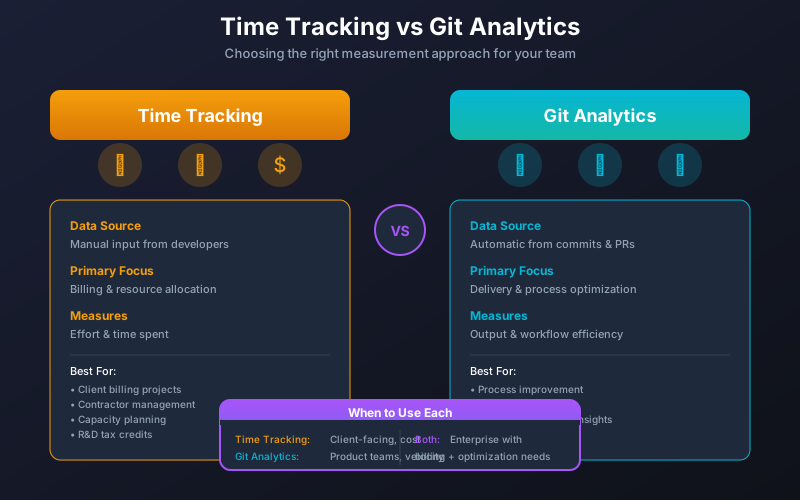
Choose uSeven (7pace) When:
- You bill clients by the hour: Professional services, agencies, and consultancies need accurate time data for invoicing. 7pace excels at this.
- You need R&D tax credits: Tax authorities require time categorization for R&D claims. Time tracking tools provide this documentation.
- You're fully invested in Azure DevOps: If your organization standardized on Azure DevOps and won't migrate, 7pace is the best time tracking option.
- Compliance requires time logs: Some industries and contracts mandate documented time entries. Time tracking is non-negotiable.
- You need payroll integration: If time tracking feeds directly into payroll systems, 7pace's Dynamics 365 integration is valuable.
Choose CodePulse When:
- You use GitHub: CodePulse extracts maximum value from GitHub data. No manual entry, no developer overhead.
- You want cycle time insights: Understanding where PRs get stuck (coding, waiting for review, in review, waiting to merge) requires Git data analysis.
- You're worried about knowledge silos: CodePulse's File Hotspots shows exactly which files have single-contributor ownership.
- You want to recognize diverse contributions: Beyond commit counts, 15 award categories celebrate reviewers, mentors, and consistent contributors.
- You need executive-level metrics: Board-ready health grades (A-F) communicate engineering performance without spreadsheet overload.
- You believe in measuring outcomes over inputs: Cycle time and throughput tell you how effectively you deliver, not how many hours were logged.
"A team that logs 40 hours per week but ships nothing has a velocity problem, not a time tracking problem. The hours aren't the issue - the pipeline is."
// How to See This in CodePulse
Navigate to Dashboard to see cycle time broken into four distinct phases:
- Coding time: First commit to PR creation
- Waiting for review: PR created to first review
- In review: First review to approval
- Merge delay: Approval to merge
This tells you more about engineering velocity than any timesheet ever could. Then explore Review Network to see collaboration patterns and identify review bottlenecks.
Pricing and Value Comparison
When comparing costs, consider what you're actually buying:
| Factor | uSeven (7pace) | CodePulse |
|---|---|---|
| Starting price | $6/user/month | Free tier available |
| Team pricing | $10-15/user/month | See pricing |
| Hidden cost | Developer time spent logging | None (passive collection) |
| ROI model | Accurate billing, tax credits | Faster delivery, reduced bottlenecks |
| Value realization | Immediate (billing data) | 30 days (trend data) |
The real cost of time tracking isn't the subscription - it's the cognitive overhead on developers. If a 50-person team spends 5 minutes per day on time entry, that's 4+ hours of engineering time daily. Whether that's worth it depends entirely on what you need the data for.
Making the Switch (If Applicable)
If you're a GitHub-native team that's been using time tracking and want to switch to automated engineering analytics:
- Connect GitHub (5 minutes): Single OAuth flow to authorize CodePulse access to your organization.
- Wait for sync (30-60 minutes): Historical PR data from the last 6 months processes automatically.
- Establish baseline (1-2 weeks): Let data accumulate to see meaningful trends and patterns.
- Identify first improvement: Look for the longest cycle time phase - that's your first optimization target.
- Consider running parallel: If time tracking serves compliance needs, you may need both tools for different purposes.
What You'll Lose
- Billable hours tracking (if you need it for clients)
- R&D time categorization (if you need it for tax credits)
- Timesheet data for payroll integration
- Azure DevOps native integration
What You'll Gain
- Zero developer overhead for time entry
- Automated cycle time analysis from Git data
- Review network visualization for collaboration insights
- File hotspot detection for knowledge silo risks
- Executive-ready health grades without manual reporting
Frequently Asked Questions
Yes, but only if you use both Azure DevOps and GitHub. 7pace tracks time in Azure DevOps; CodePulse analyzes Git activity in GitHub. If you're a hybrid shop, both could provide value. If you're GitHub-only, 7pace doesn't help.
Conclusion
uSeven (7pace) and CodePulse aren't really competitors - they're different tools for different problems:
- Use 7pace if you need time tracking for billing, compliance, or R&D tax credits in an Azure DevOps environment.
- Use CodePulse if you want automated engineering analytics from GitHub data without developer overhead.
- Use both if you have hybrid requirements across platforms.
The best tool is the one that solves your actual problem. If you're looking for a 7pace alternative because you want engineering insights without manual time tracking, and you're on GitHub, start a free CodePulse trial and see if it answers the questions you're actually asking.
For more context on choosing engineering analytics tools, see our Engineering Analytics Tools Comparison, or compare Swarmia vs CodePulse for a closer head-to-head with another GitHub-focused tool.

Evaluate CodePulse against your own delivery history
A comparison table only goes so far. Connect read-only GitHub in about five minutes and judge the output on your repositories, at one flat price, with no per-seat math.
Read-only GitHub · Your code stays yours · Team-level by default · No credit card
See These Features in Action
Board-ready engineering performance in a single page.
Track all four DORA metrics and benchmark against industry standards.
Related Guides
Jellyfish vs LinearB vs Swarmia: Full 2026 Comparison
Compare Jellyfish, LinearB, Swarmia, Allstacks, Haystack and more engineering analytics tools. Features, pricing, cycle time benchmarks, and integrations.
Hatica Alternative: Engineering Analytics Without the Complexity
Compare Hatica vs CodePulse for engineering analytics. Understand the trade-offs between integration breadth and GitHub-native simplicity.
Swarmia Alternatives: Cheaper, Deeper Analytics 2026
A Swarmia alternative worth considering: where Swarmia falls short on customization and per-seat pricing, and which cheaper, GitHub-native tools fit better.
GitPrime Alternative: 3 Owners in 6 Years, Time to Move On
GitPrime became Pluralsight Flow, then was sold to Appfire. Three owners, stagnant development, and a history of stack ranking. Find a modern replacement.