
Find quality and ownership risk before it becomes an incident
Preview how CodePulse combines review depth, risky changes, hotspots, and knowledge concentration without turning activity into individual scores.
Read-only GitHub · Your code stays yours · Team-level by default · No credit card
Every team has them: branches created months ago, sitting untouched, accumulating merge conflicts like interest on a forgotten credit card. A stale branch isn't just clutter - it's a merge conflict waiting to happen, a piece of abandoned work obscuring your actual progress, and often a symptom of deeper workflow problems. This guide helps you identify, categorize, and clean up branches before they become expensive technical debt.
"A repository with 500 branches isn't well-organized - it's a graveyard of good intentions."
Why Stale Branches Are Technical Debt
Branches age silently. Unlike code quality issues that surface during reviews or bugs that trigger alerts, stale branches accumulate without any warning system. By the time you notice them, the damage is done.
The Hidden Costs of Branch Sprawl
- Merge conflict risk: Every day a branch sits unmerged, it drifts further from main. A branch that was trivial to merge last week might require hours of conflict resolution next month.
- Context loss: After 30 days, even the author forgets the nuances. After 90 days, the original requirements may have changed entirely.
- CI/CD resource drain: Stale branches still trigger builds when rebased, consuming compute resources for code that may never ship.
- False progress signals: A repository with 200 active branches looks busy, but if 150 are stale, you have 150 pieces of abandoned work masquerading as progress.
- Cognitive overhead: Developers scanning branch lists waste time filtering through dead branches to find active work.
Quantifying the Problem
The merge conflict cost compounds exponentially. A branch that's 7 days old might have 2-3 trivial conflicts. At 30 days, expect 5-10 moderate conflicts. At 90 days, you're often looking at a partial rewrite because the underlying code has changed so significantly.
| Branch Age | Typical Conflict Count | Resolution Time | Risk Level |
|---|---|---|---|
| <7 days | 0-2 trivial | 5-15 minutes | Low |
| 7-30 days | 3-8 moderate | 30-60 minutes | Medium |
| 30-90 days | 10-25 significant | 2-4 hours | High |
| >90 days | 25+ severe | Half-day to full rewrite | Critical |
🔥 Our Take
A 90-day-old branch isn't a branch anymore - it's a historical artifact. If the work was important, it would have been merged. If it wasn't important enough to merge, it shouldn't be important enough to keep.
The sunk cost fallacy keeps teams clinging to stale branches. "We put 3 weeks into this!" But those 3 weeks are gone regardless. The only question is whether you'll spend another week dealing with merge conflicts for code that may never ship.
The Branch Lifecycle: From Fresh to Fossilized
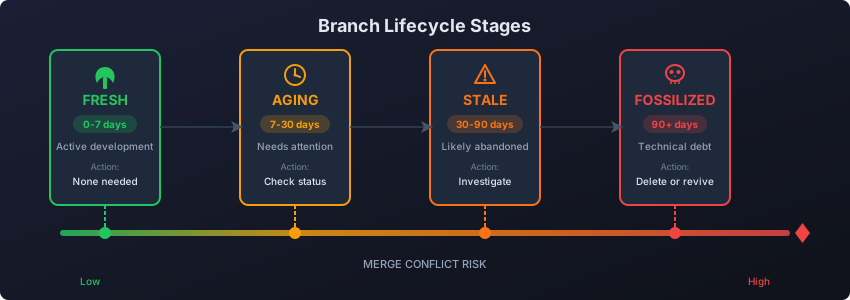
Understanding where each branch sits in its lifecycle helps you make informed decisions about what to keep, what to merge urgently, and what to delete.
Branch Age Thresholds
BRANCH LIFECYCLE STAGES
═══════════════════════════════════════════════════════════════════

FRESH (0-7 days)
├── Status: Active development expected
├── Action: None needed - normal workflow
├── Merge difficulty: Trivial
└── Context: Author fully remembers intent

AGING (7-30 days)
├── Status: Should be near completion or needs attention
├── Action: Check in with author, prioritize merge/close
├── Merge difficulty: Minor conflicts likely
└── Context: Author remembers most details

STALE (30-90 days)
├── Status: Likely abandoned or blocked
├── Action: Decide: fast-track merge, close, or document why kept
├── Merge difficulty: Significant rebase work required
└── Context: Author may need to re-learn the code

FOSSILIZED (90+ days)
├── Status: Technical debt - actively harmful
├── Action: Archive or delete - do not attempt merge without review
├── Merge difficulty: Partial or full rewrite often easier
└── Context: Original requirements may no longer apply

═══════════════════════════════════════════════════════════════════
Why Branches Stagnate
Before deleting branches, understand why they stalled. The pattern reveals workflow problems:
| Pattern | Common Cause | Fix |
|---|---|---|
| No PR created | Work started but never completed | Smaller scope, clearer requirements |
| PR open but unreviewed | Review bottleneck | Review load balancing, PR SLAs |
| PR with requested changes | Author moved to other priorities | Explicit ownership handoff process |
| Blocked by dependencies | Waiting on other teams/PRs | Better dependency tracking |
| Experimental/spike | Exploratory work, not meant to merge | Naming conventions, dedicated spike repos |
"Every stale branch has a story. Most of those stories are about unclear requirements, review bottlenecks, or shifting priorities - not lazy developers."
Identifying Stale vs Intentionally Long-Lived Branches
Not every old branch is a problem. Some branches are intentionally long-lived. The key is distinguishing legitimate long-lived branches from accidentally abandoned ones.
Legitimate Long-Lived Branches
- Release branches:
release/v2.4,release-2024-q1- maintained for hotfixes to shipped versions - Environment branches:
staging,production- deployment targets with continuous updates - Feature flags:
feature/new-checkout-behind-flag- large features deployed incrementally via flags - Compliance branches:
audit/soc2-2024- preserved for regulatory requirements
Naming Conventions That Signal Intent
A good naming convention makes branch status obvious at a glance:
RECOMMENDED BRANCH PREFIXES
═══════════════════════════════════════════════════════════════════

SHORT-LIVED (expect merge within days):
  feature/    - New functionality
  fix/        - Bug fixes
  hotfix/     - Urgent production fixes
  chore/      - Maintenance, deps, cleanup

LONG-LIVED (intentionally preserved):
  release/    - Version release branches
  env/        - Environment-specific branches
  experiment/ - Exploratory work (may never merge)

QUESTIONABLE (investigate if >30 days old):
  wip/        - Work in progress (should resolve quickly)
  spike/      - Research spikes (should convert to docs or merge)
  temp/       - Temporary branches (should be deleted soon)

═══════════════════════════════════════════════════════════════════
Branch Age Report Script
Generate a quick aging report for your repository:
#!/bin/bash
# Branch Aging Report - Run from repo root

echo "=== BRANCH AGING REPORT ==="
echo "Repository: $(basename $(pwd))"
echo "Date: $(date +%Y-%m-%d)"
echo ""

# Get current date in seconds since epoch
now=$(date +%s)

# Define thresholds in seconds
fresh_threshold=$((7 * 24 * 60 * 60))      # 7 days
aging_threshold=$((30 * 24 * 60 * 60))     # 30 days
stale_threshold=$((90 * 24 * 60 * 60))     # 90 days

fresh=0; aging=0; stale=0; fossilized=0

for branch in $(git for-each-ref --format='%(refname:short)' refs/heads/); do
  # Skip main/master/develop
  [[ "$branch" =~ ^(main|master|develop)$ ]] && continue

  last_commit=$(git log -1 --format=%ct "$branch" 2>/dev/null)
  [ -z "$last_commit" ] && continue

  age=$((now - last_commit))
  days=$((age / 86400))

  if [ $age -lt $fresh_threshold ]; then
    ((fresh++))
  elif [ $age -lt $aging_threshold ]; then
    ((aging++))
    echo "[AGING: ${days}d] $branch"
  elif [ $age -lt $stale_threshold ]; then
    ((stale++))
    echo "[STALE: ${days}d] $branch"
  else
    ((fossilized++))
    echo "[FOSSILIZED: ${days}d] $branch"
  fi
done

echo ""
echo "=== SUMMARY ==="
echo "Fresh (<7d):      $fresh"
echo "Aging (7-30d):    $aging"
echo "Stale (30-90d):   $stale"
echo "Fossilized (90d+): $fossilized"
echo "Total non-main: $((fresh + aging + stale + fossilized))"Branch Hygiene Policies That Scale
Individual cleanup is reactive. Policies make cleanup automatic and consistent across the organization.
Policy Template: Startup/Small Team (5-20 engineers)
| Policy | Setting | Rationale |
|---|---|---|
| Auto-delete merged branches | Enabled | No reason to keep after merge |
| Stale branch warning | 14 days | Fast-moving teams should merge frequently |
| Auto-archive threshold | 30 days | Aggressive cleanup prevents accumulation |
| Protected branches | main, staging | Minimal long-lived branches |
| Naming enforcement | Optional | Team is small enough for ad-hoc coordination |
Policy Template: Growth Stage (20-100 engineers)
| Policy | Setting | Rationale |
|---|---|---|
| Auto-delete merged branches | Enabled | Essential at scale |
| Stale branch warning | 21 days | Slightly longer for cross-team dependencies |
| Auto-archive threshold | 60 days | Balance between cleanup and flexibility |
| Protected branches | main, develop, release/* | Release branches preserved for hotfixes |
| Naming enforcement | Required prefixes | Consistency across multiple teams |
Policy Template: Enterprise (100+ engineers)
| Policy | Setting | Rationale |
|---|---|---|
| Auto-delete merged branches | Enabled with audit log | Compliance requires tracking |
| Stale branch warning | 30 days | Longer cycles, more dependencies |
| Auto-archive threshold | 90 days (with approval override) | Large features may legitimately take longer |
| Protected branches | main, develop, release/*, env/* | Multiple environments and release trains |
| Naming enforcement | CI/CD gated | Automated enforcement prevents drift |
| Ownership assignment | Required CODEOWNERS | Clear accountability for cleanup |
📊How to See This in CodePulse
While CodePulse doesn't directly track branch age, PR data reveals branch patterns:
- Repositories → Long-open PRs indicate branches that aren't merging
- File Hotspots → High churn in specific files often correlates with branch conflicts
- Use Cycle Time metrics to spot work that's stuck in "coding" phase too long
- PRs with extended "Waiting for Review" time often indicate blocked branches
Automating Branch Cleanup Safely
Manual cleanup doesn't scale. Automation does - but it needs guardrails to prevent accidentally deleting important work.
GitHub Native Options
GitHub provides built-in branch management that requires zero additional tooling:
- Auto-delete head branches: Repository Settings → General → "Automatically delete head branches" after PR merge
- Branch protection rules: Prevent deletion of main/develop/release branches
- Stale branch detection: GitHub shows "stale" label on branches with no recent activity in the branch listing
Safe Automation Script
This script identifies candidates for deletion but requires confirmation. Never blindly delete branches.
#!/bin/bash
# Safe Branch Cleanup Script
# Identifies stale branches, requires confirmation before deletion

THRESHOLD_DAYS=90
DRY_RUN=true  # Set to false to enable actual deletion

echo "=== SAFE BRANCH CLEANUP ==="
echo "Threshold: $THRESHOLD_DAYS days"
echo "Mode: $([ "$DRY_RUN" = true ] && echo "DRY RUN" || echo "LIVE")"
echo ""

# Protected patterns - customize for your workflow
PROTECTED_PATTERNS="^(main|master|develop|staging|production|release/|env/)"

now=$(date +%s)
threshold_seconds=$((THRESHOLD_DAYS * 24 * 60 * 60))
candidates=()

for branch in $(git for-each-ref --format='%(refname:short)' refs/heads/); do
  # Skip protected branches
  if [[ "$branch" =~ $PROTECTED_PATTERNS ]]; then
    continue
  fi

  last_commit=$(git log -1 --format=%ct "$branch" 2>/dev/null)
  [ -z "$last_commit" ] && continue

  age=$((now - last_commit))

  if [ $age -gt $threshold_seconds ]; then
    days=$((age / 86400))
    author=$(git log -1 --format='%an' "$branch")
    candidates+=("$branch|$days|$author")
  fi
done

if [ ${#candidates[@]} -eq 0 ]; then
  echo "No branches older than $THRESHOLD_DAYS days found."
  exit 0
fi

echo "Found ${#candidates[@]} candidates for cleanup:"
echo ""
printf "%-40s %-10s %s\n" "BRANCH" "AGE" "AUTHOR"
printf "%-40s %-10s %s\n" "------" "---" "------"

for candidate in "${candidates[@]}"; do
  IFS='|' read -r branch days author <<< "$candidate"
  printf "%-40s %-10s %s\n" "$branch" "${days}d" "$author"
done

echo ""
if [ "$DRY_RUN" = true ]; then
  echo "DRY RUN complete. Set DRY_RUN=false to enable deletion."
else
  read -p "Delete these branches? (yes/no): " confirm
  if [ "$confirm" = "yes" ]; then
    for candidate in "${candidates[@]}"; do
      IFS='|' read -r branch _ _ <<< "$candidate"
      git branch -D "$branch"
      echo "Deleted: $branch"
    done
  else
    echo "Cleanup cancelled."
  fi
fi
CI/CD Integration
For automated cleanup in CI/CD pipelines:
# GitHub Actions - Weekly Branch Cleanup
name: Stale Branch Cleanup

on:
  schedule:
    - cron: '0 9 * * 1'  # Monday 9 AM UTC
  workflow_dispatch:  # Manual trigger option

jobs:
  cleanup:
    runs-on: ubuntu-latest
    steps:
      - uses: actions/checkout@v4
        with:
          fetch-depth: 0

      - name: Find and report stale branches
        run: |
          echo "## Stale Branch Report" >> $GITHUB_STEP_SUMMARY
          echo "" >> $GITHUB_STEP_SUMMARY

          # Find branches older than 90 days
          git for-each-ref --format='%(refname:short) %(committerdate:relative)' \
            refs/remotes/origin/ | \
            grep -v -E '(HEAD|main|master|develop|release)' | \
            while read branch date; do
              echo "- $branch (last commit: $date)" >> $GITHUB_STEP_SUMMARY
            done

      - name: Create cleanup issue
        uses: actions/github-script@v7
        with:
          script: |
            // Create an issue for team to review stale branches
            // Instead of auto-deleting
"Automate detection, not deletion. The best branch cleanup automation creates visibility and nudges - not silent deletions that might destroy someone's work."
Best Practices for Safe Automation
- Start with reporting: Run cleanup scripts in dry-run mode for 2-4 weeks before enabling deletion
- Notify before deleting: Send Slack/email to branch author before deletion with a grace period
- Archive, don't delete: Consider creating archive tags before branch deletion for recovery
- Exclude recent activity: Never delete branches with commits in the last week, regardless of total age
- Respect PR status: Never delete branches with open PRs - close the PR first
Frequently Asked Questions
Large features shouldn't live on a single branch for months. Use feature flags to merge incremental work to main behind a flag. This keeps branches short-lived while allowing long development cycles. If you must have a long-lived feature branch, document why in the repository README and exclude it from automated cleanup.

See which files and owners carry your real risk
Connect GitHub and get your churn hotspots, single-owner modules, and review-depth signals ranked by exposure. No repository cloning, no file contents read.
Read-only GitHub · Your code stays yours · Team-level by default · No credit card
See These Features in Action
Break down cycle time into coding, waiting, review, and merge phases.
Flag large PRs, single-owner changes, and untested modifications.
Related Guides
The 'Bus Factor' File That Could Kill Your Project
Use the Bus Factor Risk Matrix to identify where knowledge concentration creates hidden vulnerabilities before someone leaves.
High Code Churn Isn't Bad. Unless You See This Pattern
Learn what code churn rate reveals about your codebase health, how to distinguish healthy refactoring from problematic rework, and when to take action.
The Monorepo Metrics Trap (And How to Escape It)
How to aggregate, compare, and analyze engineering metrics across multiple repositories or within a monorepo structure.
Continuous Testing in DevOps: Metrics That Actually Matter
Continuous testing is more than running tests in CI. This guide covers testing metrics for DevOps, the testing pyramid, how to handle flaky tests, and test automation strategy.