
Turn this metric into a baseline for your team
Preview a system-level engineering health report, then connect GitHub when you are ready to compare this metric with your own delivery history.
Read-only GitHub · Your code stays yours · Team-level by default · No credit card
Most CTO dashboards are designed by vendors who've never sat in a board meeting. They're packed with operational metrics that matter to engineering managers but leave executives asking the same question they started with: "Is engineering healthy?" This guide shows you how to build a CTO dashboard that answers the questions you actually face - from board presentations to daily operational decisions.
"A CTO's job is translation: converting technical complexity into strategic clarity. Your dashboard should do the same - one view for the board, another for your staff meetings."
The challenge for CTOs is unique. Unlike VPs of Engineering who can focus on delivery metrics, or Engineering Managers who track team-level performance, CTOs must maintain visibility across the entire technology function while presenting a coherent narrative to non-technical stakeholders. That requires different views for different contexts.
What CTOs Actually Need to See (Not What Vendors Sell)
Walk through any CTO dashboard demo and you'll see the same pitch: DORA metrics, PR velocity, deployment frequency, code coverage. These are fine metrics. But they're operational metrics - they tell you how the machine is running, not whether it's pointed in the right direction.
CTOs operate at the intersection of technology and business. The questions they face from boards, investors, and CEOs are fundamentally different from what engineering dashboards typically answer:
| What Boards Ask | What Dashboards Show | What CTOs Actually Need |
|---|---|---|
| "Can engineering support our growth plans?" | Current headcount and velocity | Capacity forecasting vs roadmap demands |
| "Where are the technology risks?" | Bug counts and incident rates | Architecture debt, single points of failure, scale limits |
| "Are we investing in the right things?" | Feature completion rates | Investment allocation: features vs maintenance vs platform |
| "How do we compare to competitors?" | Raw DORA metrics | Contextual benchmarks against similar companies |
| "Is the engineering team healthy?" | Attrition numbers | Leading indicators: burnout signals, bottleneck patterns, morale |
Our Take
The CTO dashboard market is dominated by tools built for engineering managers that slapped "executive view" on top. Real executive intelligence requires understanding that CTOs don't manage PRs - they manage portfolios, risks, and strategic alignment. If your dashboard can't answer "should we build or buy?" it's not a CTO dashboard.
The 5-Layer CTO Dashboard Architecture
Effective CTO dashboards are organized in layers, from strategic to operational. Each layer serves a different purpose and audience. The key insight: CTOs need to move fluidly between layers depending on context.
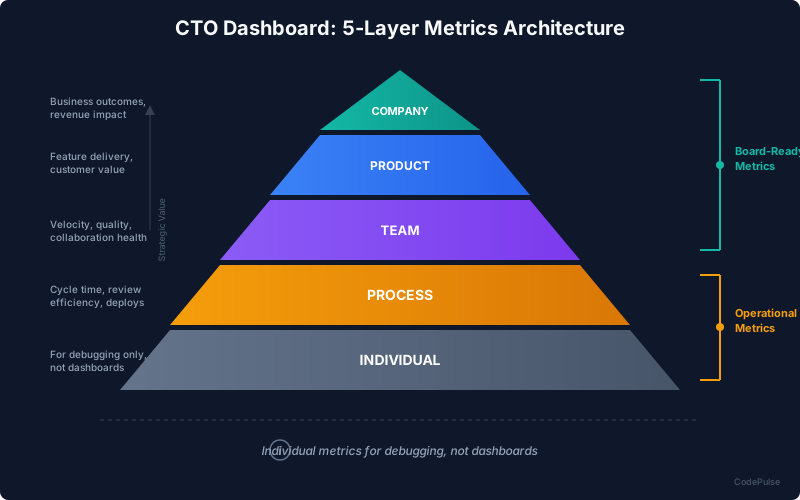
THE 5-LAYER CTO DASHBOARD ARCHITECTURE
═══════════════════════════════════════════════════════════════

┌─────────────────────────────────────────────────────────────┐
│  LAYER 1: COMPANY                                           │
│  Audience: Board, CEO, Investors                            │
│  Cadence: Quarterly                                         │
│  Questions: ROI, risk, strategic alignment                  │
├─────────────────────────────────────────────────────────────┤
│  • Technology ROI (cost per capability)                     │
│  • Strategic Risk Dashboard (tech debt, scale limits)       │
│  • Competitive Position (feature parity, time-to-market)    │
│  • Investment Allocation (build vs buy vs maintain)         │
└─────────────────────────────────────────────────────────────┘
                              │
                              ▼
┌─────────────────────────────────────────────────────────────┐
│  LAYER 2: PRODUCT                                           │
│  Audience: Product Leadership, CPO                          │
│  Cadence: Monthly                                           │
│  Questions: Delivery, roadmap confidence, dependencies      │
├─────────────────────────────────────────────────────────────┤
│  • Roadmap Delivery Score (committed vs delivered)          │
│  • Cross-Team Dependencies (blockers, waiting time)         │
│  • Feature Lead Time (idea to production)                   │
│  • Technical Debt Impact on Roadmap                         │
└─────────────────────────────────────────────────────────────┘
                              │
                              ▼
┌─────────────────────────────────────────────────────────────┐
│  LAYER 3: TEAM                                              │
│  Audience: VP Engineering, Directors                        │
│  Cadence: Weekly                                            │
│  Questions: Efficiency, health, bottlenecks                 │
├─────────────────────────────────────────────────────────────┤
│  • Team Velocity Trends                                     │
│  • Review Bottleneck Analysis                               │
│  • Capacity Utilization                                     │
│  • Knowledge Distribution (silos, bus factor)               │
└─────────────────────────────────────────────────────────────┘
                              │
                              ▼
┌─────────────────────────────────────────────────────────────┐
│  LAYER 4: PROCESS                                           │
│  Audience: Engineering Managers, Tech Leads                 │
│  Cadence: Daily/Weekly                                      │
│  Questions: Workflow efficiency, quality gates              │
├─────────────────────────────────────────────────────────────┤
│  • Cycle Time Breakdown (coding, review, merge)             │
│  • PR Size Distribution                                     │
│  • Review Coverage & Quality                                │
│  • CI/CD Pipeline Health                                    │
└─────────────────────────────────────────────────────────────┘
                              │
                              ▼
┌─────────────────────────────────────────────────────────────┐
│  LAYER 5: INDIVIDUAL                                        │
│  Audience: Managers (1:1s only), Self-reflection            │
│  Cadence: Monthly (private)                                 │
│  Questions: Growth, blockers, patterns                      │
├─────────────────────────────────────────────────────────────┤
│  • Individual Contribution Patterns (not rankings!)         │
│  • Collaboration Networks (who works with whom)             │
│  • Skill Development Areas                                  │
│  • Workload Balance Signals                                 │
└─────────────────────────────────────────────────────────────┘

KEY PRINCIPLE: CTOs should spend 80% of their time in Layers 1-3.
Layers 4-5 are for drilling down when problems are identified,
not for daily monitoring.
"The worst CTO dashboards have no layers - they dump PR metrics next to board-level KPIs and expect executives to sort it out. The best ones let you zoom in and out seamlessly."
For deeper coverage of team-level metrics (Layer 3), see our VP of Engineering Metrics Guide. For the operational details (Layers 4-5), see our Engineering Metrics Dashboard Guide.
Strategic vs Operational Metrics
The fundamental mistake most CTO dashboards make is mixing strategic and operational metrics on the same screen. This creates cognitive overload and buries the signal in noise. Let's clearly separate what belongs where.
Strategic Metrics (Board-Ready)
These metrics answer the question: "Is technology a strategic asset or a liability?" They're designed for quarterly board presentations and investor conversations.
| Metric | What It Measures | Why Boards Care |
|---|---|---|
| Technology ROI | Revenue enabled per engineering dollar | Justifies the largest operating expense |
| Delivery Predictability | % of commitments delivered on time | Builds trust in roadmap promises |
| Strategic Risk Score | Composite of tech debt, scale limits, key-person risk | Surface hidden time bombs before they explode |
| Investment Allocation | % split: Features / Maintenance / Platform / Debt | Ensures balance between building and sustaining |
| Competitive Velocity | Time-to-market vs industry benchmarks | Answers "are we fast enough to win?" |
Operational Metrics (Daily Management)
These metrics answer the question: "Is the engineering machine running efficiently?" They're for your staff meetings and operational reviews - not board presentations.
| Metric | What It Measures | Action Trigger |
|---|---|---|
| Cycle Time | First commit to merge duration | Investigate if trending above 3 days |
| Deployment Frequency | How often code ships to production | Alert if dropping below weekly |
| Change Failure Rate | % of deployments causing incidents | Review process if above 15% |
| Review Wait Time | Hours until first review | Rebalance reviewers if above 24h |
| PR Size Distribution | Lines of code per PR | Coach teams if median above 400 LOC |
Our Take
Never show cycle time to a board member. Not because it's a bad metric - it's great for operational management. But boards don't care how fast PRs merge. They care whether features ship when promised. Translate operational metrics into business outcomes before they reach the boardroom.
Board-Ready Views vs Daily Operations
The same data can tell very different stories depending on how it's presented. Here's how to structure your dashboard for both contexts.
The Board View (Quarterly)
Your board presentation should fit on one slide with backup detail available. Here's the structure:
CTO BOARD SLIDE: ENGINEERING HEALTH
═══════════════════════════════════════════════════════════════

OVERALL GRADE: B+ (UP FROM B)

┌──────────────────────┬──────────────────────┬──────────────────────┐
│  DELIVERY            │  EFFICIENCY          │  RISK                │
│  ████████░░  83%     │  ████████░░  $142K   │  ████████░░  LOW     │
│  Roadmap delivered   │  Cost per feature    │  Strategic risk      │
│  ↑ from 71% Q3       │  ↓ from $168K Q3     │  → stable            │
└──────────────────────┴──────────────────────┴──────────────────────┘

INVESTMENT ALLOCATION:
  New Features:     45% ████████████████████░░░░░░░░░░░░░░░░░░░░░░░░
  Enhancements:     25% ███████████░░░░░░░░░░░░░░░░░░░░░░░░░░░░░░░░░
  Maintenance:      20% █████████░░░░░░░░░░░░░░░░░░░░░░░░░░░░░░░░░░░
  Tech Debt:        10% ████░░░░░░░░░░░░░░░░░░░░░░░░░░░░░░░░░░░░░░░░

KEY WINS THIS QUARTER:
  ✓ Shipped mobile app 2 weeks early
  ✓ Reduced cost per feature by 15%
  ✓ Zero P0 incidents

RISKS TO WATCH:
  ⚠ Key person risk: Payment system (mitigation in progress)
  ⚠ Scale limits: Database approaching threshold Q2

NEXT QUARTER FOCUS:
  • Complete payment system knowledge transfer
  • Database migration for scale
  • Hire 2 senior engineers for mobile team
The Daily Operations View
Your daily dashboard should surface anomalies and trends, not static numbers. Here's what you should see every morning:
CTO DAILY DASHBOARD
═══════════════════════════════════════════════════════════════

ATTENTION REQUIRED (anomalies detected)
────────────────────────────────────────────────────────────────
⚠ Platform Team: Cycle time spiked 140% (3.2d → 7.7d)
    → Root cause: Blocked on legal review for vendor integration
    → Action: Escalate to legal, ETA 2 days

⚠ Mobile Team: 3 PRs waiting >48h for review
    → Root cause: Senior reviewer on PTO
    → Action: Redistribute to backend team temporarily

ALL CLEAR
────────────────────────────────────────────────────────────────
✓ Payments Team: Velocity stable, on track for Q1 milestone
✓ Core API: Cycle time improved 12% this week
✓ Infrastructure: Zero incidents, 99.99% uptime

TRENDS TO WATCH (not urgent, but track)
────────────────────────────────────────────────────────────────
📊 PR size trending up across all teams (+15% MoM)
    → Consider addressing in next engineering all-hands

📊 Review load imbalance growing (top 3 reviewers: 62% of reviews)
    → Schedule review distribution conversation with leads

DEPLOYMENT SUMMARY (last 24h)
────────────────────────────────────────────────────────────────
Deployments: 12
Success rate: 100%
Average lead time: 2.3 hours
Notice the difference: the board view shows grades and trends with business context. The daily view shows exceptions and action items. A CTO shouldn't need to dig through data - anomalies should surface automatically.
Building Your CTO Dashboard in CodePulse
CodePulse provides the building blocks for a complete CTO dashboard architecture. Here's how to configure it for the different layers and contexts we've discussed.
🎯 How to See This in CodePulse
For Board-Level Views (Layer 1-2):
- Executive Summary - Health grades, delivery predictability, investment allocation
- Benchmarks - Compare your metrics against industry standards
- Year in Review - Quarterly and annual trend analysis for board presentations
For Team-Level Views (Layer 3):
- Velocity Rings - Four-dimensional view of team performance
- Review Network - Identify bottlenecks and collaboration patterns
- Team Comparison - Cross-team performance analysis
For Operational Views (Layer 4-5):
- Dashboard - Real-time cycle time, PR activity, and anomaly detection
- File Hotspots - Identify high-risk code areas
- Knowledge Silos - Surface single points of failure
Setting Up Your Views
The key to an effective CTO dashboard is not having more metrics - it's having the right metrics for each context. Here's how to configure CodePulse for different situations:
CTO DASHBOARD CONFIGURATION
═══════════════════════════════════════════════════════════════

BOARD PREPARATION (monthly)
────────────────────────────────────────────────────────────────
1. Navigate to /executive
2. Set time range to "Last Quarter"
3. Export health grade and key metrics
4. Use /benchmarks to pull competitive comparison
5. Generate narrative from /year-in-review

STAFF MEETING (weekly)
────────────────────────────────────────────────────────────────
1. Navigate to /velocity for high-level health check
2. Check /review-network for bottleneck patterns
3. Review /alerts for any triggered thresholds
4. Prepare talking points for underperforming teams

DAILY CHECK-IN (5 minutes)
────────────────────────────────────────────────────────────────
1. /dashboard for anomaly summary
2. Check "What Needs Attention" section
3. Review any new alerts since yesterday
4. Drill into specific teams only if flagged
Common CTO Dashboard Patterns
Pattern 1: The Startup CTO (Seed to Series A)
At this stage, the CTO is often also the lead architect and sometimes an IC. The dashboard should be lightweight and focused on velocity.
- Primary metrics: Ship rate, cycle time, incident count
- Secondary metrics: Code coverage, deployment frequency
- Skip for now: Investment allocation, formal benchmarking
- Board communication: "We shipped X, we're building Y, here's Z risk"
Pattern 2: The Growth CTO (Series B to C)
The engineering team is growing, and the CTO is transitioning from building to leading. The dashboard needs to scale.
- Primary metrics: Delivery predictability, efficiency ratio, team health
- Secondary metrics: Investment allocation, knowledge distribution
- Add now: Benchmarking, formal risk tracking
- Board communication: "Engineering ROI is X, we're in the Y percentile"
Pattern 3: The Enterprise CTO
Multiple product lines, distributed teams, complex stakeholder needs. The dashboard must support delegation.
- Primary metrics: Portfolio health, strategic risk, competitive position
- Secondary metrics: Per-product delivery scores, cross-team dependencies
- Critical: Exception-based alerting, automated reporting
- Board communication: "Technology is a strategic advantage because..."
"The CTO's dashboard should shrink as the company grows. More data isn't more insight. Mature CTOs see fewer metrics with more meaning."
Frequently Asked Questions
Daily for anomalies (5 minutes), weekly for trends (30 minutes), quarterly for strategic review (2-3 hours of preparation). If you're spending more than 30 minutes daily on your dashboard, it's not well-designed - you're doing the dashboard's job instead of having it do yours.
Related Guides
- VP of Engineering Metrics Guide - Deeper coverage of Layers 2-3 metrics
- Engineering Metrics Dashboard Guide - Building effective operational dashboards
- Board-Ready Engineering Metrics - Translating technical metrics for executive audiences
- Engineering Analytics ROI Guide - Justifying investment in engineering intelligence
- KTLO vs Innovation Investment Profile - Balancing maintenance and feature development

Now measure this metric on your own repositories
Connect read-only GitHub in about five minutes and get your baseline, your trend, and the constraint behind it. Your fourteen usable trial days start when the first repository finishes syncing.
Read-only GitHub · Your code stays yours · Team-level by default · No credit card
See These Features in Action
Board-ready engineering performance in a single page.
Track all four DORA metrics and benchmark against industry standards.
Related Guides
VP Engineering Board Metrics: 7 Numbers That Defend Headcount
The 7 metrics VPs of Engineering need for board presentations: delivery predictability, investment allocation, and team health - with the language to present them.
Engineering Metrics Dashboard: The 7 Metrics You Need
Skip vanity metrics. Here are the 7 engineering metrics VPs actually need to track team performance, delivery, and quality.
I Got $2M in Budget With These 5 Engineering Metrics
Learn how to create engineering metrics presentations that resonate with board members, investors, and C-suite executives.
How to Track Developer Productivity Without Creating Surveillance
Build a sustainable tracking system with dashboards, alerts, and review cadences that surfaces the right information at the right time - without drowning your team in data.