
Turn this metric into a baseline for your team
Preview a system-level engineering health report, then connect GitHub when you are ready to compare this metric with your own delivery history.
Read-only GitHub · Your code stays yours · Team-level by default · No credit card
Measuring developer productivity is a snapshot. Tracking it is a system. Most engineering managers get the first part right - they set up dashboards, pick some metrics, maybe even run a benchmark study. Then reality hits: nobody looks at the dashboard after week two, alerts become noise, and the whole initiative dies a quiet death. If you are still choosing what to measure, start with our guide to developer productivity metrics that don't backfire.
This guide is about what comes after the dashboard. It's about building a sustainable tracking system that surfaces the right information at the right time, without drowning your team in data or creating surveillance anxiety.
"A dashboard nobody looks at is worse than no dashboard - it consumed resources and delivered nothing. Tracking systems that work require rhythm, not just tools."
Why Tracking Differs from Measuring
Measurement tells you where you are. Tracking tells you where you're going. The distinction matters because they require fundamentally different approaches.
Measurement Is a Snapshot
- Point-in-time: "Our average PR cycle time last month was 3.2 days"
- Static: The number exists whether anyone looks at it or not
- Retrospective: Answers "what happened?"
- One-time effort: Run a query, generate a report, done
Tracking Is a System
- Continuous: "Our PR cycle time has decreased 15% over 6 weeks"
- Dynamic: Requires active monitoring and interpretation
- Predictive: Answers "where are we heading?"
- Ongoing investment: Requires rhythm, process, and maintenance
🔥 Our Take
Most "tracking" initiatives fail because they're really just measurement with a scheduled report.
Sending a weekly email with metrics isn't tracking - it's spam. Real tracking changes behavior: it surfaces anomalies before they become crises, triggers conversations at the right moments, and builds institutional knowledge about what "normal" looks like for your team. If your metrics aren't changing how people make decisions, you don't have a tracking system - you have expensive wallpaper.
The Three Pillars of Effective Tracking
A working tracking system rests on three pillars:
- Visibility: The right information available at the right time (dashboards, reports)
- Alerting: Proactive notification when attention is needed (without noise)
- Rhythm: Regular cadences for review, reflection, and action
Miss any one of these and your system fails. Dashboards without alerts means problems fester unnoticed. Alerts without rhythm means they get ignored. Rhythm without visibility means discussions lack data.
The Tracking System Architecture
Think of your tracking system as three interconnected layers, each serving a different purpose in your decision-making process.
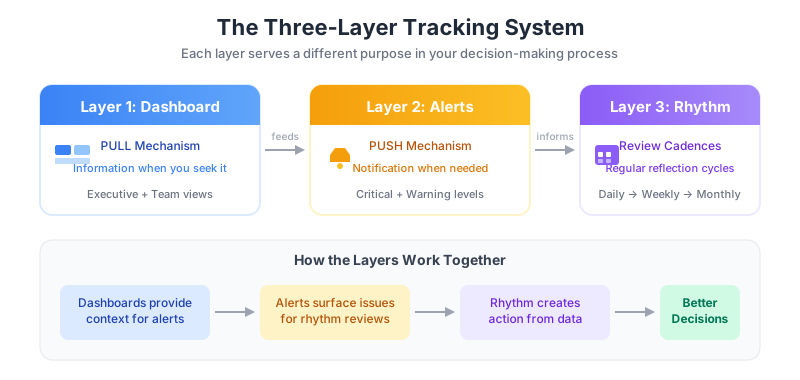
Layer 1: The Dashboard (Always-Available Visibility)
Your dashboard is the "pull" mechanism - information available when someone actively seeks it. The key is making it genuinely useful, not just comprehensive.
| Dashboard Type | Purpose | Who Uses It | Refresh Frequency |
|---|---|---|---|
| Executive Summary | High-level health check | VP/Director | Real-time, viewed weekly |
| Team Health | Process and flow visibility | Engineering Manager | Real-time, viewed daily |
| Individual Trends | Self-reflection and coaching | Developer + EM | Weekly roll-up |
| Alert History | Pattern recognition | EM + Tech Lead | On-demand |
For detailed guidance on building effective dashboards, see our Engineering Metrics Dashboard Guide.
Layer 2: Alerts (Proactive Notification)
Alerts are the "push" mechanism - they come to you when something needs attention. The challenge is finding the balance between too few (missing problems) and too many (alert fatigue).
ALERT CATEGORIES BY URGENCY:

[CRITICAL] - Requires same-day attention
  - Approval bypass rate > 10%
  - Zero deployments in 5+ days
  - CI failure rate > 40%

[WARNING] - Review within 48 hours
  - Cycle time > 2x baseline
  - PR wait time > 24 hours
  - Review coverage < 90%

[INFO] - Informational, no action required
  - Weekly summary of trends
  - Milestone achievements
  - New team member ramp-up progress
For detailed alert configuration patterns, see our Alert Rules Guide and Slack Alerts for Engineering Metrics.
Layer 3: Trend Monitoring (Pattern Recognition)
Neither dashboards nor alerts tell you the full story. Trend monitoring is about tracking patterns over time to answer: "Are we getting better or worse?"
Key trend dimensions to track:
- Week-over-week: Short-term fluctuations and immediate impact of changes
- Month-over-month: Medium-term progress toward goals
- Quarter-over-quarter: Strategic trajectory and seasonal patterns
- Year-over-year: Long-term organizational capability growth
"Trends matter more than absolute numbers. A team at 4-day cycle time improving to 3 days is healthier than a team stuck at 2 days for a year."
What to Track at Each Level
Different organizational levels need different visibility. Tracking the same metrics everywhere creates noise at the top and anxiety at the bottom.
Organization Level (VP/Director)
At this level, you need aggregate health indicators that answer: "Is our engineering organization performing well as a whole?"
| Metric | What It Tells You | Alert When |
|---|---|---|
| Deployment Frequency (org) | Overall delivery velocity | Drops 30%+ from baseline |
| Org Cycle Time (p75) | System-wide flow efficiency | Exceeds 5 days sustained |
| Review Coverage (org) | Quality gate compliance | Falls below 90% |
| Team Health Distribution | How many teams are struggling | More than 2 teams "at risk" |
| Investment Balance | Feature vs maintenance work | Maintenance exceeds 40% |
Team Level (Engineering Manager)
Team-level tracking should answer: "Is my team's process healthy and improving?"
| Metric | What It Tells You | Alert When |
|---|---|---|
| PR Cycle Time (team avg) | How fast work flows through the team | Exceeds 3 days sustained |
| Time to First Review | Review availability and response | Exceeds 8 hours average |
| Review Load Distribution | Whether review burden is shared | Any reviewer handles >30% |
| PRs Open >7 Days | Stuck work and blockers | More than 3 open PRs |
| Knowledge Distribution | Bus factor risk | Critical area with 1 contributor |
Individual Level (For Self-Reflection Only)
🔥 Our Take
Individual metrics should be visible to the individual - and used for coaching conversations, not performance reviews.
The moment you start comparing Alice's cycle time to Bob's, you've created competition instead of collaboration. Individual data is for identifying support needs and spotting blockers, not ranking performance. See our guide on measuring without micromanaging for more on this philosophy.
Individual metrics that support growth (not surveillance):
- Personal cycle time trend: Am I getting faster or slower? (For self-awareness)
- Review turnaround: How quickly do I respond to review requests?
- Work patterns: Am I working sustainable hours? (Burnout prevention)
- Code areas touched: Am I expanding my knowledge or siloed?
Setting Up Alerts Without Creating Anxiety
Alerts are powerful but dangerous. Done wrong, they create a culture of anxiety where every notification feels like a judgment. Done right, they catch problems early and save time.
The Alert Anxiety Problem
Engineers have been conditioned to associate alerts with blame. "Your cycle time is high" often translates to "you're not working fast enough." This is why alert design matters as much as alert selection.
Principles for Non-Threatening Alerts
- Focus on the system, not the person: "Team cycle time exceeded threshold" not "Developer X is slow"
- Provide context: Include what changed and possible reasons
- Suggest actions: "Consider checking for blocked PRs" not just "alert triggered"
- Make them actionable: If there's nothing to do about it, don't alert
- Start loose, tighten gradually: Better to miss some issues than create noise
Alert Message Templates
BAD ALERT:
"Developer @alice has 5 PRs open for more than 3 days"
(Feels like surveillance, implies blame)

GOOD ALERT:
"Team 'Payments' has 5 PRs open >3 days (baseline: 1-2)
Possible causes: Holiday period, external dependency, staffing
Suggested action: Review blocked PRs in standup"
(System-focused, contextual, actionable)

---

BAD ALERT:
"Low deployment frequency this week"
(Vague, no context, no guidance)

GOOD ALERT:
"Deployment frequency dropped 40% WoW (8 → 5 deploys)
This coincides with: Sprint planning week, new CI pipeline
If unexpected: Check for blocked deployments or CI issues"
(Specific, contextual, provides possible explanations)
Alert Routing: Who Sees What
| Alert Type | Primary Recipient | Why |
|---|---|---|
| Process degradation (cycle time, coverage) | Engineering Manager | EM owns team process health |
| Individual patterns (burnout signals) | Individual + EM (opt-in) | Private by default, shared if wanted |
| Cross-team patterns | VP/Director | Org-level visibility needed |
| Critical (CI failure, no deploys) | Team channel + EM | Shared responsibility, no blame |
Weekly/Monthly Review Cadences
Tracking without rhythm degrades to measurement. You need scheduled moments to actually look at the data, discuss what it means, and decide on actions.
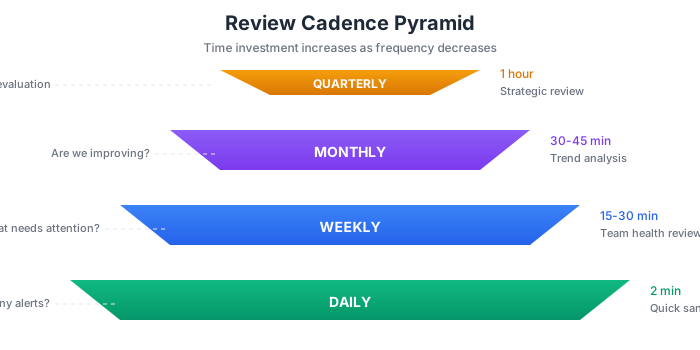
Daily: Quick Sanity Check (2 minutes)
Not a formal meeting - just a quick glance at key indicators. Best done during morning coffee or before standup.
- Any critical alerts overnight?
- PRs stuck longer than expected?
- CI/CD pipeline healthy?
Spotting "stuck longer than expected" doesn't require watching anyone's activity - review wait time and queue depth surface it from PR timestamps alone. See how to find team bottlenecks without surveillance for the full approach.
Weekly: Team Health Review (15-30 minutes)
A dedicated time to review team-level trends. Can be part of existing team rituals or a standalone meeting.
WEEKLY REVIEW AGENDA:

1. Dashboard Review (5 min)
   - Cycle time trend: improving/stable/degrading?
   - Review coverage: holding or slipping?
   - Any unusual patterns?

2. Alert Review (5 min)
   - What alerts fired this week?
   - Were they actionable? (If not, tune them)
   - Any alerts we should have gotten but didn't?

3. Blockers & Bottlenecks (10 min)
   - What's causing delays?
   - Who needs help?
   - What process tweaks should we try?

4. Actions (5 min)
   - One thing to try this week
   - Owner and check-in date
Monthly: Trend Analysis (30-45 minutes)
Step back from weekly noise to see broader patterns. This is where you evaluate whether initiatives are working.
- Month-over-month trend for key metrics
- Progress on improvement goals
- Alert tuning: What's too noisy? What's too quiet?
- Comparison with baseline or target
- Are we measuring the right things?
Quarterly: Strategic Review (1 hour)
Evaluate the tracking system itself. Is it still serving its purpose?
- Are these metrics still relevant to our goals?
- What have we learned from tracking?
- Should we add, remove, or change any metrics?
- How is the team feeling about the tracking system?
- What's our improvement target for next quarter?
"If your metrics review meeting is the first time anyone's looked at the dashboard all week, you have a visibility problem, not a metrics problem."
Common Tracking Pitfalls to Avoid
1. Tracking Everything Because You Can
Problem: More metrics = more noise. When everything is highlighted, nothing is.
Solution: Start with 3-5 core metrics. Add more only when you have a specific question they answer. Regularly prune metrics nobody uses.
2. Setting Thresholds Based on Aspirations, Not Baselines
Problem: Alerts that fire constantly because thresholds are based on where you want to be, not where you are.
Solution: Measure your baseline for 2-4 weeks before setting any thresholds. Set alerts for significant deviation from baseline, not for "industry best practice."
3. Comparing Teams Without Context
Problem: "Team A's cycle time is 2 days, Team B's is 4 days. Team B is underperforming."
Solution: Team comparisons without context are meaningless. Team B might be doing complex infrastructure work with external dependencies. Compare teams to their own baselines, not to each other.
4. Ignoring Seasonality
Problem: Alerts fire every December because holiday weeks look different from normal weeks.
Solution: Document your seasonality patterns. Use year-over-year comparisons for seasonal periods. Consider muting non-critical alerts during known slow periods.
5. No Feedback Loop on Alert Quality
Problem: Alerts that fired but weren't actionable keep firing. Alert fatigue sets in.
Solution: Track alert outcomes. Was it investigated? Was action taken? Monthly, review alerts that never led to action and tune or remove them.
6. Using Tracking for Surveillance
Problem: Individual metrics become ammunition for difficult conversations rather than tools for support.
Solution: Read our comprehensive guide on measuring team performance without micromanaging. The short version: focus on team metrics, use individual data for coaching not evaluation, and be transparent about what you track and why.
Building Your Tracking System: A Practical Checklist
Ready to implement? Here's your step-by-step plan:
Week 1: Establish Baseline
- Identify 3-5 core metrics aligned to your goals
- Set up basic dashboard visibility
- Run for a week without any alerts to establish baseline
- Document what "normal" looks like for your team
Week 2: Configure Alerts
- Set thresholds based on observed baseline (not aspirations)
- Start with loose thresholds - you can tighten later
- Configure routing: who gets what alerts
- Write actionable alert messages with context
Week 3: Establish Rhythm
- Schedule weekly team review (15-30 minutes)
- Define what gets reviewed and by whom
- Create simple agenda template
- Assign ownership for alert response
Week 4+: Iterate
- Review which alerts were actionable
- Tune thresholds based on experience
- Add or remove metrics based on utility
- Gather team feedback on the system
For related guidance, see:
- Engineering Metrics Dashboard Guide - building dashboards executives actually use
- Alert Rules Guide - configuring effective alerts
- Slack Alerts for Engineering Metrics - integrating alerts into your workflow
- Measuring Without Micromanaging - maintaining trust while tracking

Now measure this metric on your own repositories
Connect read-only GitHub in about five minutes and get your baseline, your trend, and the constraint behind it. Your fourteen usable trial days start when the first repository finishes syncing.
Read-only GitHub · Your code stays yours · Team-level by default · No credit card
See These Features in Action
Compare contribution patterns for coaching, not surveillance.
Board-ready engineering performance in a single page.
Related Guides
Engineering Metrics Dashboard: The 7 Metrics You Need
Skip vanity metrics. Here are the 7 engineering metrics VPs actually need to track team performance, delivery, and quality.
The Alert Rules That Actually Get Action (Not Ignored)
A practical guide to configuring engineering metric alerts that catch problems early without causing alert fatigue.
The Slack Alert That Catches Stuck PRs Before Standup
How to configure alerts for stuck PRs, review SLA breaches, and key metric changes to stay informed without constant dashboard checking.
Engineering Metrics That Won't Get You Reported to HR
An opinionated guide to implementing engineering metrics that build trust. Includes the Visibility Bias Framework, practical do/don't guidance, and a 30-day action plan.
Non-Invasive Engineering Analytics: Measure Without Surveillance
Build engineering visibility without destroying trust. Learn what non-invasive analytics means, which data sources respect privacy, and the CodePulse philosophy.