
PR Pulse: GitHub PR Age & Complexity Extension
Free Chrome extension showing PR age badges and complexity scores on GitHub. Color-coded indicators help spot stale PRs instantly. Zero data collection, fully customizable.
PR Pulse is a free Chrome extension that paints age and complexity badges straight onto your GitHub pull request pages. It is built for reviewers, team leads, and anyone who opens the PR list and wants to know, without clicking into each one, which requests are fresh and which have been waiting too long.
The problem it solves is simple. GitHub shows you a list of open PRs, but it does not tell you which ones are quietly going stale or which ones are big enough to need a careful read. You end up scanning timestamps and guessing. PR Pulse turns that guesswork into a color you can read in half a second.
It runs entirely in your browser. There is no account to create, no data leaves your machine, and the badges show up automatically the moment you land on a GitHub repository you have access to.
Spot Stale PRs Instantly on GitHub
PR Pulse adds color-coded age badges and complexity scores directly to GitHub pull request pages. See which PRs need attention at a glance.
Add to Chrome - It's FreeSee It In Action
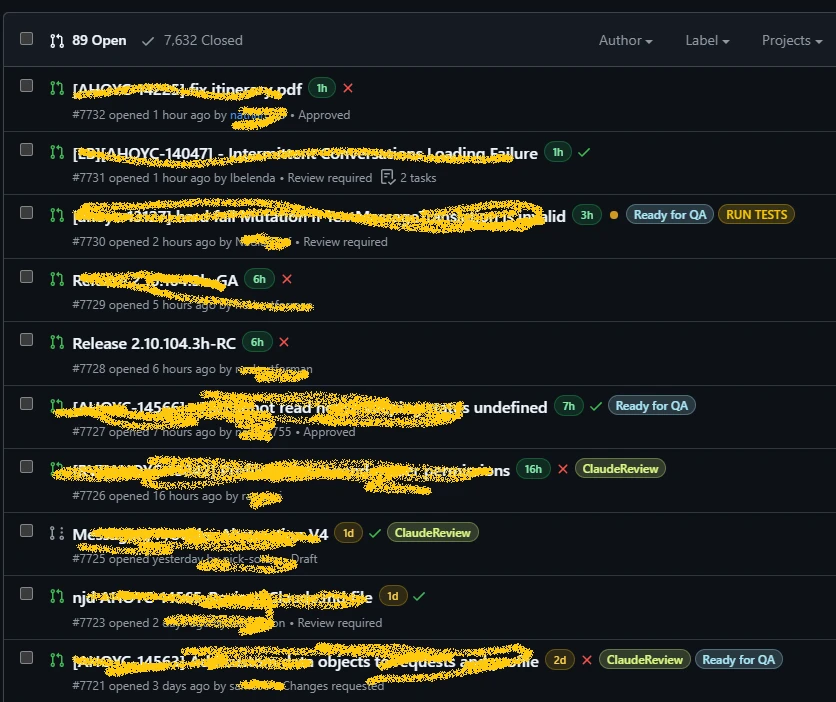
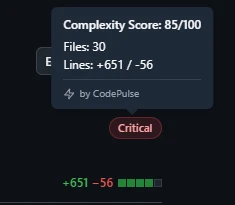
Features
PR Age Badges
Color-coded badges show PR age at a glance. Green for fresh (<24h), yellow for getting stale (1-3d), red for needs attention (>3d).
Complexity Scores
See PR complexity based on files changed and lines of code. Low, Medium, High, or Critical ratings help prioritize reviews.
Fully Customizable
Set your own age thresholds, configure complexity scoring, and toggle badges on/off for different page types.
What The Age Colors Mean
These thresholds are fully customizable in the extension settings.
Complexity Score Breakdown
| Level | Lines Changed | Review Approach |
|---|---|---|
| Low | <100 lines | Quick review, low risk |
| Medium | 100-400 lines | Moderate attention needed |
| High | 400-1000 lines | Thorough review, consider pairing |
| Critical | >1000 lines | Consider splitting the PR |
How to Install
Add to Chrome
Click the button above to visit the Chrome Web Store and add the extension.
Visit GitHub
Navigate to any GitHub repository's pull request list or detail page.
See Badges
Age and complexity badges appear automatically. Click the extension icon to customize.
Privacy First, Always
We built PR Pulse with privacy as a core principle. The extension processes everything locally in your browser and never sends data anywhere.
- No analytics or tracking of any kind
- No external network requests
- Settings stored only in your local browser storage
- Open source and auditable
Why PR Age Matters
Long-lived pull requests track with lower code quality and slower teams. A few reasons why:
- Higher defect rates: PRs open longer than 3 days tend to ship more bugs, partly because authors lose context over time.
- Lower review quality: Reviewers tend to rubber-stamp old PRs to clear their queue, leading to less thorough feedback.
- Increased merge conflicts: The longer a PR sits, the more the target branch changes, creating integration headaches.
- Developer frustration: Old PRs blocking feature work create context-switching costs and reduce team velocity.
Related Resources
How to Reduce PR Cycle Time
Actionable strategies to speed up your code review process.
Code Reviewer Best Practices
How to give effective code reviews that help your team grow.
Cycle Time Calculator
Break down where time is spent in your PR workflow.
PR Size Analyzer
Analyze PR sizes and get recommendations for optimal review.
Ready to Stop Missing Stale PRs?
Install PR Pulse in seconds and start seeing which pull requests need attention. Free forever, no account required.
Add to Chrome - It's FreeHow it’s calculated
How it works
PR Pulse reads the pull request data already on the GitHub page you are viewing and draws two badges next to each PR: one for age, one for complexity. It does this in the browser, so nothing is sent to a server and there is no setup beyond installing it.
The age badge
Age uses a traffic-light scale based on how long a PR has been open. Green means fresh and under 24 hours. Yellow means it has been sitting 1 to 3 days and is worth a look. Red means more than 3 days, which is your cue that something is stuck. The hour thresholds are yours to change in settings if your team works to different review targets.
The complexity badge
Complexity is a quick read on review effort, scored from the number of files touched and lines changed. It lands in one of four bands so you can triage your queue before you open anything.
- Low: under 100 lines, a quick review with little risk.
- Medium: 100 to 400 lines, moderate attention.
- High: 400 to 1000 lines, a thorough read and maybe a second reviewer.
- Critical: over 1000 lines, large enough that splitting the PR is usually the right call.
Badges appear on both the PR list page and individual PR detail pages, and you can toggle each context on or off. Hover a complexity badge to see the breakdown of files and lines behind the score.
Worked example
You open the pull request list for a repo you review and see eight open PRs. Without PR Pulse, they all look the same: a title, an author, a timestamp. With the extension installed, the list now carries a color next to each one.
- Two PRs show green age badges. They went up this morning, so there is no rush.
- Three sit on yellow. They are a day or two old and starting to drift, worth clearing today.
- One is red. It has been open five days, and a red complexity badge marks it as Critical at 1,400 lines.
That red-on-red PR is the one to act on first. The age badge tells you it is blocking someone; the complexity badge tells you why it stalled - it is too big to review in one sitting. You can ping the author to split it rather than letting it rot for another week. The whole read took a glance, no clicking required.
Our Take
Long-lived PRs are technical debt hiding in plain sight.
Every day a PR sits open it picks up merge conflicts, drifts from the codebase, and fades from the author's memory. PRs open longer than 3 days tend to carry higher defect rates and thinner reviews. Making age a color you cannot miss turns a vague worry into something a team can act on today.
"PRs over 1,000 lines receive 18x less scrutiny per line than small PRs."
— CodePulse research on 3.4 million PRs
Key terms
- Pull request (PR)
- A proposed set of code changes submitted for review before merging into a shared branch. GitHub lists open PRs per repository, and PR Pulse annotates that list.
- PR age
- How long a pull request has been open, measured from creation to now. The longer a PR stays open, the more it drifts from the target branch and loses context.
- Review SLA
- The time target a team sets for getting a first review on an open PR. PR Pulse age thresholds let you mirror your own SLA so the colors mean something to your team.
- PR complexity
- A rough measure of review effort based on files changed and lines of code, banded as Low, Medium, High, or Critical to help you prioritize.
- Stale PR
- A pull request that has sat open long enough to accumulate merge conflicts, lose author context, and slow the people waiting on it. PR Pulse flags these in red.
Frequently Asked Questions
Yes, PR Pulse is free and stays free. There are no premium tiers, no feature limits, and no upsell. CodePulse builds and maintains it as a community tool for engineering teams who want to keep their review queue moving.
Want to track this automatically?
CodePulse connects to your GitHub and calculates these metrics in real-time. No more manual data entry or spreadsheets.
Free tier available. No credit card required.
See These Features in Action
Break down cycle time into coding, waiting, review, and merge phases.
Flag large PRs, single-owner changes, and untested modifications.
Learn More
We Cut PR Cycle Time by 47%. Here's the Exact Playbook
A practical playbook for engineering managers to identify bottlenecks, improve review processes, and ship code faster - without sacrificing review quality.
7 Code Review Rules That Actually Get PRs Approved Faster
Learn code review best practices backed by metrics. Covers reviewer guidelines, author guidelines, team practices, and how to measure review effectiveness.
The 300-Line Rule: Why Big PRs Are Sabotaging Your Team
The research-backed case for smaller pull requests, how to measure PR size effectively, and practical strategies for breaking down large changes.
Related Tools
PR Size Analyzer
Analyze your pull request sizes and get recommendations. Learn the optimal PR size for faster reviews and fewer bugs.
Bus Factor Calculator
Calculate your team's bus factor and knowledge concentration risk. Identify critical knowledge silos before they become problems.
How to Measure Technical Debt + Free Calculator
Learn how to measure technical debt: track the debt ratio and key metrics, then put a dollar cost on it to build the case for refactoring.
How Does Your Team Compare?
Get the complete 2025 Engineering Benchmark Report, built from 802,979 merged pull requests across public GitHub repositories.
What's Inside the Report
- Cycle time benchmarks by company size (50-500+ engineers)
- Code review best practices and optimal PR sizes
- The burnout crisis: data and prevention strategies
- AI impact on engineering: productivity vs. stability
- Knowledge risk indicators and bus factor benchmarks
- How to use these benchmarks for your team