
Understand the system around the team, not a developer leaderboard
Preview team-level workload, collaboration, and delivery signals designed for process improvement rather than performance grading.
Read-only GitHub · Your code stays yours · Team-level by default · No credit card
Developer burnout doesn't announce itself with a resignation letter. It shows up first in Git data - commits at midnight, merges on weekends, review loads that keep climbing while output quietly declines. By the time someone tells you they're burned out, you're already months too late.
Can Git data really predict developer burnout?
Yes. Patterns like after-hours commits, review overload, and intensity creep are visible in Git data weeks before burnout becomes obvious. The STRAIN Score framework quantifies six observable signals into a 0-12 risk score, giving managers an early warning system that predicts turnover better than engagement surveys. CodePulse surfaces these patterns automatically through its Risky Changes and Developer Analytics dashboards.
"The best leading indicator of burnout isn't low output - it's high output at unusual hours. Midnight commits aren't dedication. They're a distress signal."
This guide shows you how to detect early warning signs of burnout using Git data, introduces the STRAIN Score framework for measuring burnout risk, and gives you concrete intervention strategies - so you can act before your best engineers quietly start updating their LinkedIn profiles.
🔥 Our Take
Burnout is a management failure, not a personal weakness.
If your team is burning out, you failed to set boundaries they couldn't set themselves. Individual developers can't say no to unrealistic deadlines - that's your job. The signals are visible in Git data weeks before anyone complains. Managers who see the patterns and don't act are complicit in the outcome.
What Is the STRAIN Score Framework for Burnout Risk?
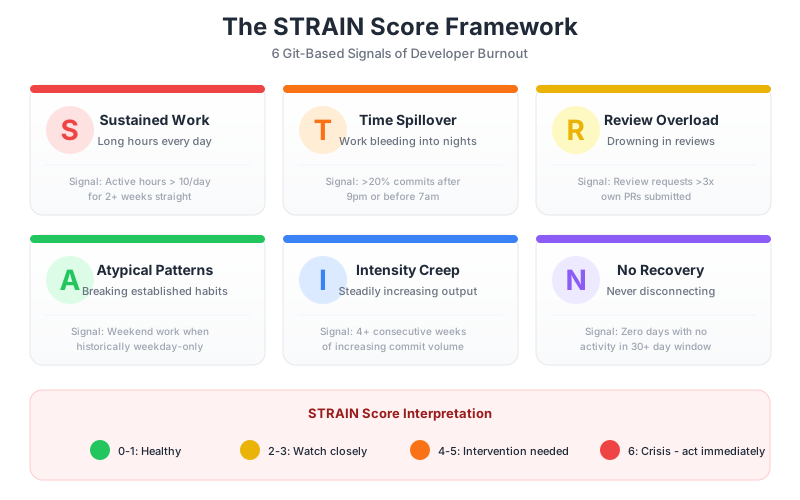
We developed the STRAIN Score to quantify burnout risk from Git data. It's not a performance metric - it's an early warning system. STRAIN stands for six observable patterns that correlate with developer burnout:
Free Download: Team Health Survey (Interactive) | PDF - A 15-question survey covering velocity, quality, wellbeing, collaboration, and growth.
| Factor | What to Look For | Score (0-2 each) |
|---|---|---|
| Sustained work | Working 3+ consecutive weeks above normal capacity | 0 = no pattern, 1 = 2-3 weeks, 2 = 4+ weeks |
| Time spillover | Regular after-hours commits (evenings, weekends) | 0 = <10%, 1 = 10-25%, 2 = >25% after-hours |
| Review overload | Review load ratio significantly above team average | 0 = normal, 1 = 2x average, 2 = 3x+ average |
| Atypical patterns | Sudden changes in work patterns (timing, volume, style) | 0 = consistent, 1 = minor shifts, 2 = major changes |
| Intensity creep | PR volume increasing while cycle time also increases | 0 = stable, 1 = slight increase, 2 = sustained increase |
| No recovery | No light weeks after heavy sprints (always at 100%+) | 0 = regular recovery, 1 = rare recovery, 2 = never recovers |
STRAIN Score Interpretation
Score range: 0-12"A STRAIN Score of 8+ predicts turnover better than any engagement survey. By the time someone rates their job satisfaction low, they've already been interviewing for weeks."
Why Is After-Hours Work the Earliest Warning Signal?
Occasional late-night coding happens. Deadlines hit, production breaks, or someone's in the zone. But pattern matters more than incidents. When after-hours work becomes systematic, it's not dedication - it's desperation.
For the baseline this sits against, our analysis of weekend and after-hours work across public GitHub measured how common the pattern actually is at scale, which is the number to compare your own team against before deciding anything is unusual.
The Burnout Progression
Burnout follows a predictable four-stage pattern:
- Overload phase: Developer takes on extra work to meet deadlines or help the team. Feels productive, even heroic.
- Compensation phase: Regular hours aren't enough. Work spills into evenings and weekends. "Just this once" becomes "just this sprint."
- Chronic phase: After-hours work is the new normal. Sleep suffers. Quality drops. Cycle times increase despite more hours worked.
- Burnout phase: Disengagement, cynicism, illness, and eventually departure. At this stage, you've already lost them.
Git data catches patterns in the compensation phase - before chronic burnout sets in. That's your intervention window. Miss it, and you're managing consequences instead of preventing them.
After-Hours Severity Levels
Not all after-hours work is equal. Context matters:
After-Hours Work Severity Matrix
Pattern Severity Matrix
🌙Detecting After-Hours Work in CodePulse
CodePulse automatically flags after-hours activity:
- Risky Changes shows merges outside 9 AM - 6 PM with a 🌙 icon
- Filter by developer to see individual patterns
- View weekly trends to distinguish one-offs from systemic issues
- Combine with Developer Analytics to see review load context
How Does Review Overload Drive Burnout?
"Your 'fastest' developer is probably just your most overworked. When one person does 3x the reviews of anyone else, they're not a hero - they're a single point of failure and a burnout risk."
Review overload is the most common cause of developer burnout because it's invisible work. The person doing 40 reviews a month looks "less productive" by commit counts while actually carrying the entire team. When they quit, everyone's surprised - except them.
Review Load Ratio
The review load ratio is the clearest signal of review overload:
Review Load Ratio
Measures the balance between review work and contribution work. High ratios indicate review overload.
Examples:
Interpretation:
Red Flags:
- Same person reviewing all PRs in one area (knowledge silo)
- Review requests increasing while PR output decreases
- Top reviewer doing 3x+ more reviews than team average
The Expert Trap
The team's most knowledgeable developer becomes the default reviewer for complex code. Seems efficient. Creates disaster:
The Expert Reviewer Trap
"Alice knows this code best, let's have her review"
"Alice is the only one who really understands this"
"Alice spends 50% of her time reviewing"
"Alice is behind on her own work, staying late"
"Alice is burned out and interviewing elsewhere"
"Alice gives notice. Team realizes only she understood the billing system. Three-month knowledge transfer panic."
Prevention:
- Pair junior developers with experts on reviews
- Rotate review responsibility deliberately
- Document complex areas (Alice shouldn't be the documentation)
- Set explicit review load caps: nobody does > 2x team average
Review Network Analysis
Visualizing who reviews whose code reveals structural problems:
- Star pattern: One person at the center reviewing everyone's code. They're burning out. You just don't know it yet.
- Mesh pattern: Everyone reviews everyone. Distributed load, lower risk. This is the goal.
- Siloed pattern: Sub-teams only review each other. May hide imbalances within teams - check each silo separately.
CodePulse's Review Network visualization shows these patterns. Star patterns are your intervention priority.
For strategies on fixing review load imbalances, see our Review Load Balancing Guide.
What Is Intensity Creep and How Do You Detect It?
Intensity creep is subtle. Each sprint, expectations tick up slightly. What was a stretch goal becomes baseline. What was baseline becomes unacceptable. A year later, your team is running 120% capacity as "normal" - and wondering why everyone seems tired.
How to Detect Intensity Creep
Look for these patterns over 3-6 month trends:
| Metric | Healthy Trend | Intensity Creep Signal |
|---|---|---|
| PR Volume | Stable or slight growth | Consistent 10%+ increase quarter-over-quarter |
| Cycle Time | Stable or decreasing | Increasing despite more output (rushing) |
| After-Hours Rate | Under 10%, stable | Creeping up 2-3% each quarter |
| Light Weeks | Regular occurrence | Fewer and fewer recovery periods |
| Vacation Patterns | Regular time off | Skipped vacations, working during PTO |
The "No Recovery" Red Flag
Healthy teams have rhythm: intense weeks followed by lighter ones. When someone never has light weeks, they're not sustainable. Look at 8-week rolling windows: if someone's bottom week is still above team average, they're overloaded.
Recovery Pattern Analysis (8-week rolling window)
Healthy Pattern
Burnout Pattern
Key insight: If you don't see valleys, you're not seeing recovery. That developer is running on fumes.
How Should You Intervene at Each STRAIN Level?
The whole point of measuring burnout risk is to act on it. Here's what to do at each level:
Score 4-6: Moderate Risk
- Casual check-in: "Hey, noticed some late commits this week. Everything okay? Anything blocking you during the day?"
- Don't make it a thing: This is a data point, not an accusation. You're showing you noticed and care.
- Watch for patterns: One week at moderate is fine. Three weeks in a row requires action.
Score 7-9: Elevated Risk
- 1:1 conversation about workload: "I've noticed X. Let's talk about what's on your plate."
- Review their assignments: What can be moved, delayed, or delegated?
- Redistribute review load: If they're doing 3x average reviews, that's the first thing to fix.
- Set explicit boundaries: "I don't want to see commits after 7 PM. If there's that much work, we have a planning problem."
Score 10-12: Critical Risk
- Immediate workload reduction: Remove responsibilities now. Don't wait for the sprint to end.
- Enforce time off: "Take Friday off. That's not optional."
- Direct conversation about sustainability: "I'm concerned about your current pace. Let's fix this together."
- Consider extended leave: If chronic, a week off may not be enough. Two weeks of true disconnection may be necessary.
- Fix the system, not the person: Why did it get this bad? What's wrong with your planning, staffing, or expectations?
🔔Setting Up Burnout Alerts in CodePulse
Automate early warning detection:
- Navigate to Alert Rules
- Create alerts for: after-hours merge rate >20%, review load ratio >3x
- Set threshold alerts for sustained high activity over 3+ weeks
- Review weekly trends in Risky Changes
How Do You Build a Culture That Prevents Burnout?
Detection is good. Prevention is better. The best burnout strategy is a culture where it's hard to burn out in the first place.
Set Boundaries Organizationally
Individual developers can't set boundaries themselves - they need organizational support and cover:
- No weekend deploys: Unless it's an incident, production changes wait until Monday. This is non-negotiable.
- Review SLAs during business hours: PRs submitted at 5 PM don't get same-day reviews. That's not a failure - that's healthy.
- On-call rotation: After-hours responsibility rotates. No one person carries it indefinitely.
- Celebrate sustainable pace: Publicly recognize efficiency during work hours. Never celebrate heroic overtime.
Make Workload Visible
Burnout thrives in darkness. Making workload visible helps everyone:
- Share review load metrics in standups: "Sarah's been doing 3x average reviews this sprint. Let's redistribute."
- Track after-hours trends as a team metric: Not individual surveillance - team health indicator.
- Include sustainability in retrospectives: "Are we working at a sustainable pace?" should be asked every sprint.
Kill the Hero Culture
"If your team has heroes, you have a broken system wearing a cape. Heroes are single points of failure. Celebrate the quiet engineers who deliver on time during work hours - they're the ones keeping you sustainable."
Hero culture glorifies unsustainable behavior. The developer who stayed up all night to fix the release gets public praise. The developer who flagged the risk two weeks ago and was ignored gets nothing. This incentivizes exactly the wrong behavior.
- Celebrate prevention: The best save is the one that never happened.
- Question heroics: "Why did this require an all-nighter? What broke in our process?"
- Protect the reliable: Steady performers are your foundation. Don't burn them out covering for chaos.
What Should You Start Measuring This Week?
This Week
- Calculate current STRAIN Scores: Review the six factors for each team member. Who's at elevated or critical risk right now?
- Check Risky Changes: How many after-hours merges happened last week? Who's responsible for them?
- Review load distribution: In Review Network, is anyone a "star" pattern? Is anyone doing 3x+ reviews?
This Month
- Have 1:1s with elevated-risk developers: Data-informed conversations, not accusations.
- Redistribute review load: Train additional reviewers for areas with single experts.
- Set up alerts: Create Alert Rules for sustained after-hours patterns and review overload.
Ongoing
- Monthly STRAIN reviews: Calculate and track scores. Trends matter more than absolutes.
- Sustainability in retros: Make "Are we sustainable?" a standing question.
- Celebrate sustainable wins: Recognize developers who deliver excellent work during reasonable hours.
Burnout is easier to prevent than recover from. The signals are in your Git data. The question is whether you're watching - and whether you're willing to act on what you see.
For more on building healthy, data-informed teams, see our guides on Measuring Team Performance Without Micromanaging, Engineering Manager Metrics Guide, and Review Load Balancing.
Frequently Asked Questions
Git data typically reveals burnout risk 4-6 weeks before it becomes obvious through other channels. After-hours commit patterns, increasing review loads, and disappearing recovery weeks are all visible in repository activity well before someone mentions burnout in a 1:1 or engagement survey.

Get this view for your own teams
Connect GitHub for team-level workload, review distribution, and delivery signals. Individual views stay off unless your organisation explicitly turns them on.
Read-only GitHub · Your code stays yours · Team-level by default · No credit card
See These Features in Action
Compare contribution patterns for coaching, not surveillance.
Get notified when cycle times spike or review patterns degrade.
Related Guides
Your Best Engineer Is About to Quit (Check Review Load)
Learn how to identify overloaded reviewers, distribute review work equitably, and maintain review quality without burning out your senior engineers.
Engineering Metrics That Won't Get You Reported to HR
An opinionated guide to implementing engineering metrics that build trust. Includes the Visibility Bias Framework, practical do/don't guidance, and a 30-day action plan.
The EM Dashboard That Won't Get You Reported to HR
With 83% of developers suffering from burnout and a 12-point perception gap between engineers and executives, EMs need metrics that reveal team health - not just delivery. Here is what to track, what to ignore, and how to use data without destroying trust.
The Git Query That Finds Your New Hire's Perfect Mentor
Use Git activity data to accelerate new hire onboarding, identify domain experts for pairing, and track ramp-up progress.
The Performance Review Framework That Doesn't Destroy Trust
Learn how to measure engineering performance fairly and effectively without creating toxic culture, gaming, or surveillance dynamics.
Developer Productivity Metrics That Don't Backfire
Stop treating engineers like factory workers. Learn which developer productivity metrics destroy trust, why lines of code fail, and how to measure productivity, including with AI tools, without surveillance.