

Understand the system around the team, not a developer leaderboard
Preview team-level workload, collaboration, and delivery signals designed for process improvement rather than performance grading.
Read-only GitHub · Your code stays yours · Team-level by default · No credit card
Developer experience surveys are broken. They suffer from recency bias, social desirability bias, and response rates that make statisticians cry. But there is another way: quantitative DevEx data extracted directly from your engineering systems. This guide shows you how to measure developer experience objectively, without asking anyone to fill out another survey.
What is quantitative developer experience data?
Quantitative DevEx data is behavioral information extracted from engineering systems like GitHub and CI/CD pipelines. It measures what developers actually do, not what they say they do. Seven key metrics, including cycle time, review turnaround, and after-hours work, provide a continuous, unbiased picture of developer experience. According to Microsoft and GitHub research, self-reported productivity correlates poorly with actual output metrics. CodePulse extracts all seven DevEx metrics automatically from your GitHub data.
Platform teams and DevEx practitioners often rely on quarterly surveys to understand developer friction. The problem? By the time you analyze the results, the situation has changed. Someone who had a terrible week before the survey skews the data. Someone who doesn't want to seem negative sugarcoats their responses. And the 60% who didn't respond? Their experience remains invisible.
Quantitative DevEx data solves this by measuring what developers actually do - not what they say they do. Git commits, PR reviews, build results, and deployment logs tell a story that surveys can't capture: the real, continuous, unbiased picture of developer experience across your entire organization.
Why is survey-based DevEx data usually wrong?
Surveys have been the default tool for measuring developer experience since the concept emerged. But they carry fundamental limitations that make them unreliable as a sole data source:
Recency Bias
Developers disproportionately weight recent events when answering surveys. A terrible CI outage the week before a survey tanks satisfaction scores - even if the previous 11 weeks were excellent. Conversely, a recent tooling improvement creates temporary euphoria that doesn't reflect the broader experience.
Research from Microsoft and GitHub's DevEx research confirms this: self-reported productivity correlates poorly with actual output metrics. What developers remember feeling productive doesn't match when they were actually shipping code.
Social Desirability Bias
Developers don't answer surveys in a vacuum. They know managers might see results. They don't want to seem like complainers. They worry about being identified despite "anonymous" promises. The result: systematically skewed data that underreports real friction.
This effect is especially pronounced for sensitive topics: burnout signals, after-hours work, frustration with leadership decisions. The things you most need to know are the things surveys least capture.
Response Rate Problems
According to DX research, DevEx surveys need 80-90% participation to be statistically credible. Most organizations achieve 50-60%. That means a significant portion of your engineering team - often the busiest, most productive members who don't have time for surveys - remain unmeasured.
🔥 Our Take
Surveys measure sentiment. Behavior data measures reality. They're not the same thing.
A developer might tell you they're "satisfied" with code review while their PRs wait 3 days for feedback. They've normalized dysfunction. Git data doesn't normalize - it shows you the 3-day wait regardless of whether anyone complains about it. The most dangerous problems are the ones your team has stopped noticing.
"The best predictor of developer experience isn't what developers say - it's what their commit history reveals about how they actually spend their time."
Why are behavioral signals better than self-reported feelings?
Behavioral data extracted from engineering systems provides signals that surveys cannot:
| Aspect | Survey Data | Behavioral Data |
|---|---|---|
| Frequency | Quarterly snapshots | Continuous, real-time |
| Coverage | 50-70% response rate | 100% of activity captured |
| Objectivity | Subject to bias | Factual, verifiable |
| Granularity | Team-level trends | Individual, team, org levels |
| Timing | Lagging indicator | Leading indicator |
| Actionability | "Reviews feel slow" | "Review wait time: 28.3 hours" |
The shift from perceptual to behavioral measurement transforms DevEx from a fuzzy concept into an engineering discipline. Instead of debating whether developers "feel" productive, you can measure flow efficiency, quantify wait times, and track improvement over time.
What Behavioral Data Reveals
Git and CI/CD data contain rich signals about developer experience that surveys miss:
- Flow state disruption: Scattered commit patterns across multiple repositories indicate context switching - a known productivity killer
- Feedback loop quality: Time from PR creation to first review directly measures how long developers wait in limbo
- Tooling friction: Build failure rates and test flakiness create invisible drag that developers often don't report
- Collaboration health: Review network density shows whether knowledge flows or silos form
- Burnout risk: After-hours commit patterns and weekend work signal unsustainable pace
What are the 7 quantitative DevEx metrics you should track?
These seven metrics form a comprehensive quantitative DevEx measurement framework, each extractable directly from your engineering systems without surveys:
1. Cycle Time
| Attribute | Details |
|---|---|
| Definition | Time from first commit to PR merge |
| Data Source | Git commits, PR timestamps |
| Healthy Range | <24 hours for most PRs |
| DevEx Signal | Overall friction in the delivery pipeline |
| Warning Signs | >48 hours average, high variance across teams |
Cycle time is the north star metric for quantitative DevEx. It captures the cumulative impact of every friction point: slow reviews, flaky tests, complex deployments. When cycle time increases, developer experience is degrading somewhere in the pipeline.
2. Review Turnaround Time
| Attribute | Details |
|---|---|
| Definition | Time from PR creation to first review |
| Data Source | PR review timestamps |
| Healthy Range | <4 hours for first review |
| DevEx Signal | Waiting time, flow interruption |
| Warning Signs | >24 hours to first review, individual reviewers as bottlenecks |
Review wait time is pure waste from a developer experience perspective. Every hour a PR waits is an hour the author loses context. Research shows developers need 15-23 minutes to regain focus after an interruption - long review waits force repeated context rebuilding.
3. Build Time
| Attribute | Details |
|---|---|
| Definition | Time for CI pipeline to complete |
| Data Source | CI/CD logs, GitHub status checks |
| Healthy Range | <10 minutes for unit tests, <30 minutes full pipeline |
| DevEx Signal | Feedback loop speed |
| Warning Signs | >15 minutes for basic feedback, increasing trend |
Build time directly impacts developer flow state. When builds take 5 minutes, developers stay engaged. When builds take 30 minutes, they context-switch to other work, fragmenting attention and reducing throughput. Build time improvements have compound returns - every developer benefits, multiple times per day.
4. Test Stability
| Attribute | Details |
|---|---|
| Definition | Percentage of test runs that fail intermittently (flaky tests) |
| Data Source | CI test results over time |
| Healthy Range | <1% flaky test rate |
| DevEx Signal | Trust in tooling, wasted investigation time |
| Warning Signs | >5% flakiness, developers ignoring test failures |
Flaky tests erode developer trust in the testing system. When tests fail randomly, developers stop trusting any failure - they retry instead of investigating. This creates a dangerous culture where real bugs slip through because "it was probably just flaky."
"A flaky test isn't a test - it's a random number generator that occasionally blocks your deploys. Either fix it or delete it."
5. PR Size
| Attribute | Details |
|---|---|
| Definition | Lines of code changed per pull request |
| Data Source | Git diff statistics |
| Healthy Range | <400 lines, 90th percentile <800 lines |
| DevEx Signal | Cognitive load on reviewers, review quality |
| Warning Signs | >1000 lines average, increasing trend |
Large PRs create terrible developer experience on both sides. Authors wait longer for reviews. Reviewers face overwhelming cognitive load and often rubber-stamp rather than truly review. Our research on 3.4 million PRs found that PRs over 1000 lines receive 83% less scrutiny than smaller changes - they're often merged with zero review comments.
6. Context Switches
| Attribute | Details |
|---|---|
| Definition | Number of different repositories/projects touched per day |
| Data Source | Commit timestamps and repository metadata |
| Healthy Range | 1-2 repositories per day sustained |
| DevEx Signal | Flow state disruption, focus fragmentation |
| Warning Signs | >3 repos daily, commits scattered across many contexts |
Context switching is the silent killer of developer productivity. Each switch requires mental state reconstruction: remembering architecture, recalling recent changes, loading relevant context. Developers who constantly hop between repositories pay an invisible tax on every task.
7. After-Hours Work
| Attribute | Details |
|---|---|
| Definition | Percentage of commits outside business hours (evenings, weekends) |
| Data Source | Git commit timestamps, organization working hours config |
| Healthy Range | <10% of commits after-hours |
| DevEx Signal | Burnout risk, work-life balance, unsustainable pace |
| Warning Signs | >20% after-hours, increasing trend, specific individuals spiking |
After-hours work patterns are the most direct signal of burnout risk that behavioral data provides. Unlike surveys where developers might minimize complaints, commit timestamps don't lie. A team with 30% weekend commits has a sustainability problem regardless of what they say in surveys.
📊 How to See This in CodePulse
CodePulse extracts all seven quantitative DevEx metrics automatically from your GitHub data:
- Dashboard → Cycle time breakdown shows where time goes (coding, waiting, review, merge)
- Dashboard → Review turnaround metrics and PR size distributions
- Developer Metrics → Individual patterns including after-hours work signals
- Review Network → Collaboration patterns that reveal bottlenecks and silos
How do you triangulate surveys with Git data?
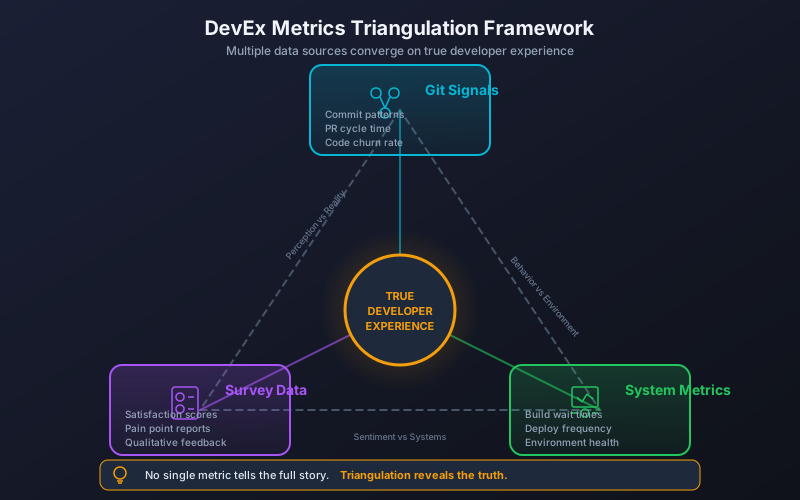
Quantitative DevEx data doesn't replace surveys entirely - it contextualizes them. The most powerful DevEx measurement programs combine both approaches strategically:
When to Use Behavioral Data
- Continuous monitoring: Track trends daily/weekly without survey fatigue
- Problem detection: Identify issues as they emerge, not months later
- Objective baselines: Establish facts before asking for opinions
- Impact verification: Confirm whether improvements actually changed behavior
When to Use Surveys
- Understanding "why": Behavioral data shows what; surveys explain why
- Satisfaction measurement: Some things only developers can evaluate
- Tool-specific feedback: Detailed opinions on specific systems
- Prioritization input: Developers rank which frictions matter most
Triangulation in Practice
The most effective approach uses behavioral data to generate hypotheses and surveys to validate them:
Triangulation Workflow
======================

1. Behavioral Data Analysis
   └─ "Team A's review wait time increased 40% last quarter"

2. Hypothesis Formation
   └─ "Team A is understaffed for review load OR
       a key reviewer left OR the review process changed"

3. Targeted Survey Question
   └─ "What factors most impact your ability to get
       timely code reviews?" + open-ended follow-up

4. Root Cause Identification
   └─ Survey reveals: New compliance requirements
       added mandatory security review step

5. Targeted Intervention
   └─ Automate security checks, add security reviewer capacity
This approach is far more efficient than broad surveys asking about everything. Behavioral data tells you where to look; targeted surveys tell you what to do about it.
"Use Git data to find the problems. Use surveys to understand the context. Use both to prioritize the solutions."
How do you build a DevEx data platform?
To operationalize quantitative DevEx measurement, you need a data platform that continuously extracts, processes, and surfaces behavioral signals:
Data Sources to Connect
| Source | Metrics Enabled | Connection Method |
|---|---|---|
| GitHub/GitLab | Cycle time, PR size, reviews, collaboration | API + webhooks |
| CI/CD (Actions, Jenkins, etc.) | Build time, test stability | API + status checks |
| Issue trackers (Jira, Linear) | Planning-to-code time, work classification | API integration |
| Calendar systems | Meeting load, focus time | Calendar API (optional) |
Build vs. Buy Decision
You can build a DevEx metrics platform in-house or use a purpose-built solution. Consider the trade-offs:
| Factor | Build In-House | Use SaaS Platform |
|---|---|---|
| Time to value | 3-6 months | <1 day |
| Ongoing maintenance | Dedicated engineer time | Included |
| Customization | Full control | Configuration-based |
| Benchmarks | Internal only | Industry comparisons |
| Cost at 100 engineers | $100-200K/year (engineering time) | $10-50K/year |
For most organizations, the math favors SaaS solutions. The engineering time required to build and maintain a robust DevEx data platform exceeds the subscription cost - and diverts DPE resources from actually improving developer experience.
Implementation Roadmap
- Week 1: Connect primary data source (GitHub/GitLab). Establish baselines for cycle time and review turnaround.
- Week 2: Add CI/CD integration. Capture build time and test stability.
- Week 3: Configure team boundaries. Enable team-level metric views.
- Week 4: Set up alerts for metric degradation. Define intervention thresholds.
- Month 2: Share dashboards with teams. Run first data-driven DevEx improvement cycle.
- Quarter 2: Integrate quantitative data into quarterly DevEx survey analysis. Establish triangulation workflow.
For more guidance on specific DevEx measurement approaches, see our Improving Developer Experience guide, the Developer Productivity Engineering guide, and our SPACE Framework Metrics guide.
Frequently Asked Questions
Quantitative developer experience data is behavioral information extracted from engineering systems like GitHub, CI/CD pipelines, and deployment logs. Unlike survey data, it measures what developers actually do, not what they say they do. Key metrics include cycle time, review turnaround time, build time, test stability, PR size, context switches, and after-hours work patterns.

Get this view for your own teams
Connect GitHub for team-level workload, review distribution, and delivery signals. Individual views stay off unless your organisation explicitly turns them on.
Read-only GitHub · Your code stays yours · Team-level by default · No credit card
See These Features in Action
Holistic developer productivity using the SPACE framework.
Compare contribution patterns for coaching, not surveillance.
Related Guides
Improve Developer Experience: Proven Strategies
A practical guide to improving developer experience through surveys, team structure, and proven strategies that actually work.
Developer Productivity Engineering: What DPE Does
Developer Productivity Engineering (DPE) is how Netflix, Meta, and Spotify keep engineers productive. Learn what DPE teams do and how to start one.
Why Microsoft Abandoned DORA for SPACE (And You Should Too)
Learn how to implement the SPACE framework from Microsoft and GitHub research to measure developer productivity across Satisfaction, Performance, Activity, Communication, and Efficiency.
Engineering Team Management: Using Data to Lead Without Micromanaging
Managing software teams requires balancing delivery, quality, team health, and individual growth. This guide shows how to use data for visibility while avoiding surveillance, with practical scenarios and communication patterns.