
Find quality and ownership risk before it becomes an incident
Preview how CodePulse combines review depth, risky changes, hotspots, and knowledge concentration without turning activity into individual scores.
Read-only GitHub · Your code stays yours · Team-level by default · No credit card
Maintainability determines whether your codebase is an asset or a liability. While the traditional Maintainability Index (MI) formula dates back to 1992, modern teams need more actionable signals. This guide covers what maintainability actually means, how to measure it with available data, and how to build a dashboard that drives real improvements in code health.
"The Maintainability Index was designed for COBOL. Your React codebase needs different signals. Focus on what predicts actual maintenance cost, not what looks good in a static analysis report."
What is Maintainability (And How to Measure It)
Maintainability is the ease with which a software system can be modified to fix defects, improve performance, or adapt to a changed environment. In practical terms, it answers the question: "How much does it cost to change this code?"
The Traditional Maintainability Index
The original Maintainability Index formula, developed by Oman and Hagemeister in 1992, combines four metrics:
MI = 171 - 5.2 * ln(HV) - 0.23 * CC - 16.2 * ln(LOC) + 50 * sin(sqrt(2.4 * CM))

Where:
  HV  = Halstead Volume (vocabulary × length × log2(vocabulary))
  CC  = Cyclomatic Complexity
  LOC = Lines of Code
  CM  = Comment Ratio (percentage of comments)

Score ranges:
  85-100: Highly maintainable
  65-84:  Moderately maintainable
  0-64:   Difficult to maintain
This formula appears in tools like Visual Studio, SonarQube, and various code analyzers. But here's the problem: it was calibrated on procedural code from the 1990s and treats comment density as a positive signal (it isn't always).
* Our Take
Static analysis tells you what code looks like. Git history tells you what code actually costs.
A file with perfect MI scores but constant churn and knowledge silos is expensive to maintain. A file with mediocre MI that's stable and well-understood is cheap to maintain. Don't optimize for academic metrics when you have real-world signals.
Why Traditional MI Falls Short
The original Maintainability Index has several well-documented limitations:
- Comment gaming: The formula rewards comments, so adding// Increment counter above `i++` improves your score without improving maintainability
- Language mismatch: Calibrated for FORTRAN and C, not modern languages with different idioms and patterns
- Missing context: Doesn't account for test coverage, ownership clarity, or how often code actually changes
- Point-in-time only: Shows current state but not trends or how maintenance cost is changing
Modern Maintainability Signals
What actually predicts maintenance cost? Research and practical experience point to these signals:
| Signal | What It Measures | Why It Matters |
|---|---|---|
| Code Churn | How often code is rewritten | High churn = unstable abstractions or unclear requirements |
| Change Frequency | How often files are modified | Frequent changes multiply the impact of any complexity |
| Ownership Clarity | How many people touch each file | Diffuse ownership leads to inconsistent patterns and gaps |
| PR Size for Area | Average PR size when touching a file | Large PRs in an area suggest it's hard to make small changes |
| Review Time | How long PRs in an area take to review | Long review times suggest code is hard to understand |
| Defect Density | Bugs per area over time | Directly measures quality outcomes |
The Maintainability Index Components
A modern maintainability dashboard should track four dimensions. Each provides unique insight into code health:
1. Code Churn Rate
Code churn measures the percentage of code changes that are deletions or rewrites (as opposed to net additions). High churn isn't always bad - it can indicate healthy refactoring - but sustained high churn in specific areas often signals instability.
| Churn Level | Interpretation | Action |
|---|---|---|
| 0-15% | Low churn, mostly additions | Normal for growing codebases |
| 15-35% | Moderate churn | Healthy balance of features and cleanup |
| 35-50% | High churn | Investigate if intentional refactoring or requirements thrashing |
| 50%+ | Very high churn | Potential instability - root cause analysis needed |
"High churn plus high change frequency is the danger zone. A file that's constantly changing AND constantly being rewritten needs architectural review, not more developers."
For deep dives on code churn, see our Code Churn Guide.
2. Cyclomatic Complexity
Cyclomatic complexity counts the number of independent paths through code. Higher complexity means more possible execution paths, more edge cases, and more difficulty understanding behavior:
| Complexity | Risk Level | Typical Characteristics |
|---|---|---|
| 1-10 | Low | Simple, easy to test, low defect probability |
| 11-20 | Moderate | More complex, needs thorough testing |
| 21-50 | High | Difficult to test exhaustively, refactoring candidate |
| 50+ | Very High | Nearly untestable, high defect risk, split immediately |
Note: While complexity is valuable, it's a static metric. A highly complex function that never changes and has extensive tests is less risky than a simple function that changes weekly and has no tests.
3. Ownership Concentration
Who knows this code? Ownership concentration measures how knowledge is distributed across the team. Both extremes are problematic:
- Single-owner files (bus factor = 1): If that person leaves, knowledge leaves with them. These files need documentation and cross-training.
- Highly diffuse ownership: When everyone touches a file, no one owns the patterns. This leads to inconsistency and subtle bugs.
The ideal is a primary owner (responsible for patterns and quality) plus 2-3 secondary contributors who understand the code well enough to review and modify it confidently.
4. Test Coverage and Stability
Test coverage alone isn't sufficient - coverage of frequently-changing code matters more than coverage of stable utilities. Consider:
- Coverage by change frequency: Are your hotspots covered?
- Test stability: Do tests flake? Flaky tests erode trust.
- Test maintenance cost: Are tests breaking with every change?
Building a Maintainability Dashboard
An effective maintainability dashboard answers these questions at a glance:
- Which areas of the codebase are expensive to maintain right now?
- Is maintainability improving or degrading over time?
- What specific actions would most improve maintainability?
Dashboard Structure
MAINTAINABILITY DASHBOARD LAYOUT

+---------------------------------------------------------------+
|  HEALTH SUMMARY                                                |
|  Overall Score: 72/100    Trend: +3 from last month           |
|  [=============================       ]                        |
+---------------------------------------------------------------+

+------------------------+  +----------------------------------+
| TOP MAINTENANCE RISKS  |  | IMPROVEMENT TREND                |
|                        |  |                                  |
| 1. payments/billing.ts |  |  Score ^                         |
|    Churn: 67%          |  |   80 |         ___               |
|    Owners: 1           |  |   70 |    ____/                  |
|                        |  |   60 |___/                       |
| 2. api/gateway.ts      |  |      +------------------------   |
|    Complexity: 45      |  |       Jan  Feb  Mar  Apr         |
|    Changes: 23/month   |  |                                  |
+------------------------+  +----------------------------------+

+---------------------------------------------------------------+
| BREAKDOWN BY DIMENSION                                         |
|                                                                |
| Churn        [================      ] 68%  Moderate            |
| Complexity   [============          ] 52%  Needs attention     |
| Ownership    [==================    ] 78%  Good                |
| Coverage     [==============        ] 61%  Moderate            |
+---------------------------------------------------------------+

+---------------------------------------------------------------+
| FILES NEEDING ATTENTION                                        |
|                                                                |
| File                  Churn  Changes  Owners  Complexity       |
| ---------------------------------------------------------------+
| payments/billing.ts    67%    18       1       34              |
| api/gateway.ts         45%    23       2       45              |
| utils/validation.ts    52%    14       1       28              |
| auth/oauth.ts          38%    11       1       31              |
+---------------------------------------------------------------+
Key Metrics to Display
| Metric | Display Format | Alert Threshold |
|---|---|---|
| File Hotspots Count | Number with trend arrow | Alert if increasing month-over-month |
| Knowledge Silos | Count of single-owner files | Alert if > 20% of active files |
| Average Churn Rate | Percentage with trend | Alert if > 40% sustained |
| High-Complexity Files | Count (complexity > 20) | Alert if increasing or > 10 files |
| PR Size by Area | Lines per PR in risky areas | Alert if consistently large (>400 lines) |
📊How to See This in CodePulse
While CodePulse doesn't calculate the traditional Maintainability Index, it provides the underlying signals that matter more:
- File Hotspots shows files with high change frequency and churn - your maintenance risks
- Knowledge Silos tab identifies single-owner files with bus factor risk
- Developer contribution patterns reveal ownership distribution
- Repository metrics track churn rates and PR sizes over time
- Set up Alert Rules to notify you when hotspots emerge
Tracking Maintainability Over Time
Point-in-time scores are less valuable than trends. Is your codebase getting easier or harder to maintain? Here's how to track it:
Weekly Health Check
- New hotspots this week: Any files that became hotspots?
- Resolved hotspots: Any files that improved?
- Knowledge silo changes: Any new single-owner critical files?
Monthly Review
- Trend analysis: Is overall maintainability score improving?
- Problem area focus: Are the top 5 riskiest files the same as last month? (Persistent problems need dedicated remediation.)
- Investment validation: If you allocated time for tech debt, did it measurably improve the metrics?
Quarterly Strategic Review
- Area-by-area assessment: Which modules improved most? Least?
- ROI on refactoring: Did past quarter's refactoring efforts reduce cycle time or defect rates in those areas?
- Planning implications: Which areas need investment next quarter?
"A dashboard that only shows current state teaches you nothing. Track trends over at least 3 months before drawing conclusions about what's working."
Leading vs. Lagging Indicators
| Indicator Type | Examples | Use For |
|---|---|---|
| Leading | New hotspots, increasing churn, growing complexity | Early warning of emerging problems |
| Lagging | Defect rates, cycle time in area, customer-reported bugs | Validating that improvements worked |
Improving Maintainability Systematically
Knowing your maintainability score is useless without action. Here's how to systematically improve it:
Triage by Impact
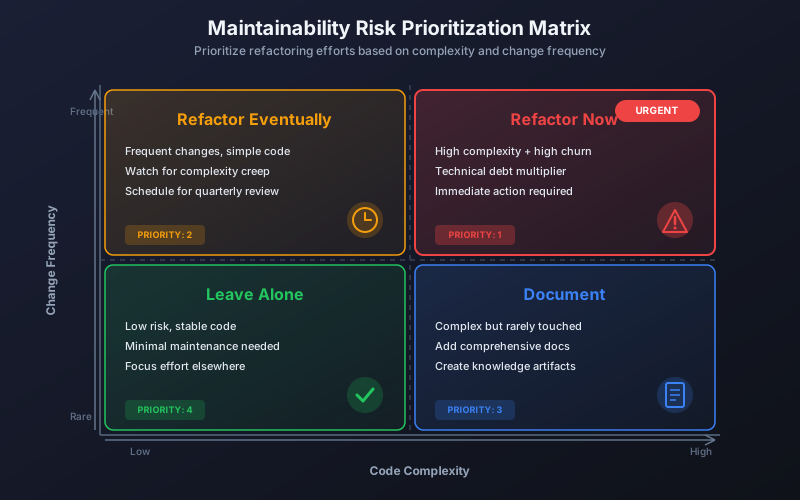
Not all maintenance risks are equal. Prioritize based on:
MAINTENANCE RISK PRIORITIZATION MATRIX

                      LOW CHANGE FREQUENCY    HIGH CHANGE FREQUENCY
                    +----------------------+------------------------+
    HIGH RISK       |  Monitor             |  FIX IMMEDIATELY       |
    (complexity,    |  Address when it     |  Every change is       |
     churn, silos)  |  becomes active      |  expensive and risky   |
                    +----------------------+------------------------+
    LOW RISK        |  Ignore              |  Watch                 |
    (stable, clear  |  Not worth the       |  Could become a        |
     ownership)     |  investment          |  problem               |
                    +----------------------+------------------------+

Priority order:
1. High Risk + High Frequency (top right) - immediate action
2. Low Risk + High Frequency (bottom right) - prevent degradation
3. High Risk + Low Frequency (top left) - scheduled cleanup
4. Low Risk + Low Frequency (bottom left) - don't touch
Improvement Strategies by Dimension
| Problem | Strategies |
|---|---|
| High Churn |
|
| High Complexity |
|
| Knowledge Silos |
|
| Low Test Coverage |
|
The 20% Rule
Approximately 20% of files cause 80% of maintenance cost (the Pareto principle in action). Your dashboard should help you identify and prioritize that critical 20%.
* Our Take
Don't try to improve everything. Ruthlessly prioritize the intersection of high-risk and high-frequency.
Teams that spread maintainability efforts across the whole codebase make slow progress everywhere. Teams that focus intensely on the top 5 problem files each quarter see dramatic improvements in those areas - and those are the areas that matter most. Be strategic, not comprehensive.
Measuring Improvement ROI
When you invest in maintainability improvements, track the outcomes:
- Before/after churn rate: Did refactoring reduce subsequent churn?
- Cycle time in area: Are PRs touching this code faster now?
- Defect rate: Fewer bugs in the improved area?
- Developer sentiment: Do developers still dread working here?
For more on making the business case for maintainability investments, see our Quantifying Technical Debt guide.
Frequently Asked Questions
Static analysis tools that calculate MI can provide useful input, but don't rely on them exclusively. A file with a perfect MI score that's constantly churning and has a single owner is more expensive than a file with mediocre MI that's stable and well-understood. Use MI as one input among many, not the final answer.
Getting Started
- Identify your hotspots: Use File Hotspots to find files with high change frequency and churn
- Map ownership: Check Knowledge Silos to understand who knows what
- Pick your top 3: Select the three highest-impact maintainability risks to address this quarter
- Set baseline metrics: Record current churn rate, cycle time, and defect rate for those areas
- Execute improvements: Allocate dedicated time for improvement work
- Measure results: After 4-6 weeks, compare metrics to baseline
For related guidance, explore our Tech Lead Metrics Guide which covers broader code quality responsibilities.

See which files and owners carry your real risk
Connect GitHub and get your churn hotspots, single-owner modules, and review-depth signals ranked by exposure. No repository cloning, no file contents read.
Read-only GitHub · Your code stays yours · Team-level by default · No credit card
See These Features in Action
Find high-churn files and correlate change frequency with ownership.
Flag large PRs, single-owner changes, and untested modifications.
Related Guides
Your Technical Debt Costs $127K/Year. Here's the Math
Stop calling it "technical debt" - call it what it is: an engineering tax. Learn to calculate the Debt Tax Rate, quantify innovation drag, and build a board-ready business case.
High Code Churn Isn't Bad. Unless You See This Pattern
Learn what code churn rate reveals about your codebase health, how to distinguish healthy refactoring from problematic rework, and when to take action.
The Tech Lead Dashboard Your Manager Shouldn't See
The metrics that matter for tech leads - code quality, technical debt, architecture decisions, and delivery. Different from EM metrics, focused on technical excellence.
Git Branch Aging Report: Finding and Cleaning Stale Branches
Track branch aging to identify technical debt. Learn branch lifecycle stages, hygiene policies that scale, and safe cleanup automation strategies.