
Compare the finished analysis before you choose a platform
See the report CodePulse produces from read-only GitHub workflow data, or connect your own repositories and evaluate the fit with real evidence.
Read-only GitHub · Your code stays yours · Team-level by default · No credit card
GitLab has invested heavily in Value Stream Management (VSM) and built-in analytics. For GitLab-native teams, these tools provide solid visibility without additional vendors. But as organizations scale, many find themselves searching for alternatives that offer deeper insights, better visualization, or cross-platform capabilities.
This guide examines GitLab's built-in analytics objectively, explains where third-party tools add value, and helps you decide whether your team needs something beyond GitLab's native capabilities.
"GitLab's VSM is genuinely good for GitLab-only shops. The question isn't whether it works - it's whether it's enough for your specific visibility needs."
GitLab's Built-in Analytics: Strengths and Gaps
Before evaluating alternatives, let's give GitLab credit where it's due. Their analytics suite has matured significantly, especially in recent versions.
What GitLab Does Well
Value Stream Analytics (Premium/Ultimate): GitLab provides end-to-end visibility from issue creation through deployment. The default stages - Issue, Plan, Code, Test, Review, Staging, Production - map well to typical software delivery pipelines.
DORA metrics (Ultimate): GitLab tracks all four DORA metrics natively: deployment frequency, lead time for changes, time to restore service, and change failure rate. For organizations using GitLab CI/CD exclusively, this data is automatically captured without additional configuration.
Merge Request Analytics: Throughput tracking, reviewer workload, and time-in-review metrics are available out of the box.
Contribution Analytics: Activity tracking across commits, merge requests, and issues - useful for understanding team engagement patterns.
Where GitLab Analytics Fall Short
Despite solid fundamentals, GitLab's analytics have notable gaps that drive teams to seek alternatives:
| Limitation | Impact |
|---|---|
| Tier-locked features | VSM requires Premium ($29/user/month); DORA requires Ultimate ($99/user/month) |
| Limited customization | Pre-defined stages don't match all workflows; custom stages require configuration |
| No cross-platform analysis | Can't correlate with GitHub repos or non-GitLab CI systems |
| Basic visualization | Charts are functional but lack the depth of dedicated analytics platforms |
| Limited drill-down | Identifying root causes often requires manual investigation |
| No code health metrics | No built-in hotspot detection or knowledge silo identification |
| Minimal executive reporting | Dashboards are engineer-focused; board-level summaries require manual work |
"The $99/user/month Ultimate tier for DORA metrics prices out many mid-market teams - exactly the organizations that need delivery performance data most."
When GitLab VSM Isn't Enough
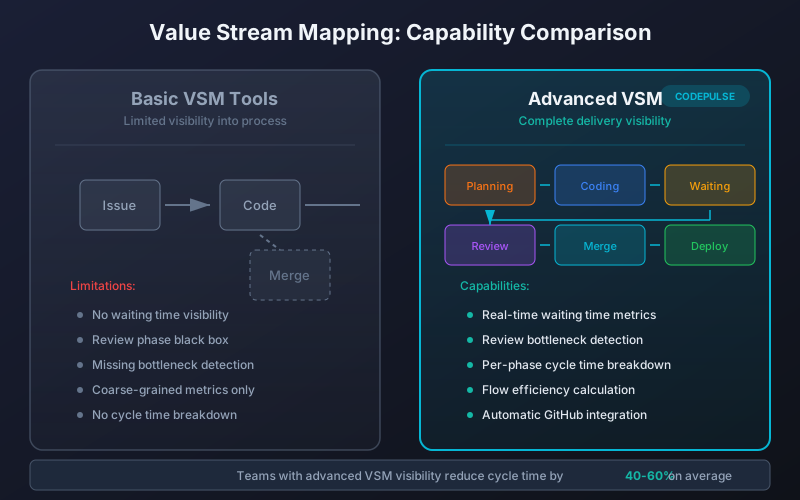
Consider third-party alternatives when you experience any of these situations:
Multi-Platform Reality
Many organizations don't live in a single-platform world. Acquisitions, legacy systems, and contractor teams often mean a mix of GitLab, GitHub, and sometimes Bitbucket. GitLab's analytics only see GitLab data - creating blind spots.
Cost Pressure on Ultimate Tier
At $99/user/month, GitLab Ultimate with DORA metrics costs $118,800/year for a 100-person engineering organization. Third-party tools often provide equivalent DORA tracking at a fraction of that cost.
Executive Reporting Requirements
VPs and CTOs rarely want to log into GitLab and navigate dashboards. They need summary views, health grades, and trend visualizations designed for board presentations. GitLab's dashboards are built for practitioners, not executives.
Deeper Analysis Needs
GitLab shows you what's happening but often not why. Understanding review bottlenecks, identifying knowledge silos, or tracking cycle time breakdown at a granular level requires tools built specifically for that analysis.
🔥 Our Take
Let's be transparent: CodePulse is currently GitHub-focused. We don't support GitLab today.
GitLab integration is on our roadmap based on customer demand. If you're evaluating CodePulse and your primary platform is GitLab, we're not the right fit right now - and we'd rather be honest about that than waste your time. For GitHub teams, or organizations considering a GitHub migration, we offer compelling advantages detailed below.
Third-Party Alternatives Compared
Several platforms specialize in engineering analytics and support GitLab. Here's how they compare:
| Tool | GitLab Support | Key Strength | Pricing Model |
|---|---|---|---|
| LinearB | Full support | Workflow automation, Jira integration | Per-developer |
| Jellyfish | Full support | Portfolio-level visibility, investment tracking | Enterprise (sales required) |
| Sleuth | Full support | DORA metrics, deployment tracking | Free tier + per-developer |
| Waydev | Full support | Work analytics, output measurement | Per-developer |
| Pluralsight Flow | Full support | Skills mapping, learning integration | Enterprise bundle |
| Swarmia | Limited | Developer experience, working agreements | Per-developer (EUR) |
| CodePulse | GitHub only (currently) | GitHub depth, code health, fast setup | Per-developer |
LinearB for GitLab Teams
LinearB offers robust GitLab integration with workflow automation features like automatic reviewer assignment and PR labeling. Their "Work Breakdown" categorizes engineering time into new work, bugs, and refactoring. Strong Jira integration makes them a good choice for organizations using both GitLab and Jira.
Best for: Teams wanting automation alongside analytics. Requires buy-in to LinearB's opinionated workflow approach.
Jellyfish for GitLab Enterprises
Jellyfish focuses on engineering portfolio management - understanding how engineering investment maps to business initiatives. Their GitLab support is comprehensive, and they excel at the "where does our engineering time go?" question executives frequently ask.
Best for: Large organizations (100+ engineers) with portfolio-level visibility needs. Enterprise pricing means it's overkill for smaller teams.
Sleuth for DORA Without Ultimate
If your primary need is DORA metrics but you can't justify GitLab Ultimate's cost, Sleuth provides deployment tracking and DORA calculations at a lower price point. Their free tier covers small teams.
Best for: Cost-conscious teams that need DORA metrics without the full GitLab Ultimate investment.
CodePulse for GitHub (and GitLab Roadmap)
While CodePulse doesn't support GitLab today, organizations using GitHub or planning a migration should understand what we offer:
What Makes CodePulse Different
- GitHub depth over breadth: Rather than shallow integrations with many platforms, we go deep on GitHub - extracting insights most tools miss
- 5-minute setup: Connect GitHub, wait for sync, start getting insights. No multi-day integration projects
- Code health focus: File hotspots, knowledge silos, and risk detection that GitLab's native analytics don't provide
- Executive-ready summaries: Health grades (A-F) designed for board presentations, not just engineering dashboards
- Anti-surveillance philosophy: Team metrics over individual tracking. We believe velocity is a signal, not a goal
📊 How to See This in CodePulse
For GitHub teams evaluating CodePulse vs GitLab alternatives:
- Dashboard shows cycle time breakdown, delivery velocity, and code quality metrics
- File Hotspots identifies high-risk code areas GitLab doesn't track
- Executive Summary provides board-ready health grades across delivery, quality, and collaboration
- Review Network visualizes collaboration patterns and bottlenecks
GitLab Support: On the Roadmap
We're actively tracking demand for GitLab integration. If GitLab support would influence your decision, reach out - customer demand directly shapes our roadmap priorities. In the meantime, if you're considering a GitHub migration, CodePulse can be part of that evaluation.
Choosing the Right Analytics Stack
Your choice depends on several factors. Use this decision framework:
Stick with GitLab Built-in Analytics If...
- You're already on GitLab Ultimate and using DORA dashboards
- Your entire engineering organization uses GitLab exclusively
- Current analytics meet your visibility needs
- Budget constraints prevent additional tooling
- You prefer fewer vendors to manage
Add a Third-Party Tool If...
- You need cross-platform visibility (GitLab + GitHub + Bitbucket)
- GitLab's pricing tiers lock out metrics you need
- Executive reporting requires polished, board-ready dashboards
- You need deeper analysis: code health, knowledge silos, risk detection
- Workflow automation would improve team efficiency
- Current analytics don't answer "why is this happening?"
Decision Matrix by Organization Size
| Team Size | Recommendation |
|---|---|
| Small (5-20 engineers) | GitLab Premium's VSM often sufficient; consider Sleuth for DORA |
| Mid-market (20-100) | Third-party tools provide better ROI than GitLab Ultimate; evaluate LinearB, Waydev |
| Enterprise (100+) | Portfolio-level tools like Jellyfish; consider GitLab Ultimate if all-in on GitLab |
| Multi-platform | Third-party required; GitLab can't see non-GitLab data |
"The best analytics investment is the one that changes behavior. A $10,000/year tool that reduces cycle time by 20% delivers more value than a $50,000 platform that generates reports nobody reads."
Frequently Asked Questions
Absolutely. Many organizations use GitLab's native dashboards for day-to-day engineering work and a third-party tool for executive reporting and deeper analysis. There's no conflict - they pull from the same Git data.
Making Your Decision
GitLab's built-in analytics are capable tools that work well for GitLab-centric organizations with appropriate tier subscriptions. They're not broken - they're just not built for every use case.
If you need cross-platform visibility, cost-effective DORA metrics, executive-ready reporting, or deeper analytical capabilities, third-party tools fill those gaps. The key is matching tool capabilities to your specific needs rather than assuming one solution fits all situations.
For further reading on engineering analytics options, see our Engineering Analytics Tools Comparison guide, which covers the broader market beyond GitLab-specific considerations.

Evaluate CodePulse against your own delivery history
A comparison table only goes so far. Connect read-only GitHub in about five minutes and judge the output on your repositories, at one flat price, with no per-seat math.
Read-only GitHub · Your code stays yours · Team-level by default · No credit card
See These Features in Action
Break down cycle time into coding, waiting, review, and merge phases.
Track all four DORA metrics and benchmark against industry standards.
Related Guides
Jellyfish vs LinearB vs Swarmia: Full 2026 Comparison
Compare Jellyfish, LinearB, Swarmia, Allstacks, Haystack and more engineering analytics tools. Features, pricing, cycle time benchmarks, and integrations.
The 4-Minute Diagnosis That Reveals Why Your PRs Are Stuck
Learn to diagnose exactly where your PRs are getting stuck by understanding the 4 components of cycle time and how to improve each one.
DORA Metrics Explained: The 4 Keys Without the Hype
A complete breakdown of the four DORA metrics - deployment frequency, lead time, change failure rate, and MTTR - with honest benchmarks and gaming traps to avoid.
uSeven Alternative: Engineering Analytics Comparison
Compare uSeven (7pace) with CodePulse. Understand the difference between time tracking and engineering analytics to choose the right tool.