
Compare the finished analysis before you choose a platform
See the report CodePulse produces from read-only GitHub workflow data, or connect your own repositories and evaluate the fit with real evidence.
Read-only GitHub · Your code stays yours · Team-level by default · No credit card
The developer productivity tools market is crowded - AI assistants, analytics platforms, project management tools, all promising to make your team faster. This guide cuts through the noise. We'll cover tool categories, evaluation criteria, and honest trade-offs to help you build a productivity stack that actually works. For the fuller SDLC-tooling picture - how these productivity categories sit inside the overall software development lifecycle - see our SDLC tools guide.
What are the best developer productivity tools in 2026?
Developer productivity tools fall into five categories: AI coding assistants (GitHub Copilot, Cursor, Claude), engineering analytics platforms (CodePulse, LinearB, Swarmia), project management (Jira, Linear, Shortcut), CI/CD (GitHub Actions, CircleCI), and developer experience platforms (Backstage, Port). Most teams need one tool from each category. Start with an AI assistant and one analytics platform. CodePulse covers engineering analytics with a 5-minute GitHub setup and free tier.
This guide helps engineering leaders understand what each tool category does, when you need it, and what to watch out for.
🔥 Our Take
Your engineering team doesn't need 7 analytics tools. They need one good one, used consistently. Tool sprawl is a symptom of not knowing what you actually need to measure.
Before buying another dashboard, ask: what decision will this data inform? If you can't answer that, you don't need the tool. Every tool adds cognitive load - more dashboards doesn't mean more insight, it often means less.
What Makes a Developer Productivity Tool?
A developer productivity tool should do at least one of these things well:
- Remove friction: Automate repetitive tasks, reduce context switching, or eliminate manual steps
- Provide visibility: Surface information developers need when they need it, without hunting through systems
- Enable collaboration: Make it easier for team members to work together effectively
- Offer insight: Help teams understand patterns, bottlenecks, and improvement opportunities
"The best productivity tool is the one that disappears. If engineers are spending time IN the tool rather than building software, you've failed."
The key question isn't "what features does this tool have?" It's "will my team actually use this, and will it make their work easier?" Not sure where to start? Try our developer productivity tool recommender for personalized suggestions based on your team's needs.
Tool Categories: What You Actually Need
1. IDEs and Code Editors
The foundation of developer productivity. A good IDE reduces cognitive load by providing intelligent code completion, error detection, and navigation.
| Tool | Best For | Key Strength |
|---|---|---|
| VS Code | Multi-language, extensibility | Massive extension ecosystem |
| JetBrains (IntelliJ, PyCharm, etc.) | Deep language support | Intelligent refactoring |
| Neovim | Power users, speed | Keyboard-driven efficiency |
| Cursor | AI-first development | Native AI integration |
When you need to invest: If developers complain about slow indexing, poor autocomplete, or missing language support. IDE productivity gains compound daily.
2. AI Coding Assistants
AI assistants accelerate coding by generating boilerplate, suggesting completions, and explaining unfamiliar code. According to GitHub's research, developers using Copilot complete tasks 55% faster on average.
| Tool | Best For | Key Strength |
|---|---|---|
| GitHub Copilot | General-purpose coding | Deep GitHub integration, context awareness |
| Cursor | AI-native workflow | Full-file context, multi-model support |
| Amazon CodeWhisperer | AWS development | Built-in security scanning |
| Tabnine | Enterprise, privacy | Self-hosted option, learns team patterns |
⚠️ Warning: AI assistants boost productivity for routine tasks but can introduce subtle bugs in complex logic. Always review generated code carefully - the time saved generating is lost to debugging if you skip review.
When you need this: When developers spend significant time on boilerplate, documentation lookups, or explaining code to new team members.
3. Software Engineering Intelligence (SEI) Platforms
SEI platforms aggregate data from your development tools to provide visibility into engineering performance, bottlenecks, and trends. This is where CodePulse fits.
| Tool | Best For | Key Strength |
|---|---|---|
| CodePulse | GitHub-focused teams | Depth without complexity, cycle time breakdown |
| LinearB | Git + Jira correlation | Project management integration |
| Jellyfish | Enterprise, board reporting | Investment allocation analysis |
| Swarmia | Developer experience focus | Working agreement tracking |
When you need this: When you can't answer basic questions like "what's our cycle time?" or "where are our review bottlenecks?" or when leadership asks for engineering metrics and you're pulling data manually.
For detailed comparisons, see our Engineering Analytics Tools Comparison.
4. Project Management and Collaboration
These tools coordinate work across teams - tracking what's being built, who's working on what, and what's blocked.
| Tool | Best For | Key Strength |
|---|---|---|
| Linear | Fast-moving product teams | Speed, modern UX, GitHub sync |
| Jira | Enterprise, complex workflows | Customization, reporting depth |
| Shortcut | Engineering-led teams | Developer-friendly interface |
| GitHub Projects | GitHub-native workflow | Zero context switching |
When you need this: When work is lost, duplicated, or blocked because people don't know who's doing what. But be careful - over-engineering your project management creates more overhead than it solves.
5. CI/CD and Build Tools
Fast feedback loops are crucial for productivity. If developers wait 30 minutes for tests to run, they'll context-switch and lose focus.
| Tool | Best For | Key Strength |
|---|---|---|
| GitHub Actions | GitHub-native teams | Zero config, marketplace ecosystem |
| CircleCI | Complex pipelines | Parallelism, caching |
| BuildKite | Scale, customization | Self-hosted runners, speed |
| Gradle Enterprise | Large codebases | Build caching, performance analytics |
When you need to invest: If builds take more than 10 minutes, you're bleeding productivity. For every developer, every day.
The 6 Criteria for Evaluating Productivity Tools
Before adding any tool to your stack, evaluate it against these criteria:
1. Time to Value
How quickly can your team start using the tool productively? Tools requiring weeks of setup and training rarely deliver their promised value.
- Good: Working demo in under an hour, team productive in a week
- Bad: Multi-week implementation, dedicated admin required
2. Integration Depth
Does the tool work with your existing stack, or does it create another silo? The best tools enhance existing workflows rather than replacing them.
- Good: Native GitHub/GitLab integration, Slack notifications, SSO
- Bad: Requires manual data export, separate login, no API
3. Signal-to-Noise Ratio
Does the tool surface actionable insights, or does it drown you in data? More metrics isn't better if you can't find what matters.
- Good: Curated dashboards, intelligent alerts, clear recommendations
- Bad: 100 metrics with no guidance on which matter
4. Team Adoption Likelihood
Will developers actually use this? The most powerful tool is worthless if it sits unused. Consider UX, learning curve, and whether it fits existing habits.
- Good: Developers ask for it, fits existing workflow
- Bad: Requires mandates, changes how developers work
5. Total Cost of Ownership
License fees are just the start. Factor in setup time, ongoing maintenance, training, and the cost of context switching between tools.
- Good: Transparent pricing, minimal maintenance, reduces other costs
- Bad: Hidden fees, requires dedicated admin, adds to tool sprawl
6. Exit Path
What happens if you need to switch tools? Data portability, API access, and export capabilities matter more than vendors want to admit.
- Good: Full data export, standard formats, documented API
- Bad: Proprietary formats, no export, vendor lock-in
Tool Evaluation Scorecard
=========================

Criterion              Weight    Score (1-5)    Weighted
─────────────────────────────────────────────────────────
Time to Value          25%       [   ]          [   ]
Integration Depth      20%       [   ]          [   ]
Signal-to-Noise        20%       [   ]          [   ]
Adoption Likelihood    15%       [   ]          [   ]
Total Cost             10%       [   ]          [   ]
Exit Path              10%       [   ]          [   ]
─────────────────────────────────────────────────────────
TOTAL                  100%                     [   ]

Scoring Guide:
5 = Exceptional    4 = Strong    3 = Adequate
2 = Weak           1 = Deal-breaker
Common Mistakes in Tool Selection
🔥 Our Take
There is no "best" engineering analytics tool. There's the tool that makes the right trade-offs for your situation. Be honest about what you need.
CodePulse is great for GitHub-focused teams who want depth without integration complexity. It's wrong for teams who need Jira correlation or non-GitHub source control. Competitor comparisons should be honest, not propaganda.
Mistake 1: Buying Features You Won't Use
Enterprise tools have 100 features. You'll use 10. Don't pay for - or wade through - the other 90. Start with what you need today.
Mistake 2: Ignoring Change Management
A tool that requires behavior change needs a change management plan. Without it, the tool sits unused while you keep paying for it.
Mistake 3: Letting Vendors Define Requirements
Define your needs before talking to vendors. Otherwise you'll end up with what they sell instead of what you need.
Mistake 4: Underestimating Integration Work
"Easy integration" often means "we have an API." The actual work of connecting systems, mapping data, and maintaining integrations is usually more than expected.
"The tool you configure correctly beats the tool with better features that you configure wrong."
Building Your Productivity Stack
Here's a pragmatic approach to building a productivity tool stack:
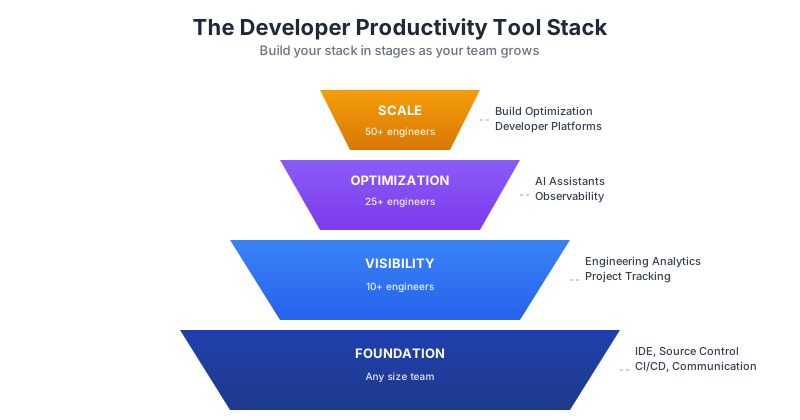
Stage 1: Foundation (Teams of Any Size)
- IDE: Standardize on one, configure it well
- Source Control: GitHub or GitLab (you probably already have this)
- CI/CD: Automated tests and deployment
- Communication: Slack/Teams for async, video for sync
Stage 2: Visibility (10+ Engineers)
- Engineering Analytics: Cycle time, review patterns, quality metrics
- Project Tracking: Lightweight work coordination
- Documentation: Searchable knowledge base
Stage 3: Optimization (25+ Engineers)
- AI Assistants: Code generation, review assistance
- Observability: Production monitoring, error tracking
- Developer Portals: Internal platforms, service catalogs
Stage 4: Scale (50+ Engineers)
- Build Optimization: Caching, parallelization, build analytics
- Advanced Analytics: Custom metrics, trend analysis, forecasting
- Platform Engineering: Internal developer platforms
For guidance on measuring the ROI of your tools, see our Developer Tooling ROI Guide.
How CodePulse Fits In
CodePulse is a Software Engineering Intelligence platform focused on GitHub-based teams. Here's where it fits in your stack:
📊 What CodePulse Does
- Cycle time breakdown - See where time goes: coding, waiting, review, merge
- Review network analysis - Identify bottlenecks and collaboration patterns
- Automated alerts - Get notified when metrics cross thresholds
- Developer recognition - Celebrate contributions across 15 categories
- Executive dashboards - Board-ready engineering health reports
CodePulse Is Right For
- GitHub-centric teams (single source of truth)
- Teams wanting depth without integration complexity
- Leaders who need visibility without surveillance
- Organizations measuring productivity sustainably
CodePulse Isn't Right For
- Teams using GitLab, Bitbucket, or Azure DevOps as primary source
- Organizations requiring tight Jira correlation
- Teams needing custom data warehouse integration
That's honest. The right tool for you depends on your specific situation. For detailed comparisons with alternatives, see our Jellyfish Alternative or LinearB Alternative guides.
"The best tool is the one your team will actually use. Everything else is just marketing."
Frequently Asked Questions
Most teams need five tool types: an AI coding assistant (Copilot or Cursor), an engineering analytics platform (CodePulse, LinearB, or Swarmia), project management (Jira or Linear), CI/CD (GitHub Actions or CircleCI), and optionally a developer portal (Backstage). One tool per category is the right target.

Evaluate CodePulse against your own delivery history
A comparison table only goes so far. Connect read-only GitHub in about five minutes and judge the output on your repositories, at one flat price, with no per-seat math.
Read-only GitHub · Your code stays yours · Team-level by default · No credit card
See These Features in Action
Compare contribution patterns for coaching, not surveillance.
Board-ready engineering performance in a single page.
Related Guides
Jellyfish vs LinearB vs Swarmia: Full 2026 Comparison
Compare Jellyfish, LinearB, Swarmia, Allstacks, Haystack and more engineering analytics tools. Features, pricing, cycle time benchmarks, and integrations.
The ROI Template That Gets Developer Tools Approved
The exact ROI calculation and business case template that gets CFOs to approve developer tool purchases.
Happy Developers Leave Breadcrumbs in Git
Learn how to measure and improve developer experience using behavioral metrics from GitHub, not just surveys. Covers flow state, cognitive load, and collaboration quality.
Your IDP Is Failing. Here's How to Prove It (Or Fix It)
Learn how to measure the success of your Internal Developer Platform. Covers adoption metrics, developer experience, delivery impact, and ROI calculation.
Engineering Management Software: What Actually Helps
The engineering tool market is confusing. This guide maps the categories - project management, portfolio, DevEx, and engineering intelligence - and helps you choose what you actually need.
Best Engineering Analytics Tools for 2026 (Ranked by Real Users)
We ranked the 10 best engineering analytics tools based on metric depth, setup speed, pricing transparency, and privacy posture. Honest pros and cons for each.
What is Developer Productivity? (It's Not What You Think)
Developer productivity means sustainable delivery with team health - not lines of code. Learn the frameworks, dimensions, and what NOT to measure.
How to Track Developer Productivity Without Creating Surveillance
Build a sustainable tracking system with dashboards, alerts, and review cadences that surfaces the right information at the right time - without drowning your team in data.