
Compare the finished analysis before you choose a platform
See the report CodePulse produces from read-only GitHub workflow data, or connect your own repositories and evaluate the fit with real evidence.
Read-only GitHub · Your code stays yours · Team-level by default · No credit card
Cursor and GitHub Copilot solve the same problem - AI assistance while you write code - from opposite architectural starting points. Cursor rebuilt the editor itself around AI, forking VS Code so every feature shares deep context about your codebase by default. Copilot stayed an extension, meeting developers inside whatever editor they already use, trading some depth of integration for zero switching cost. Neither approach is wrong; they target different tolerances for change, and the pricing gap between them is wide enough that "which is better" is really a question about how much you value that context versus how much you value not touching your setup.
Cursor vs GitHub Copilot: which should you pick?
Cursor is a full AI-native IDE (a VS Code fork) with deep, shared context across completion, chat, and multi-file agentic edits (Composer/Agent mode) - but it means switching your team's daily editor, and it costs more: Pro is $20/month vs Copilot Pro's $10/month, and Teams is $40/user/month vs Copilot Business's $19/user/month. Copilot is an extension for your existing editor (VS Code, JetBrains, and others), with a terminal agent alongside it since February 2026 and the tightest GitHub-native integration of any AI coding tool, but individually shallower context-sharing between its in-editor features. Pick Cursor if you're willing to switch editors for a more integrated AI experience and heavier agentic use; pick Copilot if you want to keep your current setup or need GitHub-native workflows.
Both companies are moving toward the same feature set from different directions: Cursor is adding GitHub-adjacent workflow features, and Copilot's Agent mode is closing the gap with Cursor's multi-file editing. The comparison that matters today is architectural, not feature-by-feature.
Cursor asks you to change editors. Copilot asks you to change nothing.
What Are Cursor and GitHub Copilot Built For?
Cursor is a standalone code editor - a fork of VS Code - built with AI as the organizing idea rather than a feature bolted on afterward. Its Tab completion, chat panel, and Composer/Agent mode for multi-file edits all draw on the same codebase-wide context, because the editor itself was designed around feeding that context to the model. This is Cursor's clearest structural advantage: features that are separate products in other tools (completion, chat, agentic editing) share one context model here. The cost is that adopting Cursor means adopting a new editor, extensions and keybindings notwithstanding.
GitHub Copilot takes the opposite bet: meet developers inside the editor they already have. It ships as an extension for VS Code, JetBrains IDEs, Visual Studio, Neovim, and github.com itself, so there's no migration cost - you install it and keep every other habit, keybinding, and extension you already rely on. Copilot's completions, Chat, editor Agent mode, and separate autonomous coding agent (which opens PRs from an assigned issue) are less unified than Cursor's single-editor context model, but that trade buys the widest possible reach and, for GitHub-centric teams, the deepest native integration with PRs, Issues, and Actions of any AI coding tool.
Put simply: Cursor bets that owning the editor produces a better AI experience. Copilot bets that meeting developers where they already are is worth some lost integration depth. Both bets are reasonable, and which one pays off for a given team depends more on switching-cost tolerance than on either tool's raw model quality.
How Do Their Features Compare?
We think of this as the Editor vs. Extension split. It shapes almost every other difference between the two tools, including price: owning the full editor is a bigger product to build and maintain, and Cursor's pricing across every tier reflects that.
| Aspect | Cursor | GitHub Copilot |
|---|---|---|
| Form factor | Standalone editor (VS Code fork) | Extension for VS Code, JetBrains, Visual Studio, Neovim, github.com |
| Switching cost | Full editor change (imports VS Code extensions/keybindings) | None - installs into your existing editor |
| Multi-file agentic editing | Composer/Agent mode, deep codebase-wide context by design | Editor Agent mode plus a separate coding agent for issue-to-PR work |
| GitHub-native depth | General Git support, no GitHub-specific UI surface | Deepest of any tool: PRs, Issues, Actions, review comments |
| Individual pricing | Hobby free, Pro $20/mo, Pro+ $60/mo, Ultra $200/mo | Free, Pro $10/mo, Pro+ $39/mo |
| Team pricing | Teams $40/user/mo, Enterprise custom | Business $19/user/mo, Enterprise $39/user/mo |
| CodePulse can measure it automatically | No - no usage API today; needs a self-reported adoption date via AI Tools ROI | Yes - GitHub's usage API feeds real cost-per-PR; coding-agent commits also carry a Co-Authored-By trailer |
How Do Cursor and GitHub Copilot Price?
Cursor's pricing is built around a credit-based model introduced in mid-2025: every paid tier includes a credit pool roughly equal to its monthly price, and those credits deplete only when you manually select a frontier model like Claude Sonnet or GPT-4 rather than Cursor's own unlimited Auto mode. The tiers run Hobby (free), Pro ($20/month), Pro+ ($60/month, roughly triple Pro's usage pool), Ultra ($200/month, roughly twenty times Pro's pool), Teams ($40/user/month), and custom-priced Enterprise. Annual billing on the individual plans cuts roughly 20% off the monthly price.
GitHub Copilot starts cheaper at every comparable tier: Free with limited completions, Pro at $10/month, Pro+ at $39/month for heavier individual use, Business at $19/user/month, and Enterprise at $39/user/month. Since June 2026, paid tiers include a monthly AI Credit allowance metering premium-model use, replacing the older Premium Requests system; ordinary code completions remain free on any paid plan regardless of credit usage.
The gap is largest at the team level: Cursor Teams at $40/user/month costs roughly double Copilot Business at $19/user/month for a comparably sized rollout. For a 50-person engineering org, that's the difference between about $11,400/year and $2,000/month - real enough money to be worth measuring the return on before committing to either at scale. Both vendors adjust these tiers regularly; check cursor.com/pricing and github.com/features/copilot/plans before budgeting a rollout.
Which Team Should Choose Which?
| Your Situation | Recommendation |
|---|---|
| Your team is open to switching editors for a more integrated AI experience | Cursor |
| You have strong per-IDE preferences you don't want to disrupt | GitHub Copilot |
| Heavy multi-file agentic editing is your main use case | Cursor (or Claude Code) |
| GitHub-native workflows (Issues to PR, review comments) matter most | GitHub Copilot |
| Per-seat budget is tight and needs to stay predictable | GitHub Copilot |
| You want to prove the extra Cursor spend is worth it before renewing | Either tool, plus a before/after ROI comparison |
* Our Take
Cursor's premium over Copilot is real money at team scale, and "it feels more integrated" is not by itself a budget justification.
We'd rather see a team pilot Cursor with a handful of developers, measure their cycle time and PR size before and after, and then decide whether the roughly 2x per-seat premium over Copilot Business is earning its keep - rather than rolling it out org-wide because the demo looked good. The same discipline applies in reverse: don't keep paying for Copilot seats nobody's actually using just because it's the cheaper default.
Where Does CodePulse Fit?
CodePulse doesn't measure Cursor and Copilot usage the same way, and it's worth being honest about why: GitHub exposes a usage API for Copilot, and Anthropic exposes one for Claude Code, but Cursor doesn't have an equivalent today. For Copilot, that means CodePulse's AI ROI page imports real per-developer spend directly from GitHub and computes an actual cost-per-PR figure - no survey needed. Copilot's coding agent commits also carry a Co-Authored-By trailer, which feeds a second, git-based rework-rate comparison. Neither mechanism has a Cursor equivalent: Cursor's Composer/Agent-mode edits don't carry a distinguishing trailer, and there's no usage API to import spend from.
* How to See This in CodePulse
For Copilot, check AI ROI for the imported, no-survey view - per-developer spend, cost-per-PR, and seat coverage straight from GitHub's own usage data. For Cursor, the useful view is AI Tools ROI, which covers all eleven supported tools including Cursor:
- Each developer records which tool they use and when they adopted it - a small, one-time input
- CodePulse then compares that developer's real delivery metrics before and after adoption
- Aggregate the comparison across your Cursor-using developers to see whether the extra per-seat spend is actually moving cycle time or PR throughput
That asymmetry is worth remembering when you compare the two tools' costs side by side: Copilot's cost-per-PR number comes from GitHub's own billing data, while Cursor's ROI case rests on a self-reported before/after comparison. Both are real signals, but they're not the same kind of evidence, and a fair comparison should say so rather than quote one number as if it were the other.
A $40-a-seat editor and a $19-a-seat extension both deserve the same question before renewal: what did it actually change?
For the Claude Code side of this comparison, see our Claude Code vs Copilot guide, or our broader GitHub Copilot alternatives guide for how the rest of the field compares. For the measurement question itself, see our AI coding tools impact guide.
If you want to see your own AI-tool ROI comparison before renewing anything, start a free CodePulse trial. It reads directly from your GitHub activity, so there's real data to look at within minutes.
Frequently Asked Questions
Cursor is a full IDE - a fork of VS Code - built around AI from the ground up, so its Tab completion, chat, and Composer/Agent mode all share deep context about your whole codebase by default. GitHub Copilot is an extension you add to an editor you already use (VS Code, JetBrains, Visual Studio, Neovim), plus a terminal agent of its own since Copilot CLI went generally available in February 2026 - which means less context sharing between its in-editor features but zero switching cost if you don't want to change editors. If you're willing to move your daily driver, Cursor's AI-native design generally gives a more integrated experience; if you want to keep your current setup and IDE plugins, Copilot slots in without disruption.
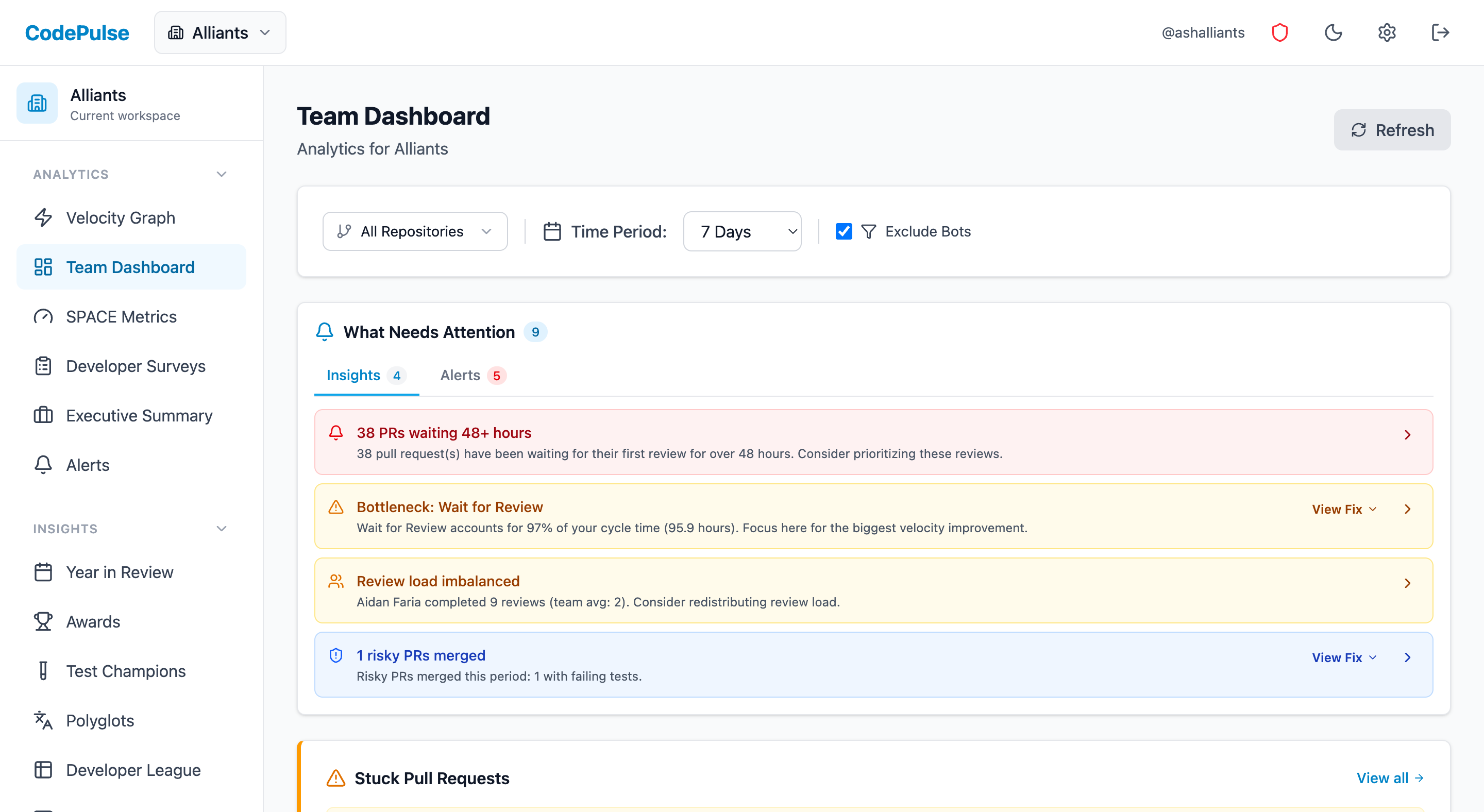
Evaluate CodePulse against your own delivery history
A comparison table only goes so far. Connect read-only GitHub in about five minutes and judge the output on your repositories, at one flat price, with no per-seat math.
Read-only GitHub · Your code stays yours · Team-level by default · No credit card
See These Features in Action
Explore all featuresRelated Guides
Claude Code vs GitHub Copilot: Which Fits? (2026)
Copilot CLI went GA in February 2026, so both tools now run a terminal agent. A head-to-head on what actually differs: model choice, AI Credits vs a Claude plan, GitHub depth, and surface spread.
GitHub Copilot Alternatives Compared (2026)
Cursor, Claude Code, Amazon Q Developer, Tabnine, and more - the AI coding assistants teams actually evaluate against GitHub Copilot, and what each trades off.
AI Coding Tools: What Actually Changed After 6 Months
Measure the real impact of AI coding tools like Copilot and Cursor on your engineering team. Data-driven framework using cycle time, code churn, and review metrics.
AI Code Review Tools: Which Actually Save Time (2026 Tests)
We tested 8 AI code review tools to see which caught real bugs, which added noise, and the metrics that prove whether they work for your team.