
See exactly where your delivery flow is waiting
Preview the phase-by-phase report for review pickup, active review, and merge time. Connect in about five minutes; the initial analysis runs after sync.
Read-only GitHub · Your code stays yours · Team-level by default · No credit card
A pull request is the unit almost everything else in modern software delivery gets measured against - cycle time, review coverage, deployment frequency, even performance conversations - so it's worth being precise about what it actually is, not just how to use one. This is the short, definitional version: what a PR contains, what it's for, and how the GitHub and GitLab versions of the concept line up.
What is a pull request?
A pull request (PR) is a request to merge a set of code changes from one branch into another, most commonly from a feature branch into main. It bundles the relevant commits, shows a line-by-line diff of what changed, and gives a team a structured place to review, comment, request changes, and approve before the code merges. GitLab calls the identical concept a merge request (MR) - same workflow, different name. Beyond code review, a PR is also where CI checks run against the proposed change and where the permanent record of what changed (and why) lives.
The concept predates GitHub itself - it comes from the distributed Git workflow, where a contributor without write access to a repository would ask ("request") the maintainer to "pull" their changes from a separate copy. GitHub built a web UI around that workflow and the name stuck, even though today most PRs are opened by teammates who already have write access and are using the PR purely for review, not permission.
The name is a historical artifact. What a pull request actually is, today, is a checkpoint - the one place in the workflow where a human (or a bot) looks at a change before it becomes permanent.
What Does a Pull Request Actually Contain?
A pull request is built from a handful of parts that show up the same way on GitHub, GitLab, and Bitbucket alike, even though the exact UI differs. The diff is the core: every added, removed, or changed line across every file the branch touches, shown either file-by-file or as a unified patch. The title and description carry the human context a diff alone can't - what changed, why, and often a link to the issue or ticket it addresses. Commits are the individual, ordered changes that make up the branch; a PR can be one commit or fifty. Checks are automated CI runs (tests, linting, security scans) triggered by the PR, reported as pass/fail statuses before a human even opens the diff. And reviews are the approve/request-changes/comment verdicts teammates leave, which most teams gate merging on.
How Does a Pull Request Move Through Its Lifecycle?
A PR starts the moment a developer opens it against a target branch (almost always main), which is also the point most teams start measuring cycle time from. CI checks typically run automatically on open and on every subsequent push to the branch. A reviewer - assigned manually, by a CODEOWNERS file, or by a load-balancing tool - reads the diff and leaves a verdict. If changes are requested, the author pushes fixes and the cycle repeats. Once required approvals and checks pass, the PR becomes mergeable, and merging closes it and (usually) deletes the source branch.
Two variants are worth knowing by name because they change what "open" means. A draft pull request signals "not ready for review yet" - useful for early feedback or just to trigger CI without asking anyone to read it closely. A PR can also sit stale: opened, apparently ready, but abandoned mid-review for days or weeks, which is its own delivery-health signal worth tracking separately from normal cycle time.
| Platform | Name for the concept |
|---|---|
| GitHub | Pull request (PR) |
| Bitbucket | Pull request (PR) |
| GitLab | Merge request (MR) |
| Azure DevOps | Pull request (PR) |
* Our Take
The pull request is the closest thing software delivery has to a universal unit of measurement - which is exactly why it's worth defining precisely instead of assuming everyone means the same thing by it.
"Cycle time" means nothing without agreeing on when a PR's clock starts. "Review coverage" means nothing without agreeing on what counts as a real review versus a rubber stamp. Get the definition right first; the metrics built on top of a fuzzy definition are fuzzy too.
Where Does CodePulse Fit?
CodePulse's entire metrics layer is built on top of the pull request as the unit of analysis - every cycle time number, every review coverage percentage, every investment category is computed per PR, then rolled up to repository, team, and org level.
* How to See This in CodePulse
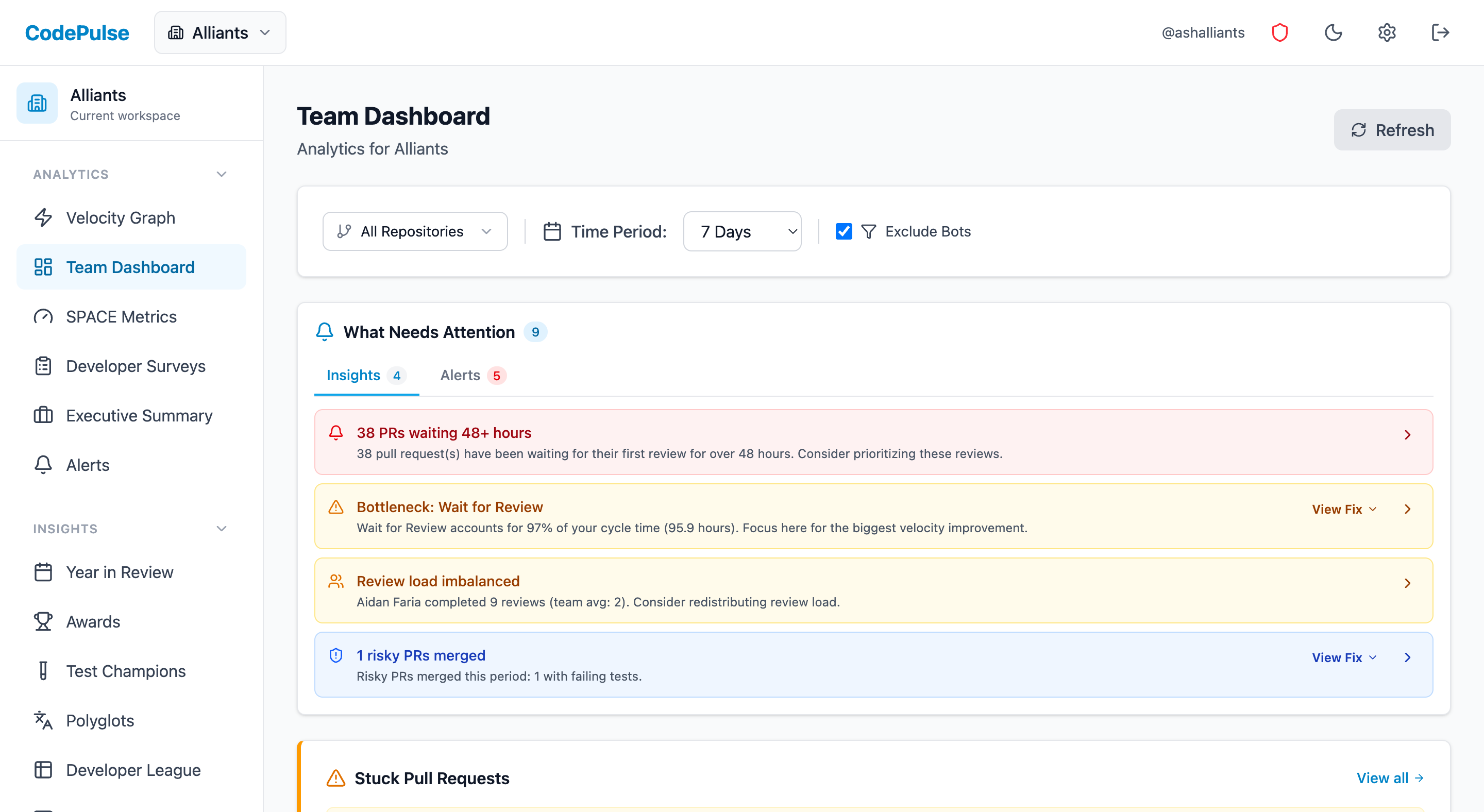
Navigate to Dashboard to see every pull request in your repositories broken down automatically:
- Cycle time split into coding, waiting-for-review, in-review, and merge phases
- Review coverage and merge-without-approval rate across the team
- Pair it with our pull request checklist to see whether the practices you've written down actually show up in the data
For the deeper analytics picture beyond the definition, see our GitHub pull request analytics guide, and for the practical author/reviewer standards, our pull request checklist.
If you want to see your own pull request metrics broken down automatically, start a free CodePulse trial. It reads directly from your GitHub history, so there's nothing to configure before you see real numbers.
Frequently Asked Questions
A pull request is a request to merge changes from one branch into another - most often from a feature branch into main. It bundles a set of commits, shows exactly what changed line by line, and gives teammates a place to comment, request changes, and approve before the code actually merges. The name comes from the workflow it originated in: you're asking the maintainer to 'pull' your changes into their branch.
Find out which phase is holding your delivery up
CodePulse splits your cycle time into coding, waiting for review, active review, and merge, so you fix the queue that is actually costing you days. Read-only GitHub, no credit card.
Read-only GitHub · Your code stays yours · Team-level by default · No credit card
See These Features in Action
Explore all featuresRelated Guides
The Pull Request Checklist That Ships Better Code
A practical pull request checklist for authors and reviewers - what to check before you open a PR, before you approve, and how to make it stick without slowing the team down.
GitHub Pull Request Analytics: From Raw Data to Team Insights
GitHub gives you PR data. It does not give you analytics. How to turn merge times, review patterns, and cycle time into decisions that improve your team.
We Cut PR Cycle Time by 47%. Here's the Exact Playbook
A practical playbook for engineering managers to identify bottlenecks, improve review processes, and ship code faster - without sacrificing review quality.
Identifying Stuck Pull Requests Before They Rot
Detect and unblock stuck PRs before they become abandoned. Learn the 5 patterns that cause PRs to stall and build automated alerts for early intervention.