
Compare the finished analysis before you choose a platform
See the report CodePulse produces from read-only GitHub workflow data, or connect your own repositories and evaluate the fit with real evidence.
Read-only GitHub · Your code stays yours · Team-level by default · No credit card
Every git commit contains a wealth of metadata beyond the code changes themselves: timestamps, authors, file paths, commit messages, branch relationships, and more. This data, accumulated over years of development, tells a story about how your engineering team actually works. The challenge is extracting actionable insights from it.
What tools analyze git metadata for engineering insights?
Git metadata analysis tools extract insights from commit history, file ownership patterns, and branch activity. Options range from open-source CLI tools (git-quick-stats, Hercules, git-fame) to SaaS platforms (CodePulse, LinearB, Swarmia). CLI tools work for one-off analysis. SaaS platforms provide ongoing tracking with dashboards and alerts. CodePulse focuses specifically on GitHub metadata, turning commit patterns, PR activity, and file change frequency into actionable engineering metrics.
This guide covers what git metadata reveals, the tools available to analyze it, and when to build your own solution versus buying a commercial platform.
The Gold Mine in Your Git History
Most engineering teams sit on years of git history without realizing its value. This data is already there, waiting to be analyzed. Unlike surveys or manual tracking, git metadata is objective, complete, and automatically generated.
Our Take
Git metadata is the most underutilized data source in engineering organizations. Teams spend thousands on project management tools while ignoring the granular, objective data sitting in their repositories. The shift from "feelings-based" to "data-informed" engineering management starts with understanding what's already in your git history.
What Makes Git Data Valuable
- Objective: Commits don't lie. Timestamps, authors, and file changes are recorded automatically without human bias
- Complete: Every change is captured, from the first commit to today
- Contextual: Commit messages, branch names, and PR descriptions provide intent alongside action
- Relational: You can trace who collaborates with whom, which files change together, and how code evolves
"The best predictor of where bugs will appear is where bugs have appeared before. Git history tells you exactly which files are unstable, which are well-maintained, and which are knowledge silos waiting to become problems."
What Git Metadata Reveals
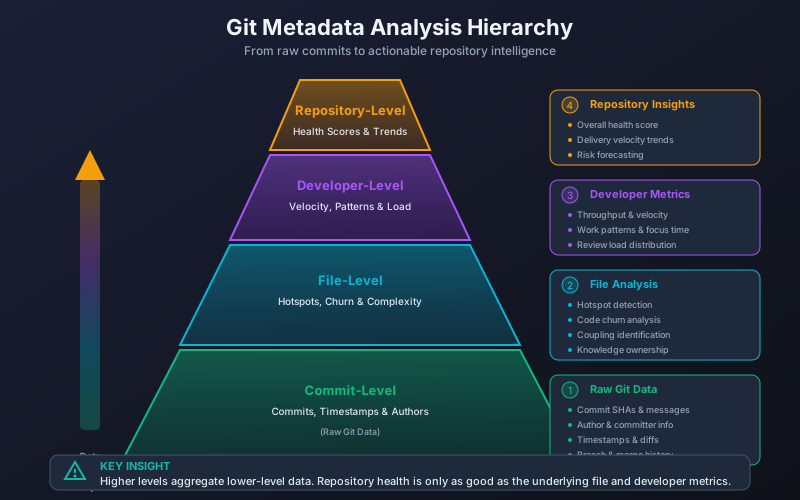
Understanding the components of git metadata helps you know what questions your data can answer.
Commit-Level Data
Each commit contains:
| Field | What It Contains | Insights Available |
|---|---|---|
| SHA | Unique identifier | Change tracking, reference linking |
| Author | Name and email | Contributor patterns, knowledge distribution |
| Timestamp | When the commit was authored | Work patterns, timezone distribution, after-hours work |
| Message | Developer-written description | Intent, issue linking, categorization |
| Parent(s) | Previous commit(s) | Merge patterns, branch complexity |
| Diff | Lines added/removed per file | Change size, file hotspots, churn |
File-Level Insights
Aggregating commits by file reveals:
- Change frequency: Which files are modified most often (hotspots)
- Ownership patterns: Who has expertise in which areas
- Coupling: Files that always change together (hidden dependencies)
- Churn rate: How much code is rewritten vs. new additions
- Age and stability: When code was last touched, how often it changes
Author-Level Analysis
Aggregating by author shows:
- Contribution patterns: Who contributes to which areas
- Collaboration networks: Who reviews whose code, who works together
- Knowledge concentration: Are certain areas owned by single individuals?
- Work timing: Active hours, timezone patterns
"We discovered that 60% of our payment system commits came from one engineer. When he took a vacation, we realized we'd built a massive knowledge silo. Git metadata made that invisible risk visible."
Repository-Level Metrics
Rolling up across the entire repository:
- Velocity: Commits per day/week, PR merge rate
- Team size trends: Active contributors over time
- Codebase growth: Lines of code, file count trends
- Health indicators: Review coverage, branch lifespan
Open Source vs Commercial Analysis Tools
Git metadata analysis tools include both open-source options and commercial platforms. Each category has distinct strengths.
Open Source Tools
These tools are free and typically run locally against your repositories:
| Tool | Focus | Strengths | Limitations |
|---|---|---|---|
| git-quick-stats | CLI statistics | Fast, simple, bash-based | Basic metrics only, no visualization |
| gitstats | HTML reports | Generates visual reports, author analysis | Python 2 legacy, limited maintenance |
| git-of-theseus | Code survival analysis | Shows which code persists over time | Narrow focus, requires Python |
| Hercules | Deep analysis | Burndown charts, complexity metrics | Complex setup, Go-based |
| git-fame | Author statistics | Lines of code attribution | LOC-focused (limited value) |
| GitStats (mergestat) | SQL queries on git | Flexible, SQL interface | Requires SQL knowledge |
Example: git-quick-stats Output
$ git-quick-stats

Contribution stats (by author):
  Alice Smith: 1,247 commits, 89,432 insertions(+), 34,221 deletions(-)
  Bob Jones:     892 commits, 67,123 insertions(+), 28,445 deletions(-)
  Carol Chen:    634 commits, 45,678 insertions(+), 19,234 deletions(-)

Commits by hour:
  09:00 - 10:00  ████████████████  342 commits
  10:00 - 11:00  ██████████████████████  489 commits
  14:00 - 15:00  █████████████████████  478 commits
Commercial Platforms
Commercial tools provide automated analysis, visualization, and team features:
| Platform | Primary Focus | Key Features | Pricing Model |
|---|---|---|---|
| CodePulse | PR velocity & code health | Cycle time, hotspots, knowledge silos, alerts | Free tier + per-team |
| LinearB | Workflow automation | Work breakdown, gitStream automation | Per developer |
| Swarmia | Developer experience | Working agreements, team health | Per developer |
| Jellyfish | Executive visibility | Portfolio tracking, resource allocation | Enterprise |
| Pluralsight Flow | Deep git analytics | Historical analysis, benchmarks | Subscription bundle |
For a detailed comparison, see our Engineering Analytics Tools Comparison.
Building vs Buying Git Analytics
The build-vs-buy decision for git analytics depends on your team size, technical resources, and the depth of analysis you need.
When to Build Your Own
Building makes sense when:
- You have specific, narrow requirements: A simple dashboard showing commits per week might be a one-day project
- You have data engineering capacity: Teams with existing data pipelines can integrate git data relatively easily
- Privacy requirements are extreme: Some organizations can't use any external services
- You want to learn: Building git analysis tools teaches you a lot about your codebase
Typical Build Approach
# Basic pipeline architecture

1. Extract: git log --format=json or GitHub API
2. Transform: Parse commits, aggregate by author/file/time
3. Load: PostgreSQL, BigQuery, or data warehouse
4. Visualize: Grafana, Metabase, or custom dashboard

# Example extraction command
git log --pretty=format:'%H|%an|%ae|%at|%s' --numstat > commits.txt

# Common challenges:
- Handling large repositories (100k+ commits)
- Merging data across multiple repos
- Keeping data fresh (incremental updates)
- Normalizing author identities (same person, different emails)
When to Buy
Commercial platforms make sense when:
- Time-to-value matters: Most commercial tools provide insights within hours, not weeks
- You need cross-repo analysis: Aggregating metrics across 50+ repositories is complex to build
- You want PR-level insights: GitHub API integration for PRs, reviews, and comments adds significant complexity
- You need ongoing maintenance: APIs change, edge cases emerge, and someone has to maintain the code
- You want alerting and automation: Building a notification system is a project unto itself
Our Take
Most teams underestimate the ongoing maintenance cost of homegrown analytics. The initial build might take a week, but handling edge cases, keeping data fresh, and adding features becomes a continuous tax. Unless git analytics is core to your business, commercial tools usually deliver better ROI for teams larger than 10 engineers.
Build vs Buy Decision Matrix
| Factor | Favor Building | Favor Buying |
|---|---|---|
| Team size | <10 engineers | 10+ engineers |
| Repositories | 1-5 repos | 10+ repos |
| Data engineering capacity | Available | Limited or expensive |
| Required metrics | Simple (commits, LOC) | Complex (cycle time, hotspots) |
| Time to first insight | Weeks acceptable | Days/hours needed |
| Maintenance appetite | High (engineering culture) | Low (focus on product) |
| Budget | Zero available | $200-2000/month available |
The Hybrid Approach
Many teams start with open-source tools for exploration, then graduate to commercial platforms as their needs mature:
- Phase 1: Run git-quick-stats locally to understand what questions matter
- Phase 2: Try a commercial platform's free tier to see advanced features
- Phase 3: Invest in paid tier or build custom solution based on validated needs
Getting Started with Git Metadata Analysis
Regardless of which tools you choose, here's a practical approach to extracting value from your git history.
Step 1: Define Your Questions
Start with the problems you're trying to solve:
- Velocity questions: How fast are we shipping? Where are PRs getting stuck?
- Quality questions: Which areas of code are unstable? Are we reviewing thoroughly?
- Team questions: Who knows what? Are we building knowledge silos?
- Process questions: Is our review process working? Are PRs the right size?
Step 2: Start Simple
Begin with a few high-value metrics rather than trying to measure everything:
- PR cycle time: How long from first commit to merge?
- Review coverage: What percentage of PRs get approved before merge?
- File hotspots: Which files change most frequently?
These three metrics alone reveal most process problems.
Step 3: Choose Your Tool
Based on your questions and resources:
- Quick exploration: git-quick-stats (5 minutes to install)
- Visual reports: gitstats or Hercules (30 minutes)
- Full analysis: Commercial platform free tier (1 hour to connect)
📊 How to See This in CodePulse
CodePulse automates git metadata analysis with GitHub-first integration:
- 5-minute setup: Connect via GitHub OAuth, data flows automatically
- Dashboard shows PR velocity, cycle time breakdown, and team health
- File Hotspots identifies frequently-changed files and knowledge silos
- Developer Insights shows contribution patterns and collaboration networks
- Automated alerts when metrics drift from healthy ranges
Step 4: Establish Baselines
Before trying to improve metrics, understand your current state:
- Run analysis on 30-90 days of history
- Note your current averages for key metrics
- Identify outliers (both positive and negative)
- Share findings with the team for context
Step 5: Act on Insights
Data without action is waste. Pick one metric to improve:
- Long cycle time? Investigate PR size and review bottlenecks
- File hotspots? Consider refactoring or better modularization
- Knowledge silos? Implement review rotation or pairing
See our GitHub Repository Metrics Guide for specific improvement strategies.
Frequently Asked Questions
Each git commit stores a SHA hash, author name and email, timestamp, commit message, parent commit references, and a diff showing lines added and removed per file. Aggregating this data reveals file hotspots, ownership patterns, collaboration networks, and delivery velocity.
For more on code health analysis, see our Code Churn Guide which covers interpreting change patterns in your codebase.

Evaluate CodePulse against your own delivery history
A comparison table only goes so far. Connect read-only GitHub in about five minutes and judge the output on your repositories, at one flat price, with no per-seat math.
Read-only GitHub · Your code stays yours · Team-level by default · No credit card
See These Features in Action
Board-ready engineering performance in a single page.
Find high-churn files and correlate change frequency with ownership.
Related Guides
Jellyfish vs LinearB vs Swarmia: Full 2026 Comparison
Compare Jellyfish, LinearB, Swarmia, Allstacks, Haystack and more engineering analytics tools. Features, pricing, cycle time benchmarks, and integrations.
GitHub Is Hiding Your Repo's Real Health Score
Learn which repository-level metrics matter for engineering managers and staff engineers, how to track them across multiple repos, and when to intervene based on health signals.
High Code Churn Isn't Bad. Unless You See This Pattern
Learn what code churn rate reveals about your codebase health, how to distinguish healthy refactoring from problematic rework, and when to take action.
Hatica Alternative: Engineering Analytics Without the Complexity
Compare Hatica vs CodePulse for engineering analytics. Understand the trade-offs between integration breadth and GitHub-native simplicity.