
See exactly where your delivery flow is waiting
Preview the phase-by-phase report for review pickup, active review, and merge time. Connect in about five minutes; the initial analysis runs after sync.
Read-only GitHub · Your code stays yours · Team-level by default · No credit card
DevOps observability goes beyond traditional monitoring to give you deep insight into what your systems are doing and why. While monitoring tells you when something is broken, observability helps you understand why it broke - and predict what might break next. This guide covers the three pillars of observability, how to implement them effectively, and which tools can help your engineering team move from reactive firefighting to proactive system understanding.
"Monitoring tells you when things are broken. Observability tells you why - and helps you predict what will break next."
What Is DevOps Observability?
Observability is the ability to understand the internal state of your systems by examining their external outputs. In DevOps, this means being able to ask any question about your production systems and get answers without deploying new code or instrumentation.
The concept originated in control theory, where a system is considered "observable" if you can determine its internal state from its outputs. For software systems, this translates to having enough telemetry data (logs, metrics, traces) to debug any issue without needing to reproduce it locally.
Observability vs Monitoring: Key Differences
| Aspect | Monitoring | Observability |
|---|---|---|
| Questions | Known unknowns (predefined alerts) | Unknown unknowns (exploratory) |
| Approach | Dashboard-centric, threshold-based | Query-centric, correlation-based |
| Data | Aggregated metrics, fixed views | High-cardinality, raw events |
| Debugging | "Alert fired" → check runbook | Explore data → find root cause |
| Value | Know when something is wrong | Understand why and prevent recurrence |
The shift from monitoring to observability reflects the reality of modern distributed systems. Microservices, containers, and serverless architectures create complex interactions that simple threshold-based monitoring cannot capture. You need the ability to trace requests across services, correlate events, and explore data in ways you did not anticipate when setting up your instrumentation.
/// Our Take
Observability is not a replacement for monitoring - it is an evolution. You still need alerts when things break. But observability gives you the power to understand why and to find issues before they become outages.
Teams that invest in observability spend less time firefighting and more time building. The ROI shows up in faster incident resolution, fewer repeat incidents, and engineers who are not constantly on-call stress.
The Three Pillars of Observability
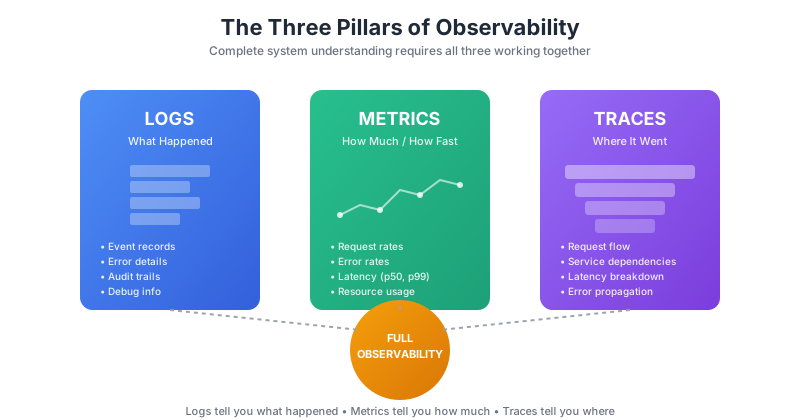
Modern observability is built on three complementary data types: logs, metrics, and traces. Each serves a different purpose, and together they provide a complete picture of system behavior.
Pillar 1: Logs
Logs are timestamped records of discrete events. They capture what happened, when, and with what context. In observability, structured logs (JSON format with consistent fields) are far more valuable than unstructured text.
| Log Type | Purpose | Example |
|---|---|---|
| Application logs | Business logic events | User login, order placed, payment failed |
| System logs | Infrastructure events | Container start, OOM kill, disk full |
| Access logs | Request/response records | HTTP requests, API calls, status codes |
| Audit logs | Security and compliance | Permission changes, data access |
Best practices for effective logging:
- Use structured JSON format with consistent field names
- Include correlation IDs to link related events across services
- Add context (user ID, request ID, environment) to every log
- Log at appropriate levels (DEBUG, INFO, WARN, ERROR)
- Avoid logging sensitive data (PII, secrets, tokens)
Pillar 2: Metrics
Metrics are numerical measurements collected over time. Unlike logs (which capture individual events), metrics aggregate data into time series that reveal trends, patterns, and anomalies.
| Metric Type | What It Measures | Examples |
|---|---|---|
| Counter | Cumulative total (only increases) | Total requests, errors, bytes sent |
| Gauge | Current value (can go up or down) | CPU usage, memory, queue depth |
| Histogram | Distribution of values | Request latency percentiles |
| Summary | Pre-calculated quantiles | P50, P95, P99 response times |
The RED and USE methods provide frameworks for what to measure:
- RED (for services): Rate (requests/sec), Errors (failed requests), Duration (latency)
- USE (for resources): Utilization (% busy), Saturation (queue depth), Errors
Pillar 3: Traces
Distributed traces follow a single request as it flows through multiple services. Each "span" represents one operation, and together they form a trace that shows exactly where time was spent and where failures occurred.
Traces are essential for microservices architectures where a single user action might touch dozens of services. Without tracing, debugging becomes a game of correlating timestamps across service logs.
TRACE: User checkout request (trace_id: abc123)
═══════════════════════════════════════════════════════════

[API Gateway]──────────────────────────────────────────────┐
│ 2ms                                                      │
└──[Auth Service]──────────┐                               │
   │ 15ms                  │                               │
   └──[User DB]            │                               │
      │ 12ms               │                               │
      └────────────────────┘                               │
   └──[Cart Service]───────────────────────────┐           │
      │ 45ms                                   │           │
      └──[Inventory Service]──────────┐        │           │
         │ 28ms                       │        │           │
         └──[Inventory DB]            │        │           │
            │ 18ms (SLOW)             │        │           │
            └─────────────────────────┘        │           │
      └──[Pricing Service]────────────┐        │           │
         │ 8ms                        │        │           │
         └────────────────────────────┘        │           │
      └────────────────────────────────────────┘           │
   └──[Payment Service]────────────────────────────────┐   │
      │ 120ms                                          │   │
      └──[Payment Gateway (external)]                  │   │
         │ 95ms                                        │   │
         └─────────────────────────────────────────────┘   │
└──────────────────────────────────────────────────────────┘

Total: 215ms | Bottleneck: Payment Gateway (44%)
Key tracing concepts:
- Trace ID: Unique identifier for the entire request journey
- Span: One operation within the trace (has start/end time)
- Parent span: Links spans to show call hierarchy
- Context propagation: How trace IDs flow between services
Key Observability Metrics to Track
While the specific metrics depend on your architecture, these categories apply to most systems:
Service Health Metrics
| Metric | What to Watch | Alert Threshold |
|---|---|---|
| Request rate | Sudden drops or spikes | >30% change in 5 min |
| Error rate | 5xx errors as % of total | >1% for 5 min |
| P99 latency | Tail latency trends | >2x baseline for 5 min |
| Saturation | Thread pools, connection pools | >80% utilized |
| Apdex score | User satisfaction proxy | <0.85 for 10 min |
Infrastructure Metrics
| Metric | What to Watch | Alert Threshold |
|---|---|---|
| CPU utilization | Sustained high usage | >85% for 15 min |
| Memory usage | Trends toward limits | >90% or growing |
| Disk I/O | Saturation, latency | >80% utilization |
| Network errors | Packet loss, retries | Any sustained increase |
| Container restarts | OOM kills, crashes | >3 restarts/hour |
Business Metrics
Technical metrics matter, but business metrics tell you if users are actually affected:
- Conversion rate: Orders per visitor session
- Checkout completion: Started vs completed checkouts
- API success rate: Successful API calls by endpoint
- Feature usage: Which features are being used
- Revenue impact: Transactions per minute/hour
"The best SRE teams measure business impact, not just system health. A 99.99% uptime means nothing if checkout is broken."
Observability Tools Compared
The observability market includes both open-source tools and commercial platforms. Here is how they compare:
Commercial Observability Platforms
| Tool | Strengths | Best For |
|---|---|---|
| Datadog | All-in-one platform, excellent UX, 750+ integrations | Teams wanting unified observability |
| New Relic | Strong APM, consumption pricing, free tier | Application-centric observability |
| Splunk | Powerful log analysis, security features | Enterprises with security focus |
| Dynatrace | AI-powered root cause, auto-discovery | Complex enterprise environments |
| Honeycomb | High-cardinality queries, BubbleUp analysis | Debugging complex distributed systems |
| Lightstep | Trace-first approach, change intelligence | Microservices debugging |
Open-Source Observability Stack
| Tool | Purpose | Notes |
|---|---|---|
| Prometheus | Metrics collection and storage | De facto standard for Kubernetes metrics |
| Grafana | Visualization and dashboards | Works with multiple data sources |
| Loki | Log aggregation | Prometheus-like labels for logs |
| Tempo | Distributed tracing | Cost-effective trace storage |
| Jaeger | Distributed tracing | CNCF project, good Kubernetes integration |
| OpenTelemetry | Instrumentation standard | Vendor-neutral telemetry collection |
| Elasticsearch + Kibana | Log storage and search | Powerful but resource-intensive |
How to Choose
| If You... | Consider |
|---|---|
| Want minimal operational overhead | Commercial SaaS (Datadog, New Relic) |
| Have strict data residency requirements | Self-hosted (Prometheus/Grafana stack) |
| Need advanced trace analysis | Honeycomb or Lightstep |
| Are cost-conscious with high volume | Open-source stack or hybrid |
| Run Kubernetes at scale | Prometheus + Grafana + Loki + Tempo |
| Need enterprise features (SSO, audit) | Commercial platforms |
/// Our Take
Start with OpenTelemetry for instrumentation regardless of which backend you choose. It is vendor-neutral, widely supported, and future-proofs your instrumentation investment.
The real cost of observability is not the tooling - it is the engineering time to instrument, maintain dashboards, and build expertise. Factor this into your build vs buy decision.
Implementing Observability: A Practical Guide
Phase 1: Foundation (Weeks 1-2)
- Audit current state: What telemetry do you already have? Where are the gaps?
- Define SLIs/SLOs: What does "working" mean for each service? Set measurable targets.
- Choose your stack: Commercial platform or open-source? Consider team expertise and budget.
- Set up collection: Deploy agents/collectors, configure log shipping, enable metrics endpoints.
Phase 2: Instrumentation (Weeks 3-4)
- Add OpenTelemetry SDKs: Instrument your critical services with tracing and metrics.
- Standardize logging: Move to structured JSON logs with consistent fields and correlation IDs.
- Enable auto-instrumentation: Use language agents for automatic HTTP/database/cache tracing.
- Add custom spans: Instrument business-critical code paths that auto-instrumentation misses.
Phase 3: Dashboards and Alerts (Weeks 5-6)
- Build service dashboards: One dashboard per service showing RED metrics and dependencies.
- Create system overview: High-level dashboard showing overall health and key business metrics.
- Configure SLO-based alerts: Alert on error budget burn rate, not arbitrary thresholds.
- Set up on-call runbooks: Link alerts to actionable documentation.
Phase 4: Culture and Process (Ongoing)
- Run game days: Practice debugging with observability tools during controlled incidents.
- Blameless postmortems: Use observability data to understand incidents, not assign blame.
- Review and refine: Regularly audit dashboards and alerts. Remove unused ones.
- Share knowledge: Document debugging patterns and query templates for the team.
📊 How to Track in CodePulse
While CodePulse focuses on engineering workflow observability (PR cycle times, deployment frequency, team collaboration), it complements production observability by helping you understand:
- Deployment frequency - How often are you shipping changes that might affect production?
- Lead time for changes - How quickly can you ship a fix once code is committed?
- Cycle time breakdown - Where do bottlenecks occur in your delivery pipeline?
- Custom alerts - Get notified when delivery metrics drift from targets
Common Observability Pitfalls
Pitfall 1: Alert Fatigue
Too many alerts lead to ignored alerts. Every alert should be actionable. If you are ignoring alerts, either fix the underlying issue or delete the alert.
Pitfall 2: Dashboard Sprawl
Teams create dashboards for every situation but maintain none. Start with a small set of core dashboards and resist adding more until you are actually using what you have.
Pitfall 3: Missing Correlation IDs
Without correlation IDs, debugging distributed systems is nearly impossible. Every request should carry a trace ID from entry to exit.
Pitfall 4: High-Cardinality Explosions
Adding user IDs or request IDs as metric labels creates cardinality explosions that crash your metrics system. Use logs or traces for high-cardinality data.
Pitfall 5: Neglecting Cost
Observability costs can grow exponentially with scale. Monitor your observability costs and set retention policies appropriate to your needs.
"The goal is not to collect all the data - it is to collect the right data. More telemetry is not better telemetry."
Observability Maturity Model
Assess where your team stands and what to work on next:
| Level | Characteristics | Focus Areas |
|---|---|---|
| Level 1: Reactive | Users report issues before you know; limited logging; no tracing | Basic metrics, centralized logging |
| Level 2: Proactive | Alerts catch most issues; dashboards exist; some tracing | SLOs, distributed tracing, structured logs |
| Level 3: Predictive | Anomaly detection; correlation across pillars; debug any issue | Error budget policies, game days, automation |
| Level 4: Optimizing | Continuous improvement; observability-driven development; chaos engineering | Business metrics, cost optimization, team enablement |
Related Guides
- DevOps Metrics and KPIs Guide - Measuring delivery performance with DORA metrics
- DevOps Maturity Model - Assessing your overall DevOps capability
- DevOps Transformation Guide - Planning and executing your DevOps journey
- DORA Metrics Guide - Deep dive into the four key delivery metrics
Conclusion
DevOps observability is the foundation for operating reliable, scalable systems. By implementing the three pillars - logs, metrics, and traces - you gain the ability to understand system behavior, debug issues quickly, and prevent problems before they affect users.
- Start with the three pillars - logs, metrics, and traces work together
- Use OpenTelemetry - vendor-neutral instrumentation protects your investment
- Define SLOs first - know what "working" means before setting up alerts
- Avoid alert fatigue - every alert should be actionable
- Instrument progressively - start with critical paths, expand based on need
The shift from monitoring to observability is not just about tools - it is about building a culture of understanding your systems deeply. Teams with strong observability practices spend less time firefighting and more time building features that matter.
Complement your production observability with CodePulse's engineering workflow observability to get visibility into both how your code performs in production and how efficiently your team delivers it.
"Observability is not a project with an end date. It is a practice that evolves with your systems and your team's understanding of them."
Turn the idea in this guide into a baseline for your team
See what the finished analysis looks like, then connect GitHub when you are ready. CodePulse measures delivery systems from read-only workflow data—never individual output.
Read-only GitHub · Your code stays yours · Team-level by default · No credit card

Find out which phase is holding your delivery up
CodePulse splits your cycle time into coding, waiting for review, active review, and merge, so you fix the queue that is actually costing you days. Read-only GitHub, no credit card.
Read-only GitHub · Your code stays yours · Team-level by default · No credit card
See These Features in Action
Track deployment frequency, lead time, and release patterns.
Get notified when cycle times spike or review patterns degrade.
Related Guides
DevOps Metrics & KPIs That Actually Drive Change
Most DevOps dashboards measure too much and improve nothing. This guide covers the essential DevOps KPIs (DORA + supporting metrics), how to build an actionable dashboard, and which tools can help.
DevOps Maturity Model: A Practical Assessment Framework
Assess your DevOps maturity across culture, CI/CD, testing, monitoring, and infrastructure. Includes self-assessment questionnaire and improvement roadmap by level.
DevOps Transformation: Why Most Fail (How to Win)
DevOps transformation is one of the most commonly failed initiatives in enterprise software. This guide shows how to avoid the pitfalls, measure success with real metrics, and achieve lasting cultural change.
DORA Metrics Explained: The 4 Keys Without the Hype
A complete breakdown of the four DORA metrics - deployment frequency, lead time, change failure rate, and MTTR - with honest benchmarks and gaming traps to avoid.